How to Read PDFs for Free: A Comprehensive Guide
Learn how to read PDF files for free across devices with built-in viewers, browser readers, and free apps. Safety, accessibility, and practical tips included for a smooth, legal free read.


Learn how to read PDFs for free across devices using built-in viewers, browser-based readers, and free apps. This guide shows how to verify file safety, choose the right free tool, access offline and online options, and maximize readability with zoom, reflow, night mode, and text search—no paid software required. It also covers accessibility and copyright considerations for a responsible free pdf read.
What 'free pdf read' means today
In 2026, reading PDFs for free means using software and services that do not require purchase while still respecting copyright. You can access a wide range of legitimate free PDFs and rely on built-in tools on your devices. For professionals who edit, convert, or optimize, the term includes not only viewing but also highlighting, searching, and basic annotation without paid licenses. According to PDF File Guide, the practice of reading PDFs for free has become easier thanks to built-in viewers, browser-based readers, and widely available open-source options. The aim of a free pdf read is to support efficient workflows while staying safe and legal. When you encounter a PDF labeled as 'free', verify that it is legally distributed or open-access to ensure you are doing a safe read. PDF File Guide keeps this guidance front-and-center for professionals who rely on access without added costs.
Safety and legality considerations when reading PDFs for free
Safety and legality are primary concerns when you pursue a free read. Always download PDFs from trusted sources, avoid files with suspicious macros, and use antivirus scanning. PDF File Guide analysis highlights that readers should check file origins and permissions. The key is to distinguish open-access materials from pirated copies and to respect licensing terms. If a file is password-protected by the publisher and you have authorization, you can read it with a free reader; otherwise you should not bypass protections. Maintain device security by using reputable readers and keeping software up to date. For busy professionals, the most reliable free pdf read comes from sources you recognize and trust.
Built-in viewers across major platforms
Most modern devices include built-in PDF viewers, enabling a seamless free pdf read without installing extra software. Windows 11/10 offers an integrated Edge PDF viewer; macOS Preview provides robust features; iOS and Android devices provide native readers as well. With these built-in options, you can open, search, annotate, and print without cost. PDF File Guide recommends starting here for quick access and reduced risk, especially when you only need to read and annotate lightly. If your needs grow, you can layer in browser-based or desktop readers later, but the free pdf read begins with the device’s native tools.
Browser-based readers: instant access
If you prefer not to install anything, browser-based readers let you open PDFs directly from cloud storage or email attachments. Many browsers render PDFs natively; you can also use online services that do not require sign-in. A free read across devices becomes possible with just a URL. Ensure you are using a reputable site to prevent malware. The primary advantage is speed, universal access, and minimal setup—ideal for quick lookups, basic reading, or verification of content before downloading a file for offline viewing.
Free desktop readers: lightweight vs feature-rich
For more features while keeping costs zero, consider free desktop readers that are either lightweight or more capable. Lightweight viewers focus on fast loading and simple navigation, while feature-rich free readers add form filling, text reflow, enhanced accessibility, and richer annotation tools. When choosing, assess memory usage, update frequency, and compatibility with your operating system. A thoughtful selection ensures a reliable free pdf read experience without purchasing software. PDF File Guide emphasizes testing a couple of options to find the best fit for your routine.
Accessibility features in free readers
Accessibility is essential for inclusive reading. Look for reflow mode, screen-reader compatibility, keyboard shortcuts, and high-contrast themes. Free readers that support these features empower visually impaired users and others relying on assistive technology to perform a truly accessible free pdf read. When you enable features like text-to-speech or landmark navigation, you improve comprehension and reduce fatigue. Prioritize tools that document accessibility support to minimize friction in long reading sessions.
How to verify PDF safety before reading
Before opening any PDF, verify its legitimacy. Check the source, file size, and metadata. Use a sandboxed viewer if possible and enable antivirus scanning. PDF File Guide analysis shows that cautious readers experience fewer security incidents when they rely on trusted sources and keep software updated. If something feels off—unexpected prompts, excessive file size, or unusual file types—pause and verify through official channels or refrain from downloading. A safe free pdf read starts with suspicion-aware behavior and good digital hygiene.
Reading on mobile: tips for small screens
Mobile reading requires adaptable layouts and touch-friendly controls. Use zoom and reflow to fit content, switch to night mode to reduce eye strain, and use built-in search to locate terms quickly. With free pdf read, you can carry a library in your pocket and review documents during commutes or downtime. Ensure your reader supports offline access if you need to read without an internet connection, and keep your device’s OS updated for better compatibility with modern PDFs.
Saving notes, highlights, and exporting content
To maximize value from a free pdf read, use highlight, underline, or notes features. If your reader supports export, extract text, copy quotes, or export highlights to a separate file for later use. Consider syncing annotations across devices so your notes stay accessible on both desktop and mobile. This capability helps maintain a streamlined workflow without resorting to paid tools, and it aligns with best practices for document literacy and long-term reference.
Tools & Materials
- Device with internet access(For online readers and downloads.)
- PDF file(The document you want to read, verify source when possible.)
- Free PDF reader option(Choose from built-in, browser-based, or offline app.)
- Antivirus/scanner(Optional but recommended when downloading PDFs from unfamiliar sources.)
Steps
Estimated time: 15-30 minutes
- 1
Define your reading goal
Clarify whether you just need to read, search, or annotate. A clear goal guides which free pdf read option to choose and helps you focus on essential features like text search or reflow.
Tip: Write a one-line goal to keep your reading session focused. - 2
Choose your free reading method
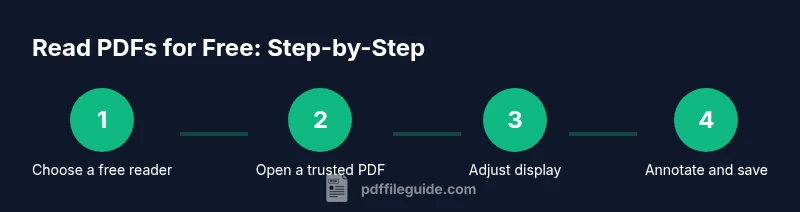
Decide between built-in viewers, browser-based readers, or a free desktop/mobile app based on your device and needs. Start simple with built-in tools for quick access, then explore other options if you need advanced features.
Tip: Test at least two methods to compare speed and readability. - 3
Open a trusted PDF
Open the file with your chosen tool and verify it loads correctly. If you encounter security warnings, pause and verify the file source before proceeding.
Tip: Prefer PDFs from known domains or official publishers. - 4
Adjust display settings
Set zoom, page layout, and contrast to maximize readability. Enable night mode or reflow if you’re reading on small screens.
Tip: Use keyboard shortcuts for quick adjustments (e.g., zoom controls). - 5
Use search and navigation
Utilize the search feature to locate terms quickly and bookmark pages for easy reference.
Tip: Organize your search by keywords to cut through long documents. - 6
Annotate and save notes
Highlight important passages and add notes where appropriate. Export highlights if your tool supports it.
Tip: Keep a separate notes file to consolidate insights. - 7
Verify safety after reading
If you downloaded the file, run a quick malware scan and monitor for suspicious activity on your device.
Tip: If something seems off, delete the file and re-check the source. - 8
Sync across devices
If possible, enable cloud sync so your bookmarks and notes are available on all devices.
Tip: Regularly back up annotated PDFs to avoid data loss.
Questions & Answers
Is it legal to read PDFs for free?
Yes, reading PDFs for free is legal when the file is legally distributed, open-access, or provided by the author for free. Always respect licensing terms and verify the source.
Yes. If a PDF is openly available or distributed with permission, it's legal to read for free.
What are the best free tools to read PDFs?
The best options include built-in viewers on your device, browser-based readers, and free desktop or mobile apps. Start with what you already have and expand if you need features like advanced search or annotations.
Start with your device’s built-in viewer, then try a browser-based reader if you need extra features.
Can free readers handle password-protected PDFs?
Free readers can enable access if you have the correct password from the publisher or owner. If you don’t have the password, you cannot bypass protections.
If you have the password, you can read it with a free reader; otherwise, you can’t access a protected PDF.
How do I read PDFs offline for free?
Download the PDF and use a local reader with offline support. This ensures you can read without internet access and reduces exposure to online threats.
Download the file and read it offline with a reader that supports offline mode.
What accessibility features should I look for?
Look for reflow, screen-reader compatibility, keyboard navigation, and high-contrast themes. These features make free pdf read accessible to a wider audience.
Search for reflow, screen-reader support, and high-contrast modes to improve accessibility.
How can I search text inside PDFs efficiently?
Use the reader’s search tool (usually Ctrl/Cmd + F) to locate keywords. Combine search with bookmarks for large documents.
Use the search function to find terms quickly and use bookmarks for navigation.
Watch Video
Key Takeaways
- Read PDFs for free using built-in, browser-based, or free desktop readers.
- Prioritize safety and source verification before reading.
- Leverage accessibility features to improve readability for all users.
- Annotate and export notes to maintain long-term value.
- Test multiple tools to find the best fit for your workflow.