APA Format Example PDF: Templates, Tips, and Best Practices
A comprehensive guide to APA format example PDFs, with templates, step-by-step setup, and best practices for students and professionals creating APA-compliant PDFs.


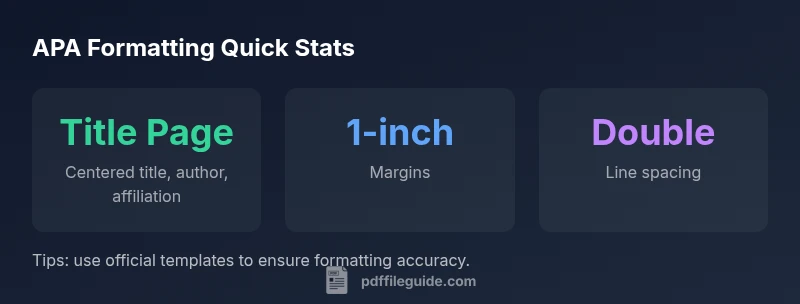
APA format example PDF typically includes a title page, abstract, main body, and references, all formatted with 1-inch margins, double spacing, and a running head. It should align with the edition (7th in 2020s) and follow university or publisher requirements. Official templates from APA and university sites help ensure accuracy.
Why APA formatting matters in PDFs
According to PDF File Guide, when you prepare a PDF document in APA style, consistency across every element improves credibility and readability. Readers expect predictable structure: the same font, margins, heading levels, and citation format throughout. A well-formatted APA PDF reduces cognitive load, minimizes reviewer questions, and improves chances of a favorable impression in academic and professional settings. This is not just about aesthetics—it signals rigor in your argument and care for your audience. By adhering to a standardized format in PDFs, you help ensure your ideas are evaluated on content rather than formatting quirks. In 2026, many instructors and editors emphasize reliable templates, especially for online submissions and institutional repositories.
The PDF File Guide team emphasizes that the PDF serves as the official carrier of your research. A consistent APA PDF reduces the risk of misinterpretation caused by misplaced headings, inconsistent citations, or inconsistent typography. For professionals, this consistency translates into clearer reports, higher perceived credibility, and smoother collaboration across teams. As you prepare a PDF, keep your audience in mind and verify that your document adheres to the APA guidelines for your field.
In practice, start with a reliable template, apply APA-stated rules throughout, and run a final check against a published example. This approach minimizes back-and-forth with editors and instructors and keeps the focus on your ideas rather than formatting details.
How an APA format example PDF is structured
An APA format example PDF typically mirrors the standard sections dictated by the APA 7th edition guidelines. You will commonly see a title page, an optional abstract, the main body organized by headings and subheadings, and a reference list with hanging indentation. Depending on the institution, there may also be appendices or footnotes. When you download a compliant template, the structure is pre-arranged so you can focus on content. A PDF preserves fonts and layout across devices, which is why it is widely preferred for submissions.
To make the most of a template, compare your document against an established example: ensure margins are consistently set, headings follow the correct levels, and the reference list uses the correct punctuation and order. For citation accuracy, use the correct parenthetical formats and ensure in-text citations correspond to the references. Keep an eye on the document’s metadata, as many editors review this metadata as part of the submission workflow. When you align your PDF with a trusted example, you streamline review and improve the odds of acceptance.
Title page and running head specifics
The title page in an APA PDF typically includes the paper title, author name, and institutional affiliation centered on the page. In the 7th edition, student papers often omit the running head; however, some professors and programs still require it. If a running head is requested, include a shortened version of the paper title in all caps, flush left, with the page number flush right. Ensure that the page formatting matches the rest of the document: the same font, size, and spacing as the body. If you work with a professional paper, include a running head on the title page as well.
Using a template helps ensure these elements appear in the correct order and with the appropriate spacing. If your institution provides a template, start there and customize the author names, affiliation, and title accordingly. Double-check the title page against the official APA examples to avoid missing any required elements.
In-text citations and references formatting
APA in-text citations follow author-date formatting. For a paraphrase, include the author surname and year of publication; for a direct quote, add a page or paragraph number where available. The reference list at the end of the document uses a hanging indent and alphabetizes entries by author surname. Include DOIs and URLs where applicable, and format each reference according to the specific source type (journal article, book, website, etc.).
Within a PDF, ensure that the citation style remains consistent—do not mix APA with MLA or Chicago formatting. If you’re unsure about a particular source type, consult the official APA Style guidelines or a university library guide. Official templates usually incorporate the reference formatting rules so you can see examples that match your citations.
Margins, fonts, spacing, and headings
APA 7th edition supports accessible, commonly used fonts such as Times New Roman 12 pt, Calibri 11 pt, and Arial 11 pt. The preferred line spacing is double, with 1-inch margins on all sides. Headings should follow a clear hierarchy, typically five levels, with bold formatting and title case for headings. The main body should be written in a readable voice, with consistent punctuation and capitalization. When formatting a PDF, keep headings consistent and ensure the page numbers appear in the header or footer according to the template.
A well-structured PDF uses these typographic rules to create a clean reading experience, which reduces cognitive load for reviewers and readers. As you adjust margins or fonts, recheck the document in a PDF viewer to confirm that line breaks occur predictably and that all sections start on logical pages.
Using templates and generator tools responsibly
Templates from official sources such as the APA Style website or university libraries provide a scaffold for correct APA formatting. They help ensure that title pages, abstracts, headings, and reference lists comply with current guidelines. When using templates, avoid simply replacing text without adjusting formatting details such as indentation, line spacing, and font choices. It’s important to verify that your references, citations, and headings align with APA 7th edition rules.
The PDF File Guide recommends starting with an official template and then personalizing it. If you modify a template, run a secondary check against an official example to ensure consistency across all elements. Templates should be used as a baseline, not a rigid mold; adapt them to your document while maintaining APA compliance.
Converting Word documents to PDF without breaking APA formatting
Converting from Word to PDF can sometimes alter layout, fonts, or line breaks. To preserve APA formatting, embed fonts when exporting to PDF and verify that margins, spacing, and heading placements remain intact. Use a high-quality PDF export option and review the resulting file on multiple devices to catch any discrepancies. If possible, perform a final check against a published APA sample to confirm that the converted file maintains the correct appearance.
When working with references, ensure that links remain clickable and DOIs render correctly in the PDF. If you notice any issues after conversion, return to the source document (e.g., the Word file) and adjust before final re-export. This approach minimizes post-submission corrections and keeps the focus on your research rather than formatting problems.
Quick-start checklist before submission
- Download an official APA template and replace placeholder text with your content.
- Confirm title page, abstract (if required), and references conform to APA 7th edition.
- Ensure 1-inch margins, double spacing, and chosen font are consistent throughout.
- Check in-text citations and references for accuracy and punctuation.
- Preview the final PDF on different devices to verify layout integrity.
- Include DOIs/URLs where applicable and verify running head requirements if requested by the instructor.
- Confirm that headings follow the correct levels and formatting.
Extra: verifying APA compliance for your PDF
Before submitting, run a final pass against a trusted APA example. Check that citations, references, and headings align with APA 7th edition rules. If you have access to institutional guidelines, compare your PDF against those templates to ensure consistency. This final validation helps ensure your document meets scholarly standards and reduces revision cycles.
APA PDF structure overview
| Section in APA PDF | Typical formatting guideline | Notes |
|---|---|---|
| Title Page | Centered title, author, affiliation | Running head on professional papers; optional for student papers |
| Abstract (optional) | Single paragraph summarizing research | Includes keywords if required by instructor |
| Main Body | Double-spaced; 12-pt serif font or readable sans-serif | Headings guide readers through sections |
| References | Hanging indent; alphabetized by author | Include DOIs/URLs when available |
| Appendices | Additional material as needed | Label clearly and reference in the text |
Questions & Answers
What is included in a standard APA format PDF?
A standard APA PDF includes a title page, abstract (if required), main text with headings, references, and appendices when needed. The exact requirements may vary by course or publisher.
A standard APA PDF includes the main sections in order: title page, abstract if required, body, and references.
Do all APA papers require an abstract?
Not all APA papers require an abstract; it depends on the document type and instructor guidelines. In many student papers, abstracts are optional or not needed.
Abstracts aren’t always required; check your assignment details.
What fonts are allowed in APA 7?
APA 7th edition allows accessible fonts such as Times New Roman 12 pt, Calibri 11 pt, Arial 11 pt, and several others recommended by your institution.
APA 7 supports common accessible fonts; pick one and be consistent.
Can I convert a Word document to PDF without breaking APA formatting?
Yes. Use embed fonts and verify margins, spacing, and heading integrity after export. Always review the PDF to confirm APA compliance.
You can convert Word to PDF, then check formatting carefully.
Where can I find official APA templates?
Use the official APA Style website and your institution’s library pages; they provide templates for title pages, abstracts, and reference lists.
Check APA Style and your university library for templates.
What is a running head in APA format?
A running head is a shortened title appearing in the header of each page (more common in professional papers). Student papers may not require it unless instructed.
The running head is a short title in the header; follow instructor guidance.
“Consistency is the backbone of credible APA formatting; rely on official templates to reduce guesswork and errors.”
Key Takeaways
- Use official APA templates to start.
- Check edition-specific rules for running heads.
- Maintain 1-inch margins and double spacing.
- Apply consistent font choices across the document.
- Verify in-text citations and references against APA guidelines.