PDF and Image Merger: A Comprehensive Comparison
Explore how to merge PDFs and images, compare desktop, online, and offline tools, and learn best practices for fidelity, speed, security, and workflow efficiency.


When deciding how to merge PDFs with images, prioritize output fidelity, processing speed, and privacy. Desktop tools excel at batch processing and high-quality results, while online services shine for quick edits and easy sharing. This comparison outlines key differentiators, costs, and security considerations to help professionals choose the right pdf and image merger workflow.
What is a pdf and image merger?
A pdf and image merger is a workflow or software capability that combines PDF documents and image files into a single, cohesive file. It covers tasks like merging existing PDF pages with high-resolution images, converting image sequences into PDFs, and embedding images within PDF pages while preserving layout fidelity. For professionals handling reports, catalogs, or marketing collateral, selecting the right merger tool affects output quality, file size, accessibility, and downstream workflows. According to PDF File Guide, the best pdf and image merger approach balances fidelity, speed, and privacy to meet professional needs. In practice, you might merge scanned photographs into a product brochure, append diagrams from image files to an annual report, or assemble a slide-to-PDF handout for meetings. The core goal is to integrate raster images and vector content into a portable document format that remains viewable across devices and platforms.
Why this topic matters for professionals
In modern document workflows, images often provide essential context—charts, photographs, and design elements that enhance a PDF’s utility. A robust pdf and image merger preserves image fidelity, maintains color accuracy, handles fonts correctly, and minimizes file size without sacrificing readability. When you blend text and visuals, misalignments or color shifts can undermine professionalism. The right tool also ensures accessibility features such as tagged PDFs remain intact after merging, which is critical for compliance and inclusive design. PDF File Guide analysis shows that professionals gain significant productivity when choosing tools that automate layout preservation and batch processing while offering clear controls for image embedding and compression.
Quick context: common use cases
- Marketing collateral combining product images and spec sheets into a single PDF.
- Scientific reports that append high-resolution figures to textual content.
- Archival projects that merge scanned images with existing PDFs for long-term preservation.
- Client deliverables requiring brand-consistent layouts with embedded imagery.
Understanding these scenarios helps tailor the merger approach to output quality, file size targets, and delivery timelines.
Comparison
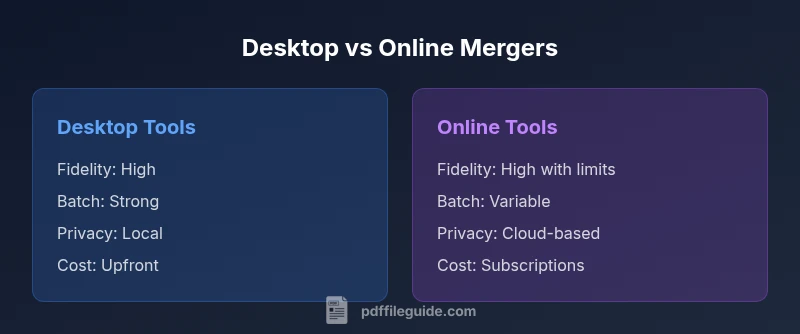
| Feature | Desktop tools | Online tools |
|---|---|---|
| Output fidelity | High, with full control over downsampling and color management | Good to high depending on server and compression settings |
| Batch processing | Strong batch capabilities for large projects | Varies by service; may limit simultaneous merges |
| File size handling | Typically no strict upload limits; local processing | Upload limits may apply; size may influence speed and cost |
| Security/privacy | Data stays on device unless saved to cloud | Files uploaded to cloud; rely on provider security |
| Cost model | One-time license or perpetual license | Subscription or pay-per-use |
| Ease of use | Steep learning curve but highly capable | Often simpler, with guided flows |
| Offline availability | Yes, fully offline in most cases | Typically requires internet access |
Strengths
- Precise control over image embedding and compression
- No reliance on internet connection for processing
- Better support for large, sensitive files
- Excellent for batch workflows and enterprise use
Disadvantages
- Higher upfront cost and steeper learning curve
- Requires installation and maintenance
- Less immediate for quick ad-hoc tasks
Desktop tools win on fidelity; online tools win on speed and collaboration
Choose desktop solutions when output quality and batch processing matter most. Opt for online tools when you need fast sharing and easy access from any device, accepting some trade-offs in control and privacy.
Questions & Answers
What is the difference between a pdf merger and an image merger?
A pdf merger combines PDFs with other content, while an image merger focuses on integrating image files into a PDF or other formats. In practice, a pdf and image merger handles both tasks by controlling how images are embedded, scaled, and compressed within PDFs. The choice depends on output quality needs and workflow requirements.
A pdf merger combines PDFs and images, controlling image embedding and compression. An image merger centers on turning images into a PDF or combining them with existing PDFs.
Can I batch merge many files at once?
Yes, many desktop tools offer robust batch processing to merge dozens or hundreds of pages. Online tools may support batch tasks but can be limited by server resources and file size restrictions. Always test large batches to ensure consistency of layout and compression.
Most desktop tools support batch merging; online services vary, so test large batches to confirm results.
Are online pdf and image mergers secure for sensitive documents?
Security depends on the provider. Desktop solutions keep data local, but cloud-based services require trust in encryption, access controls, and data retention policies. For sensitive materials, prefer offline workflows or trusted providers with transparent privacy terms.
Online mergers depend on provider security. For sensitive docs, prefer offline workflows or trusted services with strong privacy terms.
How can I preserve image quality when merging?
Choose tools that offer lossless or targeted compression, set DPI and color management explicitly, and avoid unnecessary downsampling. Ensure embedded fonts and color profiles are preserved to prevent artifacts in print or display.
Use tools with explicit DPI settings and lossless or controlled compression to keep image quality intact.
Is OCR necessary when merging scanned documents with images?
OCR is beneficial when you need searchable text in the merged PDF. Many tools offer OCR as an option; enabling it increases processing time and may affect accuracy depending on the source material. Verify recognition quality after merging.
If you need searchable text, enable OCR; it adds time but improves accessibility and searchability.
What are common pitfalls when merging PDFs and images?
Common issues include color shifts, unwanted downsampling, font embedding problems, and excessively large file sizes. Plan the workflow, test a representative sample set, and review output on target devices to catch problems early.
Watch out for color changes, poor compression, and oversized files; test outputs on real devices.
Key Takeaways
- Evaluate output fidelity before tool selection
- Prioritize privacy for sensitive documents
- Balance upfront cost with batch-processing needs
- Test color management for image-heavy PDFs
- Use OCR or text-search features when required