What Causes a PDF File to Be Corrupt and How to Fix It Fast
Urgent guide to diagnose and fix corrupted PDFs. Learn common causes, rapid checks, and step-by-step recovery methods to restore access and prevent future corruption.


What causes a pdf file to be corrupt
If you're wondering what causes a pdf file to be corrupt, you're not alone. According to PDF File Guide, corruption often results from transfer glitches, incomplete downloads, abrupt power losses, or disk errors that damage data streams. A corrupted PDF may fail to open, display error messages, or show garbled content. The underlying issue is that the file's internal structure (objects, cross-reference table, and trailer) becomes inconsistent or damaged, making it unreadable to reader apps. Understanding these roots helps you pick the right remedy, from simple re-downloads to professional recovery when needed. The PDF File Guide team also notes that external factors like antivirus scans or aggressive cloud syncing can briefly modify bytes and introduce file damage. Recognizing patterns such as missing pages or unreadable text helps distinguish corruption from other issues like password protection or font embedding problems. This practical overview sets the stage for targeted fixes you can implement quickly to regain access.
Signs and symptoms of a corrupted PDF
Corrupted PDFs often present with clear indicators: the file won’t open, an error message appears, pages may be missing, or text rendering looks garbled. Some readers show a generalized “cannot open file” alert; others report “end of file occurs unexpectedly” or “unknown object type” messages. If you can view a preview but content is inconsistent, or if search functions fail, corruption is a plausible culprit. It’s important to differentiate corruption from issues like password protection, outdated readers, or fonts that fail to render. PDF File Guide emphasizes that identifying the exact symptom helps narrow the repair path—from simple re-downloads to specialized recovery tools. Always check multiple readers to confirm the problem isn't reader-specific.
Quick checks you can perform today
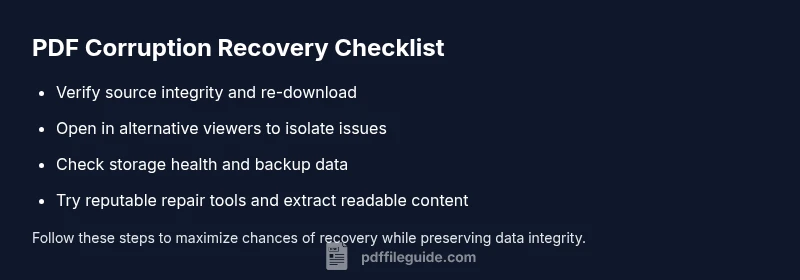
Start with simple, low-risk steps before deeper repairs. First, re-download the file from a trusted source and compare file sizes if possible. Open the PDF in an alternate viewer to determine if the problem is with the file itself or a single app. Move the file to a different storage device and retry to rule out local corruption on the drive. If available, try a built-in repair option in your reader or a reputable repair utility. Finally, scan your system for disk issues or memory problems that could corrupt files during saving or transfer. These quick checks can save time and avoid unnecessary repairs.
How corruption can begin during creation, transfer, or storage
PDF corruption often starts during the creation process when the exporter fails mid-write or when an intermediate object is damaged. Transfer interruptions—such as unstable network connections, interrupted email attachments, or cloud syncing glitches—can leave a file in an inconsistent state. Storage faults, like bad sectors on a hard drive or faulty RAM, may corrupt data as pages are written. Antivirus software can also interfere by sandboxing or rewriting parts of a PDF during scanning. Distinguishing these contributing factors helps determine whether you should retry the download, attempt a repair, or rebuild content from source. PDF File Guide highlights that preventing the above events with reliable hardware, stable networks, and cautious transfer practices dramatically reduces corruption risk.
Recovery options: DIY fixes vs. professional help
For moderately corrupted files, DIY fixes include re-downloading, trying a different viewer, and using a trusted repair tool or feature within your PDF reader. If those steps fail, you can attempt to extract readable pages or text from the file using export or copy-paste features, or recover the file via specialized software designed to reconstruct corrupted PDF structures. However, when damage is extensive, or the file is critical, professional data-recovery services may offer higher chances of restoration. Always back up a copy of the original before attempting any repair, and document the methods you tried for future reference. The PDF File Guide team recommends following a structured workflow to avoid further loss.
Best practices to prevent future PDF corruption
Prevention is easier than recovery. Use reputable PDF creation tools and save directly to reliable storage rather than removable media. Enable automatic backups and maintain multiple copies across devices or cloud storage. When transferring PDFs, use stable networks and avoid interrupting transfers mid-way. Regularly update PDF readers and related software to ensure compatibility with newer file structures. If you share PDFs via email or cloud services, consider zipping large files to preserve integrity during transit. By adopting these habits, you diminish the likelihood of corruption and improve overall document reliability.
Quick DIY repair tools and utilities you can trust
If a file is only lightly corrupted, several reputable tools offer recovery features or repair wizards. Look for software from established vendors with positive reviews and transparent licensing. Always run repairs on a copy of the original file, not the source, to avoid data loss. Read user guides and start with conservative repair options before attempting aggressive fixes. Remember, not all damaged PDFs are recoverable; professional help is a prudent option when documents are priceless or legally significant.
A practical wrap-up: your action plan now
Begin with a source check and safe re-download, then test across viewers to isolate the issue. Apply a reputable repair tool if needed, and attempt to extract intact pages if possible. Keep backups and implement preventive measures for future documents. If you still cannot access the file, seek professional advice rather than risking further loss.