PDF vs Accessible PDF: A Practical Side-by-Side Guide
An analytical comparison of standard PDF files and accessible PDFs, covering tagging, structure, usability, standards, and practical workflows for editors and professionals.


PDF vs Accessible PDF is not just about file format; it hinges on tagging, reading order, and how content is interpreted by readers and assistive tech. A properly accessible pdf enables screen readers to interpret headings, lists, tables, and form fields, while a standard pdf may preserve layout but obscure meaning for assistive devices. This comparison helps editors decide when to prioritize accessibility and how to balance effort with project goals.
Understanding pdf vs accessible pdf: Core Concepts
According to PDF File Guide, the debate around pdf vs accessible pdf rests on how information is structured and presented to people and machines. A standard PDF can faithfully reproduce document layouts, fonts, and graphics, but without proper tagging and reading order it may be difficult or impossible for assistive technologies to interpret. An accessible pdf, by contrast, includes semantic tags, logical structure, and alternative text that enable screen readers, search engines, and accessibility tools to navigate content. In this article, we examine what makes pdf vs accessible pdf distinct, what editors and organizations must consider when producing or converting documents, and how decisions in early stages of a project affect long-term usability, compliance, and workflow efficiency. We also discuss common workflows, standards such as WCAG and PDF/UA, and practical steps to balance accessibility with performance. Throughout, the focus is on actionable guidance for both individuals and professionals who edit, convert, and optimize PDF files.
Why accessibility matters in pdf vs accessible pdf
Accessibility is not an optional add on in the pdf vs accessible pdf discussion. It shapes who can access information, how easily content is navigated, and how content behaves across devices and assistive technologies. For organizations, accessible PDFs support compliance with legal frameworks, reduce the risk of accessibility claims, and expand the reach of information to users with disabilities, cognitive differences, or visual impairments. For editors, embracing pdf vs accessible pdf means embedding structure that survives platform changes and ensures long-term readability. In practice, the differences go beyond screen readers; accessible PDFs improve search indexing, readability on varied screens, and compatibility with assistive devices used by people who rely on keyboard navigation, color contrast tools, and text-to-speech applications. In short, pdf vs accessible pdf is about making information durable, inclusive, and easier to reuse across contexts.
Key concepts in pdf vs accessible pdf: structure, content, and semantics
The core distinction lies in structure and semantics. A standard pdf captures the appearance of a page, while an accessible pdf conveys the page as a sequence of meaningful blocks such as headings, lists, tables, and form fields. When those blocks are tagged correctly, assistive technologies can announce the content in a logical order, describe table headers, and expose alternative text for visuals. This not only helps screen readers but also improves navigation for sighted users relying on zoom, reflow, or reflowable layouts. The pdf vs accessible pdf conversation thus centers on how content is tagged, how reading order is preserved, and how interactions with forms and multimedia are made accessible. It is a multidisciplinary practice that touches document design, metadata management, and user experience across platforms.
Reading order and logical structure in pdf vs accessible pdf
A well built pdf vs accessible pdf uses a logical reading order that mirrors the visual layout. This enables users who navigate with keyboards or screen readers to move from heading to heading and to understand the relationships between sections without visual cues. Logical structure extends to lists, tables with header rows, and captions that describe figures. When reading order matches the intended narrative, the document becomes navigable, searchable, and usable for assistive technologies. Editors should verify reading order using accessibility checkers and manual review, ensuring that the sequence aligns with the document story and that no critical content is hidden behind decorative elements. Consistency across chapters and sections reinforces the reliability of the pdf vs accessible pdf in professional workflows.
Tagging and structure: the foundation of accessible pdfs
Tagging is the backbone of pdf vs accessible pdf. Tags provide a hierarchy that defines headings, lists, tables, and alternate content. Without proper tagging, screen readers may skip sections, misinterpret lists, or misread tables. The process includes creating a tag tree, assigning roles to elements (eg, P, H1, Table), and ensuring that reading order matches the visual flow. A robust tag structure helps automated tools detect logical relationships, which in turn improves keyboard navigation and searchability. Editors should establish tagging early in the workflow and re-check after every major edit to preserve pdf vs accessible pdf integrity. This approach yields documents that are robust across readers, devices, and accessibility tools.
Visual content and alt text in pdf vs accessible pdf
Images, charts, and multimedia must have descriptive alternative text in pdf vs accessible pdf. Alt text provides essential context for readers that cannot view visuals. Captions should be concise yet informative, and decorative imagery can be appropriately tagged to avoid interrupting the reading order. Color contrast matters too; accessibility considerations require sufficient contrast or alternatives for color-based meaning. When done well, alt text and captions enable readers to interpret complex graphics, diagrams, and infographics without losing meaning. The pdf vs accessible pdf workflow emphasizes a thoughtful combination of text, description, and visual design to maintain fidelity while ensuring interpretability for all users.
Practical workflows for creating accessible PDFs
A practical pdf vs accessible pdf workflow begins with planning accessibility goals during authoring. From the start, authors should tag content, structure headings, and prepare alternate text for images. During conversion, ensure that the tagging tree is preserved, the reading order remains logical, and that form fields are labeled and navigable. Validation steps include automated checks and human review, screen reader testing, and user feedback from people with disabilities. This approach reduces backtracking and ensures that accessibility is not an afterthought but a built-in feature of the pdf vs accessible pdf lifecycle. In addition, create an accessibility style guide to standardize heading levels, lists, and image descriptions for consistency across documents.
Tools, standards, and workflows editors need to know in pdf vs accessible pdf
Editors have a broad set of tools at their disposal for implementing pdf vs accessible pdf. Software suites offer tagging capabilities, reading order analysis, alt text insertion, and form field accessibility features. Standards such as WCAG and PDF/UA guide best practices and provide testable criteria for accessibility. In a professional environment, aligning workflow with these standards ensures not only compliance but also predictable outcomes when producing pdf vs accessible pdf documents for clients, colleagues, or public audiences. Regular training, updated checklists, and cross-team collaboration are essential to sustain progress in this area.
Common pitfalls in pdf vs accessible pdf and how to avoid them
Even experienced editors can stumble when working with pdf vs accessible pdf. Common pitfalls include forgetting to tag nontext elements, misplacing reading order after edits, omitting alt text for graphics, and neglecting form field labels. Color only cues without text alternatives can exclude users. To avoid these issues, implement a strict review loop with automated checks and human testing, maintain a shared tagging taxonomy, and standardize alt text guidelines. The most effective approach to pdf vs accessible pdf is proactive planning, continuous learning, and accountability for accessibility outcomes across the document lifecycle.
When to choose standard pdf vs accessible pdf in practice
The decision between standard pdf and accessible pdf hinges on audience and use cases. If the document targets a broad audience, includes forms, or must comply with accessibility standards, pdf vs accessible pdf is the preferred path. For internal drafts or archival files with no accessibility constraints, standard pdf may be sufficient, though not optimal for long-term usability. The key is to make an explicit choice early in the project, document the rationale, and integrate accessibility considerations into the project plan. This minimizes rework and aligns pdf vs accessible pdf decisions with organizational goals and user needs.
Case scenarios: real world pdf vs accessible pdf decisions
Scenario A involves a public-facing report with charts and interactive elements. In this case pdf vs accessible pdf is essential to ensure that users with assistive tech can access the data. Scenario B covers internal training materials where accessibility is beneficial but not strictly required; here you might choose pdf vs accessible pdf based on time constraints and the expected user base. Scenario C deals with archival documents with static content that are legible as images; tagging and reading order can still be improved, but the urgency depends on whether future access is anticipated. These scenarios illustrate how pdf vs accessible pdf decisions unfold in real projects, balancing usability, compliance, and delivery timelines.
The road ahead for pdf vs accessible pdf: evolving standards and workflows
Looking forward, the pdf vs accessible pdf landscape continues to evolve as tools improve and standards mature. Organizations that invest early in accessible pdf workflows gain long-term advantages in usability, compliance, and inclusivity. As authors and editors update documents, they should plan for ongoing maintenance to keep pdf vs accessible pdf content current with evolving WCAG guidelines, PDF/UA updates, and assistive technology improvements. PDF File Guide anticipates a future where accessibility becomes the default expectation for professional documents, with better tooling, clearer guidelines, and stronger collaboration between design, content, and accessibility teams.
mainTopicQuery":"accessible pdf"],
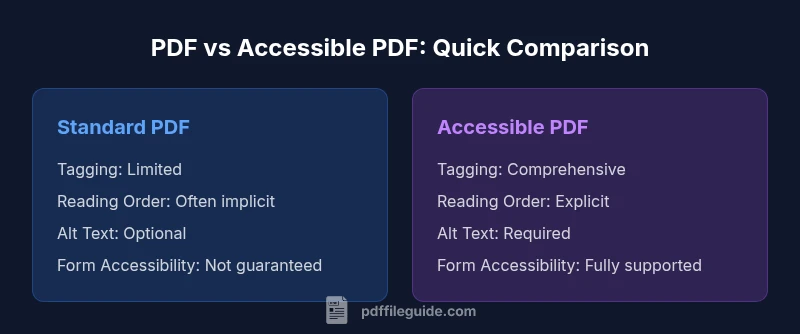
comparisonTable":{"items":["Standard PDF (untagged)","Accessible PDF (tagged)"],"rows":[{"feature":"Tagging and Reading Order","values":["Limited or none","Comprehensive tagging; preserved reading order"]},{"feature":"Searchability and Indexing","values":["Reduced indexing without tags","Enhanced with semantic structure and tags"]},{"feature":"Form Accessibility","values":["Forms may be non accessible","Fully accessible with labeled fields"]},{"feature":"Screen Reader Compatibility","values":["Poor compatibility","Excellent support across readers"]},{"feature":"Compliance Standards","values":["Often non compliant with PDF/UA and WCAG","Aligns with WCAG and PDF/UA requirements"]},{"feature":"File Size Impact","values":["Tags add overhead; can increase size","Tags add minimal overhead; optimized tagging saves space"]}]}
prosCons({"pros":["Improved usability for all readers and devices","Better compliance with WCAG and PDF/UA","Future-proofing documents for long-term access","Enhanced searchability and navigation"],"cons":["Requires additional tagging work and review","May increase production time and require training","Initial file size can rise; optimization is needed"]})
verdictBoxProperty3?null
keyTakeaways
faqSection
Comparison
| Feature | Standard PDF (untagged) | Accessible PDF (tagged) |
|---|---|---|
| Tagging and Reading Order | Limited or none | Comprehensive tagging; preserved reading order |
| Searchability and Indexing | Reduced indexing without tags | Enhanced with semantic structure and tags |
| Form Accessibility | Forms may be non accessible | Fully accessible with labeled fields |
| Screen Reader Compatibility | Poor compatibility | Excellent support across readers |
| Compliance Standards | Often non compliant with PDF/UA and WCAG | Aligns with WCAG and PDF/UA requirements |
| File Size Impact | Tags add overhead; can increase size | Tags add minimal overhead; optimized tagging saves space |
Strengths
- Improved usability for all readers and devices
- Better compliance with WCAG and PDF/UA
- Future-proofing documents for long-term access
- Enhanced searchability and navigation
Disadvantages
- Requires additional tagging work and review
- May increase production time and require training
- Initial file size can rise; optimization is needed
Accessible PDFs are the recommended default for professional workflows.
Prioritize accessibility to improve usability, compliance, and long-term value. Standard PDFs may suffice for very limited internal use, but pdf vs accessible pdf should guide most production decisions to serve diverse users and ensure future-proof documents.
Questions & Answers
What is an accessible PDF?
An accessible PDF includes structural tags, reading order, alt text, and accessible form fields so assistive technologies can interpret content. This improves usability for screen readers and other tools.
An accessible PDF is designed so screen readers can read the document properly and users can navigate it with ease.
How is pdf vs accessible pdf different in practice?
In practice, pdf vs accessible pdf differs in tagging, structure, and navigation. Accessible PDFs expose a logical document order and descriptive content for nonvisual readers, while standard PDFs focus on layout fidelity.
The difference is about structure and accessibility, not just appearance.
Can I convert an existing PDF to accessible?
Yes. You can convert existing PDFs by adding tags, ensuring proper reading order, labeling form fields, and adding alt text for visuals. This process may require manual adjustments and validation.
You can improve accessibility by tagging and reorganizing content, but it takes effort to get it right.
Do accessible PDFs affect search engine indexing?
Accessible PDFs generally improve searchability because tags and reading order help bots understand content better. But proper metadata and alt text are also important for optimal indexing.
Yes, accessibility features help search engines index content more effectively.
What standards govern accessible PDFs?
Accessible PDFs are guided by standards such as WCAG and PDF/UA. Following these standards helps ensure content is perceivable, operable, and robust for diverse users.
Standards provide clear criteria to meet accessibility goals.
Are accessible PDFs more time consuming to create?
Implementing pdf vs accessible pdf can add time to the production workflow, especially for complex documents. However, early planning and automated checks can reduce long-term rework.
It can take more time upfront, but pays off later in usability and compliance.
Key Takeaways
- Plan accessibility early in the project
- Tag and structure content for readable navigation
- Test with assistive tech and real users
- Balance tagging effort with delivery timelines
- Maintain ongoing accessibility updates