Is PDF or EPUB Better for Kindle? A Practical Comparison
Learn which format—PDF or EPUB—is best for Kindle reading, with practical guidance on layout, navigation, annotations, and conversion workflows. PDF File Guide analyzes use cases and provides actionable recommendations for professionals and readers.


When deciding is pdf or epub better for kindle, EPUB is usually the smarter default due to its reflowable text, adjustable typography, and smoother navigation across Kindle apps and devices. PDF preserves exact layouts but often sacrifices readability on small screens. The best choice depends on your content type and goals, but for most Kindle readers, EPUB wins after proper preparation; PDFs remain valuable for fixed-layout content.
Understanding PDF and EPUB in the Kindle ecosystem
For publishers, educators, and readers asking is pdf or epub better for kindle, the answer depends on how you plan to use the content and which Kindle experience you value most. PDF preserves fixed page layouts, fonts, and image positions, which is critical for forms, diagrams, and design-heavy documents. EPUB, by contrast, is a reflowable format designed to adapt to different screen sizes, font settings, and reader preferences. According to PDF File Guide, EPUB generally offers a smoother reading experience on Kindle apps and devices when the files are properly prepared and converted, especially on smaller screens where text reflows and margins adjust automatically. This difference matters for navigation, search, and annotation behavior across devices. The following sections dissect practical outcomes, from viewing and annotating to converting and delivering content to Kindle libraries. The goal is to help you decide, is pdf or epub better for kindle, for your specific context.
How Kindle handles fixed-layout versus reflowable formats
Kindle devices and apps manage two distinct content paradigms. Fixed-layout formats like PDF attempt to keep every element in its original position, copy exact margins, and preserve page numbers. This can be advantageous for magazines, calendars, or forms where alignment matters. However, fixed layouts can cause awkward scrolling, zooming, and unpredictable line breaks on small screens. Reflowable formats like EPUB, on the other hand, allow the text to reflow to fit the reader’s font size, line height, and margins. This yields a more comfortable reading experience on phones and small tablets, and it improves dynamic features like adaptive lighting and text search. In short, Kindle’s handling of each format shapes how readable a document is, how search works, and how annotations sync across devices. The upshot: if you value layout fidelity over adaptability, PDF might feel natural; if you want comfortable reading across devices, EPUB is usually better after conversion.
When PDF shines on Kindle
PDFs are excellent when your material relies on precise page geometry: charts, forms, schematics, and multi-column layouts that must appear exactly as intended. On Kindle devices with larger screens or updated apps, PDFs can still deliver accurate fonts and color rendering, and some readers appreciate maintaining the original design. For professionals distributing invoices, research papers, or design-heavy manuals, PDF’s fixed format reduces the risk of reflow altering key elements. But be mindful of the need to zoom or pan on small screens and to ensure your embedded fonts are embedded and licensed appropriately. If you plan to annotate heavily, you may encounter limitations in how highlights align with the underlying text if the PDF is image-based. In practice, the best workflow for PDF on Kindle often involves pre-flighting the document to ensure fonts are embedded, and compressing images to reduce load times. PDF File Guide notes that, while PDFs retain fidelity, they are less forgiving for dynamic reading on small devices.
When EPUB shines on Kindle
EPUB excels where readers value fluid typography, adjustable margins, and consistent navigation. On Kindle apps, EPUB becomes highly adaptable to different screen sizes and orientations, making it ideal for novels, essays, and long-form content that benefits from reflowable text. Properly prepared EPUB files enable easier text search, faster page turns, and smoother annotation across devices. EPUB’s structural markup – headings, sections, and metadata – helps Kindle’s built-in features, such as table of contents and reading progress indicators, feel more natural. However, EPUB on Kindle requires careful preparation: the file must be well-formed, free of licensing restrictions that block distribution, and converted to a Kindle-friendly container if needed. PDF File Guide emphasizes that the most reliable EPUB experiences arise when publishers build compliant EPUB 3 files with clean CSS and consistent embedding of fonts. The result is a lighter, more adaptable library item that shines on mobile readers.
Metadata, navigation, and search differences
Metadata quality can influence how easily you locate content in a Kindle library. EPUB files typically carry rich metadata, including author, title, subject, and series information, which improves searchability and organization. Kindle’s search can leverage these markers to surface relevant material more quickly. PDFs also carry metadata, but search within a PDF depends on text recognition and how the file was created; a scanned image-heavy PDF may behave like an image in search results. Navigation features differ as well: EPUB’s internal table of contents tends to work seamlessly with Kindle’s built-in navigational tools, while PDFs rely on bookmarks or on-page anchors that may not map perfectly to Kindle’s UI. PDF File Guide highlights that, when you distribute content across multiple formats, harmonizing metadata across EPUB and PDF versions helps readers locate titles consistently, regardless of device.
Annotations, highlights, and note-taking
Readers often annotate to study or review material. EPUB supports annotations more fluidly because text remains selectable and reflowable, aligning well with Kindle’s highlighting and note-taking features. Highlights in EPUB typically sync across devices when the content is re-delivered to the user’s library. With PDFs, highlights and notes can be attached to specific page coordinates, which can be less intuitive to manage if the user switches devices or uses smaller displays. If you are building a teaching resource or a textbook, EPUB’s annotation-friendly structure tends to provide a smoother experience, especially on Kindle apps for smartphones and tablets. That said, image-based PDFs can support precise diagram labeling, but their annotations might appear misaligned when the file is viewed at different zoom levels.
Conversion workflow: turning PDFs into EPUBs for Kindle
Converting between PDF and EPUB is a common workflow for Kindle preparation. When you start with a PDF, conversion to EPUB can yield better readability on mobile devices, but you may need to rebuild tables, reflow complex layouts, and re-embed fonts to maintain consistency. Conversely, starting with EPUB and exporting to Kindle-friendly formats can preserve structure while enabling margin adjustments and font choices. Always check for licensing restrictions on embedded fonts, ensure accessibility features are preserved, and run a quick preflight to confirm that headings, lists, and images render correctly. Tools range from desktop editors to cloud-based services; the right choice depends on your source material and desired output. PDF File Guide recommends a staged approach: verify the source content, perform a clean conversion, and then test on multiple Kindle devices to confirm the reading experience.
Case studies: textbooks, novels, comics, and magazines
Textbooks often benefit from EPUB’s reflowable text, which makes equations and diagrams easier to read on handheld devices; however, many institutions ship PDFs for grade compliance and distribution. Novels typically perform best as EPUBs, providing comfortable page turns and standard navigation. Comics and magazines, with heavy image use, might favor fixed-layout PDFs unless a high-quality EPUB with image handling is used. In professional magazines, fixed layouts can preserve advertising and mastheads, but readers may still prefer reflowable EPUB for on-the-go reading. The mixed realities of publishing for Kindle necessitate a hybrid approach: offer both formats and clearly explain what a reader can expect in each. PDF File Guide’s team has observed that readers gravitate toward EPUB for daily reading, reserving PDFs for fixed-layout content when fidelity is critical.
Pros and cons at a glance
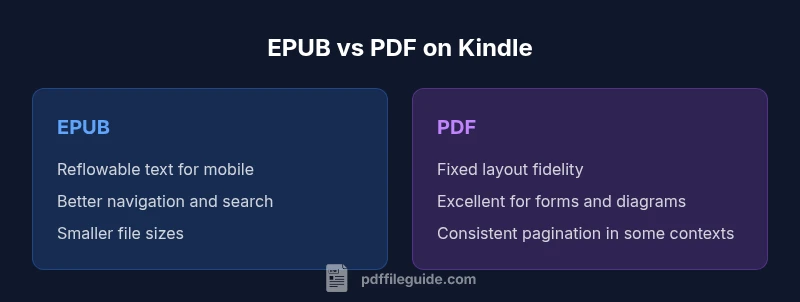
Pros of EPUB on Kindle: improved readability, better navigation, adaptable typography, and easier cross-device syncing. Pros of PDF on Kindle: fixed layout fidelity, precise formatting for complex designs, and predictable pagination in some contexts. Cons of EPUB on Kindle: requires careful preparation and validation; some older Kindle apps may have inconsistent EPUB rendering. Cons of PDF on Kindle: larger file sizes, zooming and panning on small screens, and potential misalignment when reflow is forced. The choice hinges on whether you value fluid reading and portability (EPUB) or layout fidelity and forms (PDF).
Comparison
| Feature | EPUB | |
|---|---|---|
| Reading behavior on Kindle devices | Reflowable text that adapts to font size and screen | Fixed-layout that preserves page geometry and images |
| Layout fidelity | High adaptability with consistent typography across devices | Exact page geometry preserved, best for forms or designs |
| Annotations and highlights | Seamless reflowable text annotations synchronized across devices | Page-based highlights tied to coordinates; may be less flexible |
| Search and metadata | Rich metadata support improves search in EPUB | PDF text search depends on text layer and OCR; metadata support varies |
| File size and performance | Often smaller for text-driven EPUB files | PDFs with images or fonts can be larger and slower to render |
| Best use case | Daily reading on multiple devices; easy resizing | Documents requiring exact layout or forms; archival copies |
Strengths
- EPUB offers better reading comfort on Kindle due to reflowable text
- EPUB supports adjustable typography and easier navigation
- PDF preserves exact layout for fixed-format content
- PDF is reliable for forms and documents with precise layout
- Well-prepared EPUB files improve search and syncing across devices
Disadvantages
- EPUB often requires careful preparation and validation for Kindle
- Some Kindle apps may render EPUB inconsistently without proper CSS
- PDF can be large and slower to render on small devices
- Conversion steps may introduce formatting challenges if not tested
EPUB generally wins for Kindle reading; PDF remains essential for fixed-layout content
Choose EPUB for everyday reading and cross-device consistency. Use PDF when exact layout or form fidelity is non-negotiable.
Questions & Answers
Is EPUB better for Kindle than PDF in most cases?
In most everyday reading scenarios, EPUB provides a smoother Kindle experience due to reflowable text and easier navigation. PDFs excel when layout fidelity is critical, but reading on small screens can suffer from zooming and panning. Consider EPUB as the default, with PDFs reserved for fixed-layout needs.
EPUB usually wins for daily reading on Kindle, while PDFs stay useful for layout-critical content.
Does Kindle natively support EPUB, or is conversion required?
Kindle devices traditionally relied on MOBI/AZW formats, so EPUB often requires conversion for native Kindle support. Some Kindle apps can handle EPUB after conversion, but always test to ensure formatting and metadata survive the handoff.
EPUB isn’t universally native on Kindle; conversion is usually needed.
What format works best for textbooks on Kindle?
Textbooks benefit from EPUB when you value reflowable text and search across chapters. But many institutions distribute PDFs for fixed-layout accuracy of diagrams and formulas. A hybrid approach—EPUB for reading and PDF for reference copies—often serves educators well.
EPUB is usually better for textbook reading; PDFs help with diagrams and tables.
Can I annotate EPUBs effectively on Kindle?
Yes, EPUBs tend to offer smoother annotation support because text remains selectable and reflowable. Kindle highlights and notes sync more reliably across devices when the EPUB is cleanly structured and properly converted.
EPUB annotations typically work well on Kindle.
How do I convert PDF to Kindle-friendly formats?
Use a reputable conversion tool and validate the output on multiple devices. Start with a well-prepared EPUB from the source, then convert to Kindle-friendly formats if needed. Check fonts, tables, and images after conversion.
Convert PDFs through a trusted tool, then test across devices.
Are there drawbacks to using EPUB on Kindle?
The main drawbacks are potential rendering inconsistencies on older Kindle apps and the need for careful formatting during conversion. Some features from the original EPUB may not map perfectly to Kindle’s UI, requiring adjustments.
EPUB can have rendering quirks on older Kindle apps; test is essential.
Key Takeaways
- Prioritize EPUB for flexible reading on Kindle devices
- Keep PDF for fixed-layout needs like forms or magazines
- Test conversions across Kindle apps and devices
- Harmonize metadata across formats for easier discovery
- Label formats clearly to prevent reader confusion