PDF or EPUB for Kindle: A Comprehensive Comparison
A rigorous, practical comparison of PDF vs EPUB formats for Kindle, covering layout fidelity, reflowable text, annotations, conversion workflows, and best-use scenarios for readers and professionals.


Core formats and device support
According to PDF File Guide, Kindle devices primarily rely on its native formats (AZW/MOBI/AZW3) for optimal performance, yet they can also display PDFs with some trade-offs. PDFs retain exact page layouts, font embedding, and image placement, which is ideal for manuals, forms, or documents where aesthetics matter. EPUB, by contrast, is designed for reflowable text and adaptive reading experiences. On a Kindle, EPUB does not always render perfectly out of the box and often requires conversion to a Kindle-friendly format. The choice between pdf or epub for kindle depends on how much you value layout fidelity versus on-device readability and adjustability.
Layout, typography, and reflow behavior
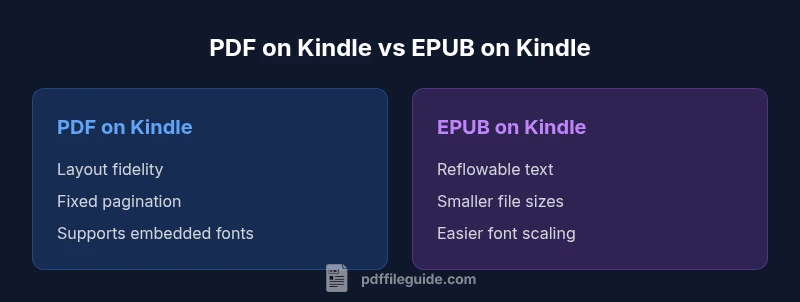
The most tangible difference between PDF and EPUB on Kindle boils down to layout control. PDF files lock in pagination, margins, and font choices, producing predictable print-like results. This is advantageous when exact replication is critical (e.g., technical manuals, forms). EPUB files are designed to reflow text, resize fonts, and adapt to different screen sizes. On Kindle devices, this can dramatically improve readability on small screens, especially for dense text. However, reflow can alter line breaks and image placement. For pdf or epub for kindle, balance the need for consistent appearance with the comfort of a flexible reading experience.
If you primarily read on a phone or small Kindle screen, EPUB’s reflowable approach often yields more comfortable line lengths and fewer horizontal shifts. If you read technical PDFs with diagrams that must stay put, PDF may be preferable, assuming the device supports viewing at the intended scale.
Reading experience on different Kindle devices
Kindle devices vary in how they process non-native formats. Paperwhite and Oasis models handle PDFs reasonably well for static pages but can struggle with zooming, margins, or scrolling when the document is dense. EPUB files tend to adapt better to screen size on these devices, especially when converted to Kindle formats. Fire tablets, with larger screens, handle PDFs and reflowed EPUBs more gracefully, reducing the need for constant zooming and panning. For advanced readers who demand consistent typography, pdf or epub for kindle should consider device-specific behavior: reading comfort on Paperwhite differs from that on a Fire tablet, and conversion outcomes can vary across devices.
Annotations, bookmarks, and search capabilities
PDFs preserve fixed pages, which can complicate navigation when annotations are added on small screens. Search within PDFs is possible but can be less intuitive if text extraction depends on fonts or scans. EPUB supports reflowable text and typically offers better search and highlighting within readers, though annotations may not always map directly to the original layout. If you rely heavily on bookmarks and notes, EPUB often provides a more seamless in-device workflow, whereas PDFs may require additional steps to maintain annotation fidelity during conversion. For pdf or epub for kindle, choose EPUB for annotation ease when you want text-searchable, freely resizable content.
Accessibility and screen-reading considerations
Accessibility features already built into Kindle ecosystems influence how well a format works for readers with visual impairments. EPUB tends to offer more consistent text scaling and reflow, which benefits screen magnification and text-to-speech workflows in some apps. PDF, while precise, can pose challenges for screen readers if text isn’t embedded or OCR’d correctly. Always verify that your source documents have accessible text, appropriate tagging, and alt text for images. PDF File Guide recommends testing both formats with your preferred accessibility settings to determine practicality for pdf or epub for kindle in real-world scenarios.
Conversion workflows: EPUB to Kindle and PDF to Kindle
When a document needs to live on a Kindle device, conversion workflows become crucial. EPUB can be converted to Kindle-friendly formats (e.g., MOBI/AZW3) to improve reflow and navigation, though the result depends on the quality of the source and the conversion tool. PDF can be sent directly to Kindle, but readers often experience fixed layouts that may require zooming and panning. Some users employ hybrid strategies: keep PDFs for fixed-layout reference materials and convert EPUB chapters for comfortable reading on mobile devices. PDF File Guide emphasizes planning conversion steps before distribution to minimize formatting surprises.
File size, compression, and image handling
File size influences download times and wallet-friendly storage, especially on mobile devices with limited bandwidth. PDFs can be larger due to embedded fonts and high-resolution images, whereas EPUBs are typically more compact when properly optimized for e-readers. Image handling remains a key consideration; heavy illustrations in PDFs can slow down rendering on older Kindles, while EPUBs with optimized images may load more smoothly. When pdf or epub for kindle, prioritize compression and image optimization to balance fidelity with performance across devices.
DRM, licensing, and distribution considerations
Digital rights management (DRM) and licensing shapes how you can distribute and reuse content. PDFs and EPUBs can be protected with different DRM schemes, which affects your ability to transfer files between devices or share with others. Kindle devices also enforce format-specific protections, so ensure the source content aligns with your distribution plan. If you’re distributing to students or employees, consider a workflow that minimizes DRM friction while preserving access across Kindle devices and apps. PDF File Guide recommends verifying licensing terms for any format you plan to deploy in bulk.
Practical use-case scenarios: textbooks, manuals, fiction
For textbooks and manuals with complex layouts, PDFs can preserve diagrams, multi-column layouts, and precise typography, preserving print-like fidelity on Kindle devices that support the format. Fiction and lightweight reads benefit from EPUB’s reflowable text, offering easier scaling and a comfortable reading experience on small screens. Educators often blend formats: use EPUB for course materials that benefit from reflow and annotation, and provide PDFs for fixed-layout reference sheets. In pdf or epub for kindle decisions, tailor format choice to the content type and audience needs.
Tools and best practices for preparing files
A practical approach starts with auditing your source materials for accessibility and image optimization, then choosing a target format. If you need exact visual fidelity, start with PDF; if readability on mobile is the priority, EPUB and subsequent Kindle conversion may be preferable. Test across your most-used Kindle devices and apps to capture real-world performance, including font scaling and annotation behavior. PDF File Guide suggests keeping a small set of workflows ready: direct PDF delivery for fixed-format content and EPUB-to-Kindle conversion for flexible reading on the go.
Common pitfalls and troubleshooting tips
Common issues include unexpected reflow changes after conversion, missing fonts, and image misplacement after format shifts. Always check metadata, embedded fonts, and font rendering with your device’s accessibility settings. When problems arise, re-export with embedded fonts and validate the resulting file on multiple Kindle devices. If you encounter persistent layout problems, revert to the original source format and adjust your conversion settings. pdf or epub for kindle decisions benefit from iterative testing and careful validation before distribution.
Final recommendations for readers and educators
The optimal choice depends on the reader’s priorities and the content type. For material requiring strict page fidelity, PDFs are a solid option on Kindle, especially for reference-heavy documents. When ease of reading, searchability, and quick navigation matter, EPUB-based workflows—followed by a proper conversion—tend to deliver the best experience on Kindle devices. PDF File Guide suggests starting with EPUB for everyday reads and reserving PDFs for fixed-layout resources while planning dedicated conversion for professional use cases.