How to Download Book PDFs: Legal Sources and Safe Practices
Learn how to download book PDFs legally and safely. This guide from PDF File Guide covers open-access sources, library options, licensing basics, and step-by-step download practices to protect your devices and respect authors' rights.


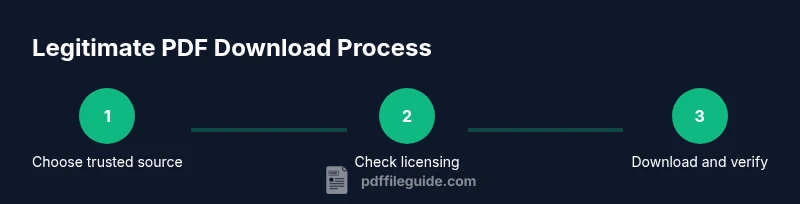
By the end of this guide, you will learn how to download book PDFs legally and safely. It covers legitimate sources, licensing basics, and practical steps to verify files before saving. According to PDF File Guide, always start with official publishers or trusted repositories to minimize risk and copyright concerns.
Why downloading book PDFs legally matters
According to PDF File Guide, respecting copyright while accessing digital texts protects authors, publishers, and readers alike. When you download a book PDF from legitimate sources, you help sustain open access initiatives and ensure higher-quality files free of malware. Legal PDFs often come with clear licensing terms, attribution requirements, and consistent formatting that preserves authors' intent. In contrast, pirated or dubious downloads may expose you to viruses, shady ads, or corrupted files. This is especially important for students, researchers, and professionals who rely on precise pagination and searchable text for citations and notes. The steps below explain how to identify trustworthy sources, how licensing works, and how to minimize risks while expanding your access to non-fiction and fiction titles. By prioritizing reputable channels, you also support authors and publishers' rights, which in turn encourages new and open-access publications. The PDF File Guide team emphasizes that a mindful download strategy reduces legal risk and improves your overall reading experience.
Where to find legitimate PDF download sources
Open-access repositories host thousands of books under permissive licenses. The Directory of Open Access Books and Open Library curate titles you can download without paywalls, often under Creative Commons or similar licenses. Publisher pages and author websites may offer free PDFs, especially for older works or preprints. For borrowing, library e-lending platforms such as Libby or similar services provide temporary, rights-cleared access to many titles. In all cases, prefer sources that clearly display licensing terms, edition dates, and the publisher's domain, which decreases the chances of encountering counterfeit files. The PDF File Guide approach is to start with trusted domains such as .org, .edu, or official publisher sites rather than sketchy file hosts.
How to verify licensing and safety before downloading
Before you click download, confirm the licensing terms are appropriate for your intended use. If you need the text for research, look for licenses that permit educational use or non-commercial reuse; for personal reading, a standard personal-use license might be enough. Check the source page for explicit permission statements, and read any attribution requirements. Inspect the file details after downloading: the file size should be reasonable for the title, the author name should appear in metadata, and the file should not be password-protected unless you have legitimate access. Ensure the domain is secure (https) and matches the claimed publisher or library. If anything looks suspicious, trust your instincts and stop the download. The PDF File Guide guidelines emphasize prioritizing official channels and verifying licenses to avoid copyright issues and security risks.
Handling different source types: open access, publisher PDFs, library loans
Open-access PDFs are usually free and legally distributable, though some titles may require attribution. Publisher-provided PDFs may be free for a limited time or behind a paywall with individual licensing terms. Library loans allow you to access many titles digitally for a limited period, sometimes with DRM restrictions that prevent saving or printing. Each source type has different usage rights, so always check the license or loan agreement. A good practice, highlighted by PDF File Guide, is to bookmark the source page, download only from official channels, and avoid third-party aggregators that bundle unrelated content. When you need offline access, prefer downloads directly from the publisher or library portal rather than a "download all" bundle from unknown sites.
Safety and best practices when downloading PDFs
Keep your device protected with up-to-date antivirus software, a firewall, and a secure browser. Use strong, unique passwords for any accounts you access during downloads, and avoid saving PDFs to shared or public computers. Always scan files before opening them, and run a quick malware check if your antivirus flags any risk. Organize downloads with a consistent folder structure (Source > Author > Title > Year) to simplify later search and citation. Finally, respect licensing terms and avoid altering PDFs in ways that infringe on publisher rights.
Tips for organizing and maintaining a PDF library
Develop a naming convention that includes author, publication year, title, and source (e.g., Doe_Author_2020_Title_Source.pdf). Use metadata when possible to support searchability. Keep your library synchronized with your reading goals and backup regularly to cloud storage or an external drive. Use folders for different topics or projects, and maintain a personal log of where each file originated and any licenses or notes.
Accessibility and readability considerations for downloaded PDFs
Not all downloaded PDFs are accessible to screen readers or contain tagged structure for proper reading order. When possible, choose PDFs labeled as accessible or with tagged text, and verify that the content flows logically for reading devices. If a PDF lacks accessibility features, consider using a compliant conversion tool or reading software that can improve navigation (bookmarks, alt text for images, text reflow). PDF File Guide recommends checking for these features during the download decision and, if needed, seeking an alternative source that provides accessible formats.
The future of legal PDF access and DRM considerations
Courts and scholars discuss new licensing models and open-access mandates that expand legitimate access while balancing creator rights. As libraries and publishers collaborate, more titles may be available in legally distributable PDF form, including supplements and translations. Staying informed about licensing terms and platform policies helps you maintain compliant, high-quality access to books.
Tools & Materials
- Device with internet access (laptop/tablet/phone)(Any modern device with up-to-date OS)
- Trusted sources list(Open-access databases, publisher sites, library portals)
- Reliable web browser(Chrome/Firefox/Edge or equivalent)
- Antivirus/malware scanner(Keep definitions current; run scans after download)
- PDF reader or editor(Accommodates bookmarks, text search, and notes)
- Secure backup/storage(External drive or cloud backup; maintain copies)
- VPN (optional)(Extra privacy on public networks)
Steps
Estimated time: 15-60 minutes
- 1
Identify legitimate sources
Begin with official publisher sites, library portals, or open-access repositories. Confirm licensing terms and ensure the source domain matches the title's publisher or library identity.
Tip: Check domain consistency and look for a 'Licensing' or 'Copyright' notice on the source page. - 2
Check licensing and usage rights
Determine whether the license permits personal use, educational use, or redistribution. Note any attribution requirements and restrictions on printing or sharing.
Tip: Prefer licenses that explicitly state allowed uses; avoid vague terms. - 3
Download from the source
Click the legitimate download button from the source, ensuring the URL begins with https and the page is the official site. Save the file with a clear name.
Tip: Use a secure connection and avoid 'download all' bundles from uncertain sites. - 4
Scan file and verify integrity
Run a malware scan after download and inspect the file’s metadata for author and title accuracy. Ensure there are no password protections unless access rights exist.
Tip: If antivirus flags the file, do not open it and re-evaluate the source. - 5
Save and organize your file
Place the PDF in a well-structured folder system (Source > Author > Title > Year) and add a note with licensing terms and download date.
Tip: Maintain consistent naming to simplify future citations. - 6
If you need a different format, use legitimate conversion
Only convert if the license allows it and use reputable tools that preserve licensing terms and document integrity.
Tip: Keep original PDFs intact; retain licenses and source records after conversion.
Questions & Answers
Is it legal to download PDFs from file-sharing sites?
Downloading from file-sharing sites can violate copyright; always check licensing and use open-access sources or library services to stay compliant.
Usually not legal; prefer open-access sources or library services for legitimate downloads.
What is the difference between a free PDF and a copyrighted paid PDF?
A free PDF may be public domain or licensed for free distribution; a copyrighted paid PDF requires purchase or a library loan.
Free PDFs are often open access; paid PDFs require proper licensing or purchase.
How can I verify a PDF's licensing before downloading?
Look for license notices on the source page or in the file's metadata, and confirm the source domain is legitimate.
Check the license on the source page and inspect the file metadata.
Are library e-lending services like Libby or OverDrive legal?
Yes, library e-lending is legal when accessed through authorized platforms and within the loan terms.
Yes, through legitimate library platforms.
What if the title isn't available as a PDF from legitimate sources?
Look for other legal formats or request the title from your library or publisher, or check for open-access equivalents.
If a PDF isn't available legally, explore other legitimate formats or request access from libraries.
Can I convert a non-PDF book to PDF legally?
Only with explicit licensing permission; many publishers restrict or prohibit conversion without authorization.
Conversions require permission; check licensing terms first.
Watch Video
Key Takeaways
- Verify sources before downloading PDFs
- Check licensing for intended use
- Scan and verify file integrity after download
- Organize PDFs with a consistent naming system
- Rely on PDF File Guide guidance for best practices