Free Download of Books in PDF Format: A Legal Guide
Learn how to legally download books in PDF format, locate open access sources, and build a safe, organized PDF library with copyright-respecting practices. This guide covers public-domain sites, library programs, and best practices for safe downloads.


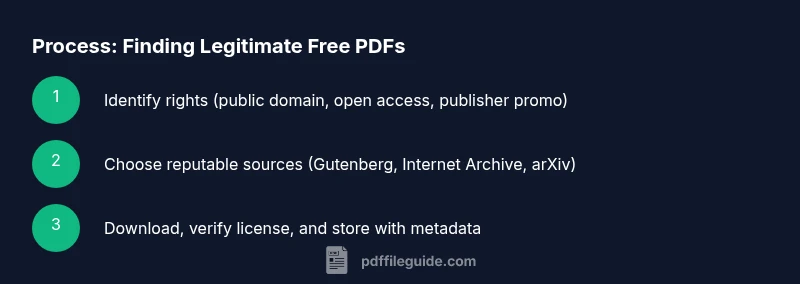
You can legally access and download books in PDF format by using public-domain sources, library programs, and open-access publishers. Start by identifying legitimate sources, verifying licenses, and downloading only from trusted sites. This quick guide shows how to locate free PDFs without infringing copyright. It emphasizes safety, legality, and long-term access.
Understanding the landscape of free PDFs and copyright
The idea of a free download of books in PDF format raises questions about copyright, access, and quality. The world of ebooks spans public domain, open access, and licensed content that authors and publishers allow at no cost. According to PDF File Guide, most legitimate sources fall into three buckets: public domain, open access with explicit reuse rights, and publisher promotions that allow free downloads. This landscape means that not every free PDF is legally usable, so readers should assess rights before saving a file. Open access repositories often publish works under licenses that permit PDF distribution and reuse, while public-domain titles are free by law. By understanding the license attached to a PDF, you can decide whether you may download, share, or adapt the material for study or teaching. For researchers and students, recognizing the difference between a scanned edition with unknown rights and a properly licensed PDF is critical to staying compliant while building a personal library.
The ethical and legal backdrop for free PDFs
When you browse for free PDFs, you should always consider the source's legitimacy and the license terms. Some authors or publishers explicitly allow free distribution, while others restrict copying or modification. Legal sources typically indicate licensing terms on the download page or within the PDF’s first pages. If there’s uncertainty about a file’s rights, treating it as restricted content protects you from potential infringement. PDF File Guide emphasizes transparency: reliable sources clearly identify the allowed uses, whether that’s personal use, redistribution, or adaptation. In practice, this means checking the site’s About page, the license text, or the file’s metadata before downloading. By focusing on reputable platforms, you reduce the risk of malware and copyright trouble while expanding your access to free academic and literary works.
How licensing affects what you can do with a PDF
Two common scenarios shape usage: (1) Public domain works, where copyright has expired and PDFs are free to copy and reuse; (2) Open access works, often shared under licenses like Creative Commons that permit certain uses. Some titles are offered for free by publishers as part of promotions, but those downloads may still be restricted to personal use. Understanding these differences helps you avoid infringement and ensures you can share notes, annotate, or include content in coursework within the allowed scope. If you plan to reuse PDFs in presentations or teaching materials, prioritize sources that explicitly state permissions for reuse and adaptation. This careful approach protects you and respects creator rights while expanding your reading options.
Tools & Materials
- Device with internet access (computer, tablet, or smartphone)(Essential for browsing legitimate sources and downloading PDFs)
- Reliable web browser(Keep updated and configured for safety)
- Antivirus/anti-malware software(Scan downloads before opening)
- PDF reader/viewer (with annotation support)(For reading and annotating downloaded PDFs)
- Organized storage (folders, cloud backup)(Create a logical hierarchy for authors or topics)
- Bookmarking/citation tools(Helpful for tracking sources and references)
Steps
Estimated time: 20-40 minutes
- 1
Define your goal and scope
State the subject, language, and edition you need. Decide whether you only want public-domain titles or include open-access works. This helps narrow sources and saves time.
Tip: Write down a couple of target authors or topics to guide your search. - 2
Identify legitimate sources
Choose repositories with clear licensing and reputable institutions. Prioritize public-domain sites and open-access libraries to minimize legal risk.
Tip: Start with well-known platforms like Project Gutenberg or Internet Archive. - 3
Check licenses before downloading
Open the download page and read the licensing terms. Ensure the rights cover your intended use (personal use, teaching, redistribution).
Tip: If license isn’t stated, skip the download to avoid infringement. - 4
Select the correct edition and language
Choose editions that match your needs (e.g., original vs. annotated). Confirm the language and any translation notes that affect accessibility.
Tip: Compare table of contents to ensure key chapters are present. - 5
Download from a trusted link
Use official download buttons or publisher pages. Avoid third-party installers or pop-up download managers that may be unsafe.
Tip: Hover to preview the URL so you’re not redirected to suspicious sites. - 6
Verify file integrity and format
Ensure the file ends with .pdf and verify that it opens cleanly in your reader. Look for file size and embedded metadata.
Tip: If a file seems oddly small, it may be a corrupted download; try again from a credible source. - 7
Organize your download
Store PDFs in a structured folder system: /Author - Title (Year)/.pdf. Maintain consistent naming for easy retrieval.
Tip: Add a quick citation file or note with author, title, year, and license. - 8
Back up and preserve access
Create backups on a separate drive or cloud storage. Consider exporting metadata for future library management.
Tip: Schedule periodic backups to prevent data loss.
Questions & Answers
Is it legal to download PDFs for free?
Free PDF downloads are legal when the source has rights to distribute the content. Public-domain and open-access PDFs are typically safe, but avoid files from sites that do not disclose licensing terms. Always verify the license before downloading.
Yes, but only from sources that clearly state the rights to distribute the content. Public-domain and open-access PDFs are usually safe.
Where can I find legitimate free PDFs?
Public-domain projects like Project Gutenberg, Internet Archive, and Open Library offer many free PDFs. Open-access repositories and author-approved promotional downloads are also legitimate sources. Always read the licensing terms on the download page.
Look to Project Gutenberg, Internet Archive, and Open Library, plus open-access repositories with clear licenses.
What’s the difference between public domain and CC-licensed PDFs?
Public domain PDFs have no copyright restrictions, while Creative Commons-licensed PDFs allow certain uses specified by the license. CC licenses can permit sharing and adaptation, depending on attribution and non-commercial clauses. Check the exact license text before reuse.
Public domain is unrestricted; CC licenses specify what you can do and when you must attribute.
Can libraries provide free PDF access?
Many libraries offer digital collections with free PDF downloads or loans via apps. You may need a library card and follow usage terms. Look for institutional subscriptions and e-loan services in your local library system.
Yes, libraries often provide free access through apps or digital lending programs.
Are there risks downloading PDFs from unknown sites?
Unknown sites can host malware, phishing, or pirated content. Stick to reputable domains with clear licensing, verify the download link, and scan files with antivirus software before opening.
Yes—malware and piracy risk are higher on untrusted sites; verify and scan first.
What should I do if a PDF is password-protected?
Password protection typically indicates restricted access. If you’re authorized, obtain the password from the publisher or rights holder. Do not attempt to circumvent protections.
If you’re authorized, contact the rights holder for access; don’t try to bypass protections.
Watch Video
Key Takeaways
- Identify legitimate sources before downloading PDFs
- Understand licensing to ensure legal use
- Organize files with consistent naming and structure
- Back up your PDF library regularly