How Big of a PDF Can ChatGPT Read? A Practical Guide
Explore practical size limits, chunking strategies, and best practices for reading PDFs with ChatGPT. Learn how PDF File Guide suggests handling large documents for editing, converting, and optimization in 2026.


ChatGPT reads PDFs by processing extracted text in manageable chunks rather than a single monolithic block. In practice, plan for a few pages per prompt and use chunking for larger documents. According to PDF File Guide, success hinges on how you partition content and summarize before querying. For many PDFs, chunked extraction plus targeted prompts yields reliable results across topics.
How to conceptualize reading a PDF with ChatGPT
Reading a PDF via ChatGPT is not about loading an entire file in one go. The practical limit is driven by the model's context window, the quality of extracted text, and how you structure prompts. The PDF File Guide team emphasizes treating long documents as a sequence of digestible chunks. This approach preserves concepts, preserves important details, and enables precise follow-up questions that refine understanding without losing context.
In real-world workflows, you often extract text from each section, convert tables to plain text, and summarize each chunk before sending it to the model. This method reduces noise from formatting artifacts and ensures you retain central arguments, dates, numbers, and cited sources. Over time, chunking also makes it easier to compare sections and build a cohesive narrative across the document.
Distinguishing size, bytes, and tokens
When people ask how big a PDF is, they usually mean the amount of textual content and its density, not the raw file size. In ChatGPT workflows, text exists as tokens rather than bytes. A dense chapter with long paragraphs and many citations can consume tokens quickly, while lightly formatted pages may use fewer tokens. This distinction matters because the same PDF could require different chunking strategies depending on how the content is authored and converted to text. For reliable results, estimate the number of tokens per page and plan prompts that stay within the model’s context budget while preserving meaning.
Additionally, image-heavy PDFs or documents with embedded figures may require extra steps to OCR images or describe non-text elements. The extra processing adds to token usage but may be essential for extracting actionable insights from charts, diagrams, or scanned documents.
Content types and readability factors
Text quality greatly affects how well ChatGPT can read a PDF. Clean, searchable text with consistent fonts and clear headings tends to translate into higher extraction accuracy. Tables often degrade readability if they are flattened into text without structural cues; in such cases, pre-formatting tables as simple, row-based text improves the model’s ability to interpret data. Figures and captions should be described succinctly if the prompt relies on them for context. If your PDF contains footnotes, appendices, or long-form quotes, consider isolating these sections as separate chunks to preserve their nuance.
Formatting quirks—hyphenated line breaks, multi-column layouts, and skewed column order—can confuse text extractors. Pre-processing with a clean OCR pass and a consistent layout helps ensure the model captures the correct sequence of ideas. PDF File Guide consistently recommends validating extracted text against critical sections to minimize misinterpretation.
Chunking strategies that work in practice
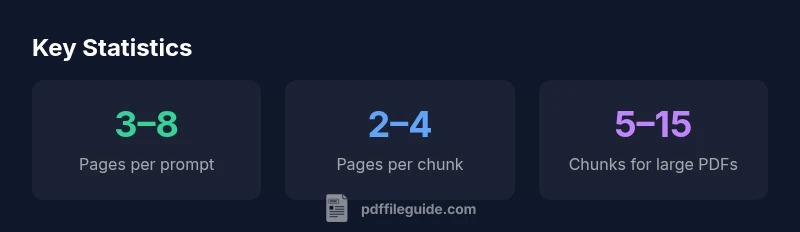
Effective chunking starts with a document outline. Break the PDF into logical sections such as Introduction, Methods, Results, and Conclusion. Within each section, create sub-chunks around 2–4 pages that share a thematic thread. Use target prompts for each chunk, e.g., ask for a summary of key findings, then request a detailed explanation of one figure. Maintain a running log of questions and answers to build a coherent narrative across chunks. Finally, compile a synthesis prompt that draws insights from multiple chunks to deliver a comprehensive answer.
A practical, repeatable workflow
- Extract text from the PDF and run a quick quality check for missing sections.
- Create outline-based chunks (2–4 pages each).
- Summarize each chunk and append essential details (figures, dates, citations).
- Ask focused questions per chunk to extract understanding and validation.
- Synthesize answers across chunks to preserve continuity and reduce redundancy.
- Validate outputs by cross-referencing with the original document where possible.
This workflow aligns with the best practices endorsed by PDF File Guide and supports consistent, repeatable results across documents of varying complexity.
Case study style examples for common PDFs
Example 1: A research paper with methods and results. Break into sections and focus on the main findings and limitations. Example 2: A user manual with step-by-step instructions. Chunk by feature or task, then verify steps against the full procedure. Example 3: A corporate report with charts. Describe each chart in text, then query insights across sections to form a top-level summary.
Pitfalls to avoid and how to mitigate them
- Avoid overly dense prompts that try to cram too much content at once. Mitigation: split into two or more prompts with targeted questions.
- Don’t rely on a single extraction pass for critical data. Mitigation: cross-check with multiple chunks for key facts and dates.
- Beware formatting artifacts that obscure meaning. Mitigation: pre-process with OCR and table normalization to preserve data integrity.
Beyond reading: verification, extraction, and optimization
Use the read PDFs to extract essential data, convert to alternate formats, or summarize for reporting. Verification steps include cross-referencing quoted figures with the source, re-running prompts with clarifying questions, and maintaining an audit trail of prompts and responses. PDF File Guide highlights how well-structured PDFs support more accurate extractions and smoother conversions, especially when preparing content for workflows or client deliverables.
Readability and chunking guidance by PDF File Guide
| Scenario | Readable Range | Chunk Size | Notes |
|---|---|---|---|
| Small PDF | 3–8 pages | 1–2 pages per chunk | Great for quick answers and exports |
| Medium PDF | 8–20 pages | 2–4 pages per chunk | Balanced analysis and summaries |
| Large PDF | 20+ pages | 5–15 pages per chunk | Use progressive loading and synthesis |
Questions & Answers
Can ChatGPT read a 100-page PDF in one go?
In practice, ChatGPT reads PDFs by processing text in chunks rather than a single block. A full 100-page document is unlikely to fit in a single prompt; instead, chunking and targeted questions yield better results.
Usually not in one go; break it into chunks and ask targeted questions.
What is the practical limit for a PDF size ChatGPT can handle in a single prompt?
There isn’t a fixed page count; practical limits depend on text density and token usage. Plan for smaller chunks and iterative querying to cover larger documents.
There isn’t a single limit—focus on chunks and prompts.
How should I chunk a large PDF for best results?
Start with an outline-based approach, create 2–4 page chunks per topic, summarize each, then query across chunks for synthesis. Maintain a log of prompts and responses.
Chunk by topic, summarize, then synthesize across chunks.
Does the type of content affect readability (text vs images, tables)?
Yes. Text is easiest to read, but tables and images require careful description or OCR. Preprocess images and convert tables to plain text for better extraction.
Text is easiest; images and tables need extra handling.
Can I use external tools to improve reading large PDFs?
Yes. Use tools to extract, OCR, or structure content before feeding it to ChatGPT. Pre-processing increases accuracy and saves prompts.
Tools can improve reading accuracy.
Is there a way to verify the accuracy of ChatGPT's extraction from PDFs?
Cross-check extracted data against the source text in multiple chunks and validate key facts with you or your team. Maintain an audit trail of prompts.
Yes—verify across chunks and keep an audit trail.
“ChatGPT performs best on PDFs when inputs are structured as clear chunks and prompts are precise. The quality of your prompt often matters as much as the text itself.”
Key Takeaways
- Chunk PDFs into manageable sections
- Prioritize high-signal sections with targeted prompts
- Use summaries to extend context without exceeding limits
- Test with representative pages before full documents