How Many PDF Pages Can ChatGPT Read: Limits, Strategies, and Best Practices
Explore how many pdf pages ChatGPT can read, the limits you’ll encounter, and practical chunking strategies to process large PDFs efficiently. Learn from PDF File Guide’s 2026 analysis to optimize reading and data extraction.


How many pdf pages can chatgpt read? There is no single fixed value; it depends on model token limits, input encoding, and page content density. In practice, you’ll typically process tens of pages in one pass, but larger PDFs require chunking and iterative querying. The effective limit improves with summarization and structured extraction, per PDF File Guide Analysis, 2026.
How many pdf pages can chatgpt read in practice
According to PDF File Guide, the practical capacity to read pdf pages with ChatGPT depends on token budgets and how you chunk input. When you feed a PDF as plain text, the model can process a contiguous block up to its token limit, which translates to roughly tens of pages for dense content or more pages if the content is lighter and well-structured. The exact number varies by model variant, image density, and whether you include metadata or footnotes. In real-world workflows, readers often split a large document into chapters or sections, process each segment, and then synthesize a cohesive summary. This approach aligns with the PDF File Guide Analysis, 2026 findings, which emphasize practical chunking over chasing a single-page limit.
What counts toward the limit: tokens, chunks, and formatting
ChatGPT’s reading capacity is governed primarily by the input token budget, not raw page counts. Tokens include words, punctuation, code, and formatting tokens; pages with dense math or tables generate more tokens than simple prose. When you preserve layout, tables, and figures, more tokens are consumed, reducing the number of pages you can fully process in a single pass. To maximize effectiveness, convert PDFs to plain text or structured representations where possible, and deliberately drop nonessential elements. PDF File Guide Analysis, 2026 shows that the same document can yield different page counts depending on how you tokenize and summarize, so testing with your own PDFs is essential.
Practical chunking strategies for large PDFs
To extend ChatGPT’s effective reading window, adopt a chunking strategy: break the document into logical units (chapters, sections, or topics), feed each unit separately, and keep a running outline. Use headings to anchor the model’s context and generate per-chapter summaries before stitching them together. Create a data map for key facts, figures, and citations as you progress. When working with long PDFs, you might run multiple passes: first pass for topic-level understanding, second pass for details, and a final pass for cross‑document synthesis. PDF File Guide’s recommended workflow (PDF File Guide Analysis, 2026) prioritizes clarity over volume and reduces the risk of context drift.
Scanned PDFs and OCR: making text readable
If a PDF is a scan rather than native text, you must run OCR before ChatGPT can read it meaningfully. OCR quality directly influences how many pages can be read and how accurately data can be extracted. After OCR, re-check for errors, misread numbers, and misaligned tables. In many cases, extracting text through OCR followed by selective summarization yields better results than attempting to feed raw scans directly. The PDF File Guide team has observed that OCR-enabled workflows substantially increase the readable content pool for large documents.
Extracting structured data from PDFs: tables, headings, and bullets
For business and research tasks, the goal is often structured data rather than free-text. To extract tables and headings efficiently, consider converting sections into structured JSON or CSV. Tag tables and figures, annotate key findings, and verify extracted numbers against the source. This approach reduces cognitive load for reviewers and enables downstream automation. When you need to compare figures across documents, maintain a consistent unit system and document versioning. Structured extraction improves reliability within token budgets, according to PDF File Guide Analysis, 2026.
Measuring reading success: testing your PDFs with ChatGPT
A practical test plan involves selecting representative PDFs (dense articles, forms, manuals) and measuring how many pages ChatGPT reads in a single pass, then comparing results against expected tokens and processing time. Use a mix of text-only and image-heavy PDFs to understand performance variability. Track the number of pages processed, summarization quality, and data accuracy. Document adjustments to chunk boundaries and prompts, and re-test. This iterative approach aligns with the PDF File Guide Analysis, 2026 methodology.
Real-world use cases by density and purpose
Academics often seek topic-level extraction across chapters, while product manuals require precise sectioning for feature lists and troubleshooting steps. Legal documents demand careful cross-referencing of clauses, with attention to defined terms. In each case, chunking by logical units and validating critical facts against the source improves reliability and reduces the risk of context loss. Across categories, the strategy remains consistent: break content into meaningful segments, summarize, and verify.
Common pitfalls and best practices
Avoid assuming a fixed page limit. Don’t feed raw data naively when the document includes complex tables or equations. Prefer plain text or structured feeds, and always pilot test with your most important PDFs. Keep expectations aligned with token budgets and the model’s capabilities, and maintain versioned outputs for traceability.
Final guidelines for teams and individuals
Plan a scalable workflow: define chapters, run chapter-level summaries, and compile a final synthesis. Maintain a separate data map for numbers and key findings. Use OCR for scans, convert to text where possible, and verify outputs with human review for critical decisions.
Examples of reading capacity by document type
| Scenario | Pages Read in One Pass | Recommended Approach |
|---|---|---|
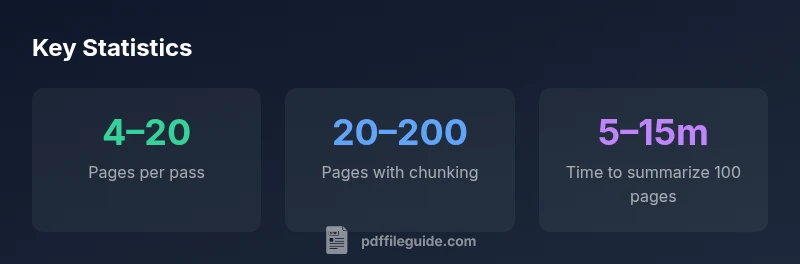
| Dense academic article | 4–20 pages | Chunk and summarize; extract key insights |
| Invoices or forms | 2–6 pages | OCR + field extraction |
| Book-length manual | 20–200 pages | Chunk by chapters; summarize per section |
| Code or tabular data | 1–4 pages | Isolate sections, convert tables to structured data |
Questions & Answers
Can ChatGPT read scanned PDFs?
Not effectively without OCR. Scanned PDFs must be converted to text via OCR before ChatGPT can process them. After OCR, re-check for recognition errors and adjust prompts as needed.
Yes, but only after OCR converts scans to text.
Does font size affect how many pages can be read?
Yes. denser pages with smaller fonts yield more words per page, increasing token usage and potentially reducing the number of pages readable in a single pass.
Font density affects how many pages you can read in one go.
What is the best workflow for large PDFs?
Break the document into chapters or sections, summarize each part, then synthesize the findings. Use a data map for facts and figures to maintain consistency across chunks.
Break into chunks, summarize, and stitch together.
Can I read beyond token limits?
Yes, by processing in steps: summarize first, then extract details from subsequent chunks. You won’t retain full context across all chunks unless you build a structured memory of the document.
Do it in steps and keep a running summary.
Are there tools to help convert PDF to text for ChatGPT?
Yes. Use reliable PDF-to-text converters or OCR pipelines to feed ChatGPT. Then structure the results for targeted questions or data extraction.
Yes, use conversion tools to feed ChatGPT.
“The practical limit for reading PDFs with ChatGPT isn't a fixed page count; it depends on the model's token budget and how you structure the input. With deliberate chunking, you can extract meaningful insights from sizable documents.”
Key Takeaways
- Chunk content into logical sections for better context
- Respect token budgets; plan multiple passes if needed
- OCR is essential for scanned PDFs to improve readability
- Aim for structured data extraction to preserve value
- Test with representative PDFs to calibrate expectations