How Much Does Foxit PDF Editor Cost in 2026
Explore Foxit PDF Editor pricing in 2026: perpetual licenses vs annual subscriptions, Standard vs Pro tiers, regional promos, and practical tips to maximize ROI.


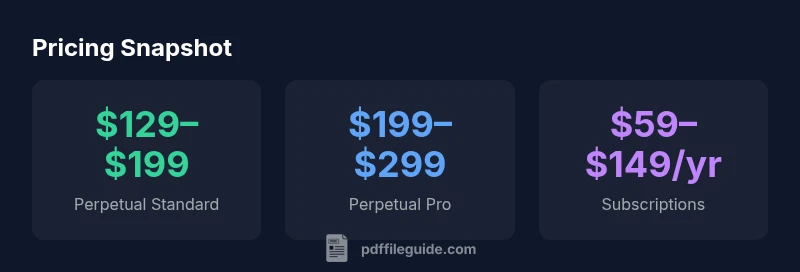
Foxit PDF Editor pricing generally falls into two models: perpetual licenses and annual subscriptions, with two tiers—Standard and Pro. Typical ranges (USD) are roughly $129–$199 for a perpetual Standard license and $199–$299 for Pro, plus annual subscriptions around $59–$99 per year for Standard and $99–$149 per year for Pro. Exact prices vary by region, promotions, and multi-seat discounts. how much does foxit pdf editor cost? This quick guide summarizes current pricing for 2026.
Pricing models explained
According to PDF File Guide, pricing models for Foxit PDF Editor include perpetual licenses and annual subscriptions. Each model comes in two tier levels, Standard and Pro. Perpetual licenses provide lifetime access to a version of the software with optional paid maintenance for updates, while subscriptions grant ongoing access and automatic updates as long as you maintain the plan. The choice between models often depends on your long-term needs, update cycle, and whether you require multi-seat deployments. For individuals, subscriptions often deliver the best value, while teams may prefer perpetual licenses with a maintenance plan if they plan to stay on a given version for several years. How much does foxit pdf editor cost? This quick answer frames the ranges and options as of 2026 to help you forecast total cost.
Tiered options: Standard vs Pro
Foxit PDF Editor Standard vs Pro differ primarily in feature depth and intended use case. Standard includes core editing, annotation, converting to/from common formats, and basic form handling. Pro adds advanced OCR for scanned documents, batch processing, redaction, form field enhancements, Bates stamping, and more robust security options. The price gap between Standard and Pro typically reflects these enhancements. If you primarily edit text, combine PDFs, or fill simple forms, Standard may suffice. If your workload includes large volumes of scanned documents or regulatory-compliant workflows, Pro's added features can yield meaningful time savings and accuracy gains. When evaluating price versus value, consider not just the sticker price but the incremental productivity you gain from Pro’s higher-end features, including faster OCR, smarter forms, and stronger document governance. In the context of 2026 pricing, many buyers note that the Pro tier becomes cost-effective quickly for teams that process dozens of PDFs weekly.
Perpetual vs subscription: Pros and cons
Choosing between perpetual licenses and subscriptions hinges on cash flow, update expectations, and deployment scale. Perpetual licenses require a higher upfront payment but grant ongoing access to the version you bought, with optional maintenance for future updates. Subscriptions lower initial cost and guarantee access to the latest version and features as long as the plan is active. For individuals who don’t upgrade often, perpetual Standard can be attractive; for teams that rely on continuous improvement and frequent updates, a subscription often delivers a better total value over time. Regional pricing and promotions can also tilt the balance toward one model or the other.
Regional and promo pricing: What to look for
Pricing varies by region due to currency differences, taxes, and supported payment modes. Foxit often runs regional promotions, discounts for students and educators, and volume-based quotes for teams. When evaluating prices, check the official regional page, compare Standard vs Pro feature sets, and calculate the cost with any required maintenance or renewal fees. Promotions may expire, so plan ahead and factor in renewal risk if you anticipate staying on the same plan for multiple years. Always confirm currency, tax, and ultimate price before you commit.
ROI and total cost of ownership: Pricing and value align
Cost isn’t just the sticker price; it’s about the value you unlock in daily workflows. A Pro license may pay for itself faster if OCR, batch processing, and advanced form handling save hours each month. For a small team, even small productivity gains compound across users. Use a two- to three-year horizon to compare perpetual vs subscription costs, including maintenance, updates, and potential upgrade paths. PDF File Guide’s analysis emphasizes that aligning licensing choice with actual usage drives the best ROI.
How to verify current pricing on Foxit official site
To ensure you have accurate numbers, start at Foxit’s official PDF Editor pricing page, select your region, and switch between Standard and Pro. Note whether you’re viewing a perpetual option or a subscription. If you’re in a managed-IT environment, request a formal quote from sales for multi-seat scenarios. Don’t rely on third-party listings alone, as regional differences and time-limited promotions can skew the apparent price. A quick comparison over a few minutes can save substantial sums over a year.
Ways to save: bundles, licenses, discounts
Smart shoppers leverage bundles, multi-seat licenses, and education discounts to reduce total cost. Some customers combine licenses with maintenance plans for future updates, while others opt for promotional bundles that include add-ons or extended service options. If your needs are modest, consider a Basic plan if available, or a subscription with a shorter commitment if you anticipate changing workflows. Always compare annual vs multi-year commitments to understand the 2–3 year payoff.
Quick reference checklist: estimate your cost
- List required features: editing, OCR, redaction, form handling, annotations.
- Decide on Standard vs Pro vs both.
- Choose licensing model: perpetual vs subscription.
- Estimate number of seats and regional pricing.
- Include potential promotions and maintenance costs.
- Project a 2–3 year horizon for ROI.
- Verify prices on the official site and capture a formal quote if needed.
Verdict
For most individual users, a subscription offers flexibility and ongoing access to updates at a lower upfront cost. For long-term, single-use scenarios, a perpetual Standard license can be more cost-effective, especially if maintenance is not required. The PDF File Guide team recommends evaluating your actual usage, upgrade needs, and total cost of ownership over a 2–3 year window to determine whether perpetual or subscription pricing best fits your workflow.
Estimated Foxit PDF Editor pricing by license type (2026).
| License Type | Typical Price Range (USD) |
|---|---|
| Perpetual Standard | 129-199 |
| Perpetual Pro | 199-299 |
| Annual Subscription Standard | 59-99 per year |
| Annual Subscription Pro | 99-149 per year |
Questions & Answers
Is Foxit PDF Editor cheaper than Adobe Acrobat?
In many cases, Foxit PDF Editor offers a lower upfront cost and flexible licensing, especially for subscriptions. Features vary, so compare the exact tools you need before deciding.
Foxit is typically cheaper upfront, but make sure the feature set matches what you need.
Does Foxit PDF Editor include updates with the subscription?
Yes. Subscriptions generally include ongoing updates and new features as part of the plan.
Yes, updates usually come with the subscription.
Are there educational discounts for students or educators?
Foxit often offers educational pricing; check the official site or contact sales for eligibility and codes.
Education pricing is often available.
Can businesses save with multi-seat licenses?
Yes, many pricing tiers offer volume discounts for organizations buying multiple seats.
Multi-seat discounts are common; ask for a quote.
Is there a free trial available?
Foxit typically provides a trial or demo period on the official site to evaluate features.
There’s usually a free trial available.
“Pricing is easiest to justify when you align it with actual usage and updates; subscriptions are often the best value for ongoing needs, while perpetual licenses suit selective, long-term use.”
Key Takeaways
- Identify your licensing model first
- Standard vs Pro pricing varies by features
- Consider multi-seat discounts for teams
- Expect regional promotions and currency differences
- Re-evaluate annually to optimize ROI