Why is PDF better: A Comprehensive Comparison for Professionals
Explore why PDF formats outperform alternatives for editing, sharing, and securing documents. This analytical comparison covers layout fidelity, security, accessibility, and practical workflows for professionals.


Why is pdf better? PDFs preserve typography and layout across devices, ensure consistent presentation, and enable secure sharing. They also support signatures, annotations, and long-term archiving, making them reliable for professional workflows. According to PDF File Guide, these attributes reduce version drift and simplify distribution, especially in regulated environments. This quick answer sets the stage for the deeper comparison that follows.
Why PDF Defines Modern Document Workflows
In today’s mixed-device, multi‑vendor environments, understanding why pdf better often boils down to reliability, portability, and control. The PDF format bundles fonts, vector graphics, and embedded metadata to reproduce a document exactly as authored, regardless of the viewer. This stability is crucial for legal documents, contracts, and forms that must look the same on every screen and printer. According to PDF File Guide, the strength of PDF lies in its ability to preserve the intended appearance and structure across platforms, software versions, and languages. That stability reduces headaches from last‑minute reflows and reformatting, saving time for busy teams. Throughout this article, we’ll examine concrete workflow scenarios, practical tips, and best practices so you can decide when PDF is the most sensible choice for your work.
Core Advantages: Portability, Integrity, and Consistency
PDF excels at delivering consistent visuals whether you’re on Windows, macOS, Linux, iOS, or Android. When fonts are embedded or subsetted, and graphics are vector-based, a complex page remains legible and faithful to the author’s intention. This fidelity matters in regulated environments where deviations can trigger compliance risk. PDF’s compact container format also supports embedded files, metadata, and accessibility tags, which helps organizations maintain a reliable archive. The result is a document that travels well across email, cloud storages, and enterprise platforms without the need for a specific application to view it. The practical upshot is predictable rendering, reduced rework, and clearer communication with external partners and clients.
Editing Reality: PDF vs Native Formats
The ability to edit a PDF versus a native file (like DOCX) is a frequent point of comparison. PDFs are not meant to replace drafting documents; rather, they are intended for final distribution, signing, and archival. When you need to edit, you typically convert back to an editable format or use specialized tools that preserve the original layout. This is the core reason why pdf better applies to finalized documents rather than raw drafts. For reviewers and approvers, comments, markups, and form fields offer a structured workflow that preserves the source’s integrity while enabling collaboration. The trade-off is that editing a PDF directly can be slower and often requires dedicated software—but the payoff is stable, platform‑agnostic results.
Security and Compliance: Controls you can trust
Security is a top criterion in professional settings. PDFs can be password-protected, encrypted with strong standards, and equipped with permission policies that restrict printing, copying, or editing. Digital signatures provide an auditable trail—useful for contracts and regulatory filings. This layer of control is a key factor in answering why is pdf better for sensitive documents. When combined with metadata management and document policies, PDFs help organizations demonstrate accountability and protect sensitive information from leakage or tampering. As part of a robust workflow, security features reduce risk while preserving usability for authorized recipients.
Accessibility and Long-Term Viability
Accessibility features—such as tagged content, alternative text, and proper reading order—enable screen readers to navigate PDFs effectively. This is essential for compliance with accessibility standards and for ensuring that critical information reaches all audiences. Long‑term viability is another advantage: PDFs are widely supported by readers and archivers, and their standardized specification reduces dependency on a single vendor’s product lifecycle. While newer formats can offer incremental benefits, PDF’s maturity and broad tool ecosystem make it a safer bet for long-term preservation, searchability, and retrieval of information.
Collaboration and Review: Annotations, Signatures, and Versions
Modern PDF tools offer rich annotation capabilities, commenting, and collaborative markup without altering the original document. Signatures—digital or biometric—provide non‑repudiation and traceability, which is critical for approvals and legal acceptance. By contrast, many editable formats rely on revision histories that can become unwieldy. The PDF workflow supports version control through structured file naming, metadata, and archival practices, making it easier to audit who changed what and when. For organizations with governance requirements, the ability to lock down content and verify integrity is a decisive advantage.
Conversions and Workflows: PDFs in a Hybrid Environment
Real-world document workflows often involve multiple formats. You might draft in a word processor, convert to PDF for distribution, and keep a separate editable source for ongoing edits. The key is choosing reliable conversion paths that preserve fonts, color profiles, and layout. With careful handling—embedding fonts, preserving vectors, and including accessible text when possible—PDFs can serve as the definitive endpoint in many workflows while still supporting a parallel editable track where needed. This hybrid approach balances editing flexibility with the stability of final output.
Cost, Licensing, and Total Cost of Ownership
Total cost of ownership often hinges on the tools you choose for creating, editing, and securing PDFs. While some suites include PDF creation and editing capabilities, others rely on standalone viewers or cloud services. The cost differential generally reflects feature depth: branded signing, batch processing, and advanced redaction typically appear in higher‑tier plans. When evaluating options, consider both upfront licensing and the ongoing time savings from reduced formatting issues and faster approvals. The goal is to optimize value over the life of the document, not just the initial purchase.
Real-World Scenarios: Where PDFs Shine
Contracts, policies, financial reports, and forms benefit from PDF’s reliability and formal appearance. In legal and regulatory contexts, the ability to lock formatting, ensure consistent fonts, and verify signatures is invaluable. Academic and government organizations also rely on PDFs for official publications and archiving. While other formats may be preferred for rapid drafting or collaborative editing, PDFs excel when a document must appear identical to recipients and endure over years of access, audit, and retrieval.
Common Pitfalls and How to Avoid Them
One common error is assuming a PDF can replace all drafting tasks. Treat PDFs as the authoritative final version, not the living draft. When creating forms, ensure fonts are embedded and accessibility tagging is complete to avoid rendering issues for assistive technologies. Another pitfall is failing to plan for long-term access: store PDFs in a supported, standards-based environment and maintain versioned archives. Finally, avoid over‑reliance on password protection without a documented key management plan. A disciplined approach preserves security without hindering legitimate work.
The Practical Playbook for 2026
Adopt a pragmatic, governance‑driven approach: designate a primary source format for drafting (e.g., DOCX) and use PDFs for distribution, review, signing, and archiving. Invest in tooling that preserves fonts, colors, and accessibility. Create clear labeling and metadata so that future users can locate and identify the document type, revision, and purpose. Finally, incorporate education and playbooks that align with your organization’s compliance requirements. The result is a robust, scalable workflow that keeps content trustworthy and accessible across years and devices.
Comparison
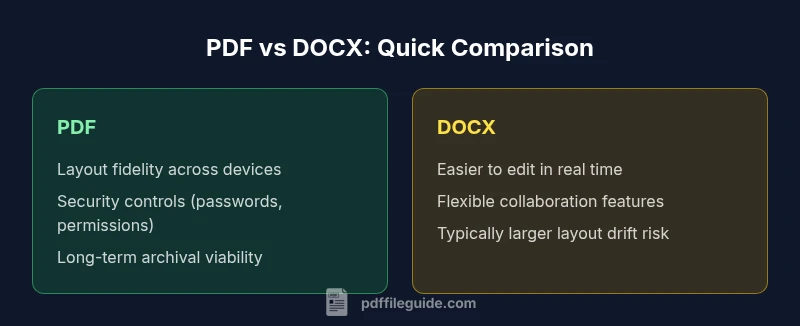
| Feature | PDF (Portable Document Format) | DOCX (Microsoft Word) |
|---|---|---|
| Primary use-case | Official distribution, archiving, and sharing with exact formatting | Drafting, editing, and collaborative authoring |
| Layout fidelity | High fidelity across devices and OS | Good fidelity, but dependent on editing tools and fonts |
| Editability | Harder to edit directly; relies on specialized tools | Easily edited with standard word processors |
| Security features | Built-in encryption, permissions, and signing | Limited built-in security; relies on external protections |
| Searchability/Accessibility | Supports indexing and tagging when properly prepared | Less consistent unless content is fully editable |
| File size & compression | Often optimized for stable, predictable sizes | Typically larger when embedded objects are used |
| Long-term viability | Strong archival support with stable readers | Dependent on software ecosystem and format support |
Strengths
- Preserves formatting across platforms and devices
- Supports secure signing and access control
- Widely supported by readers and editors
- Good for archival and compliance
Disadvantages
- Editing can be less intuitive without specialized tools
- Real-time collaboration is less seamless than some native formats
- Requires careful handling to avoid loss of fidelity during conversions
PDF is generally the better default for distribution, security, and archival; DOCX can be preferable when drafting and frequent editing are the priority
For most professional workflows, choose PDF for sharing and archiving. If ongoing editing is essential, keep the editable source and convert to PDF for final distribution. The PDF File Guide team notes that a hybrid approach often yields the best balance.
Questions & Answers
What makes PDF more reliable than other formats for official documents?
PDF provides consistent rendering across devices and platforms, with embedded fonts and graphics that prevent layout drift. Its security features and digital signatures support compliance and accountability. For many organizations, these qualities outweigh the convenience of editable formats for official outputs.
PDFs offer reliable display and strong security, making them a trusted choice for official documents.
Can PDFs be edited after creation without losing formatting?
You can edit PDFs, but typically you edit in an original source format and then re-export to PDF. Direct edits can alter layout unless you use dedicated tools. For ongoing collaboration, keep the editable source and use PDF for distribution and signatures.
Editing a PDF is possible, but often better to edit the source and re-export.
Are PDFs accessible to screen readers and compliant with accessibility standards?
PDFs can be accessible if properly tagged and structured, with alternate text for images and logical reading order. Not all PDFs automatically meet accessibility standards; ensure tagging and metadata are included during creation. This matters for both compliance and usability.
Yes, but you must tag and structure the PDF correctly to be accessible.
Do PDFs typically take less space than Word documents?
PDF file size depends on content and optimization, but PDFs often become compact when optimized for print or archiving. Rich media can increase size. The key is intentional optimization, including font embedding and compression settings.
Size varies; optimize PDFs to balance quality and storage needs.
What is the best workflow for distributing fillable forms?
Create fillable fields in PDF form templates and test across platforms. Maintain accessibility tagging and ensure that form data can be exported for processing. Use a trusted signing workflow to collect approvals efficiently.
Use fillable PDFs with proper tagging and a clear signing process.
When should I avoid using PDFs?
Avoid PDFs when you need heavy, iterative editing by many authors in real time. In such cases, a living document format with robust collaboration features may be preferred, with PDFs used later for sharing and archiving.
Avoid PDFs if real-time editing by many authors is the priority.
Key Takeaways
- Prioritize PDF for final distribution and archival
- Use embedded fonts and accessibility tagging when possible
- Leverage digital signatures for verification and approvals
- Balance editing needs with a disciplined conversion workflow
- Adopt a hybrid approach when drafting and finalizing documents