EPUB vs PDF: A Thorough Comparison for Digital Readers
Compare EPUB and PDF for reading, editing, and distribution. This analytical guide covers layout, accessibility, fonts, interactivity, and publishing workflows to help you choose the right format.


EPUB and PDF serve distinct reading and publishing needs. EPUB shines with reflowable text that adapts to screens, ideal for mobile and accessible reading, while PDF preserves exact layout and typography for printing and fixed-page documents. This in-depth comparison helps editors, designers, and readers decide when to use each format or provide both.
EPUB and PDF: Why the Debate Matters
In the world of digital documents, the choice between EPUB and PDF is not merely a technical preference — it shapes how content is consumed, accessed, and preserved. For editors, curriculum designers, authors, and institutions, understanding where EPUB and PDF excel helps ensure that documents reach the right audience with the right experience. The PDF File Guide team emphasizes that choosing the correct format reduces friction for readers, especially when considering devices, accessibility, and long-term maintenance. When you plan a publication strategy, thinking in terms of epub and pdf from the start can save time and ensure compatibility across platforms and readers.
Core Differences in Structure and Layout
EPUB and PDF differ fundamentally in how content is structured and displayed. EPUB is built around a flexible, semantic flow where chapters, headings, figures, and metadata are organized for dynamic rendering. PDF locks content into fixed pages with precise coordinates, designed to reproduce a specific layout regardless of device or font. This structural divergence drives how easy it is to edit, reflow, and scale text, as well as how accurately typography and page design are preserved across viewing environments.
Reflow, Layout, and Typography: How Readers Experience Content
Readers experience epub and pdf differently. EPUB’s reflowable text lets you resize fonts, adjust margins, and reflow content to match screen size, which is especially beneficial on smartphones and small tablets. PDFs maintain exact page geometry, ensuring that diagrams, columns, and typography render identically on desktops and printers. Font embedding in PDFs can preserve type accuracy, but some devices may substitute fonts if embedding is not permitted, potentially altering appearance. In contrast, EPUBs rely on system fonts and embedded font data where allowed, which can lead to more variability but better customization on a per-device basis.
Accessibility: Tagging, Semantics, and Screen Readers
Accessibility is a critical factor in format choice. EPUBs encourage semantic tagging, reading order, and structural roles that screen readers rely on to navigate content. This makes EPUB a strong default choice for accessible publishing, particularly for long-form text and textbooks. PDFs can be accessible through proper tagging and reading order, but achieving consistent results across readers and platforms often requires more meticulous tagging and verification. For institutions and publishers aiming for universal accessibility, EPUB’s structure typically provides a clearer path, complemented by careful PDF tagging where fixed-layout is unavoidable.
Interactivity and Multimedia: EPUB3 vs PDF Capabilities
EPUB3 introduces rich interactivity: multimedia, reflowable widgets, and accessible navigation that can adapt to reader preferences. This makes EPUB a good carrier for interactive textbooks, cookbooks, and guides that benefit from dynamic content. PDFs support forms, annotations, and embedded media, but their interactive features are generally less flexible and depend on reader software. For documents that rely on interactive quizzes, embedded audio, or synchronized captions, EPUB offers a more robust framework, while PDFs remain solid for documents requiring forms and secure annotations.
Publishing Workflow: Editing, Conversion, and Distribution
Publishing for epub and pdf involves distinct workflows. EPUB editing emphasizes semantic structure, metadata, and stylesheet management to ensure consistent rendering across devices. PDF editing often requires more specialized tools to preserve layout and fonts, especially for complex layouts or print-ready assets. Converting between formats introduces practical challenges: reflow can shift images and captions in EPUB, whereas fixed layouts in PDF can complicate text extraction and reflow. When distributing content across libraries, retailers, and repositories, providing both formats is common practice to maximize reach.
Use-Case Scenarios: When to Choose EPUB, PDF, or Both
For mobile reading, long-form web articles, or educational content focused on accessibility, EPUB is typically the better starting point. For textbooks with precise typography, design-heavy layouts, or print-on-demand, PDF is often preferred. In many publishing programs, providing both formats ensures readers can choose the experience that best fits their device and context. The decision should factor in audience devices, licensing, and whether updates will be frequent or static.
Quality Control: Fonts, Embedding, and Long-Term Archiving
Quality control for epub and pdf involves font embedding strategies, metadata accuracy, and archival practices. EPUB benefits from proper font embedding and web-safe typography, but font licenses can limit embedding in some environments. PDFs can preserve exact type and page layouts when fonts are embedded, yet long-term archiving requires checks for font licensing and accessibility tagging. In both formats, maintaining consistent metadata, thumbnails, cover images, and accessibility tags supports discoverability and user experience across libraries and platforms.
Conversion Pitfalls and Best Practices for Conversions
Converting between epub and pdf presents several pitfalls. Fixed-page content in PDF may not reflow well in EPUB, while reflowable EPUB content can lose precise positioning for complex diagrams or multis column layouts when converted back to PDF. Best practices include preserving metadata, ensuring fonts are embedded where license permits, validating reading order for accessibility, and testing on representative devices and readers. Always verify image placement, table structure, and captions after conversion, and keep a clean, structured source file to minimize surprises.
Comparison
| Feature | EPUB | |
|---|---|---|
| Layout behavior | Reflowable, adapts to screen size | Fixed layouts with precise page design |
| Font handling | Font embedding with scalable typography (where allowed) | Font embedding or subset for exact typography |
| Accessibility | Semantic tagging and reading order support strong accessibility | Tagging possible but can be inconsistent across viewers |
| Interactivity | Rich media and interactivity via EPUB3, responsive UI | Forms and annotations; limited multimedia interactivity |
| Device compatibility | Broad support on mobile, tablets, e-readers | Excellent on desktops and printers; varies by viewer |
| Print fidelity | Less ideal for exact print layouts | Excellent for print-ready reproduction |
| Editing and updating | Easier to update content and reflow | PDF edits are more complex and tool-dependent |
| DRM and licensing | DRM varies by platform; widely used with distribution | PDF DRM varies; strong control but engineering varies |
| Best for | Web/e-reader reading, accessible content | Print-ready manuals, fixed-layout documents |
Strengths
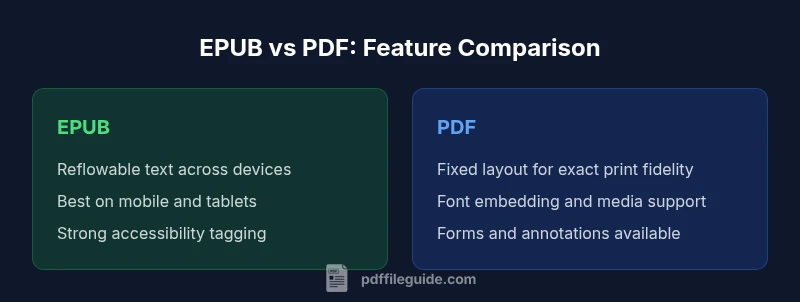
- EPUB supports reflowable text across devices, improving readability on small screens
- PDF preserves exact layout and typography for print-ready quality
- Both formats benefit from metadata and accessibility improvements when used properly
- Providing both formats broadens audience reach and flexibility
Disadvantages
- EPUB can struggle with complex layouts or non-text elements on some readers
- PDF editing is non-trivial and may require specialized software
- DRM and licensing complexity vary by platform and format
- Long-term archiving requires careful handling of fonts and accessibility tagging
EPUB is the better default for flexible reading and accessibility; PDF remains superior for precise print-ready layouts.
If your audience reads on mobile devices or values accessibility, prioritize EPUB. For documents requiring exact typography and print fidelity, provide PDF. In many workflows, offering both formats maximizes reach and usability.
Questions & Answers
What is the primary difference between EPUB and PDF?
EPUB is reflowable and adapts to screen size, ideal for mobile reading and accessibility. PDF preserves fixed page layouts and typography for print-ready output and exact design reproduction.
EPUB adapts to your device; PDF keeps pages the same.
Can EPUBs be edited as easily as PDFs?
EPUBs are typically easier to edit for reflowable content using markup and styles. PDFs often require specialized tools to modify layout or embedded fonts.
EPUBs are generally easier to edit for text and structure.
Which format is better for accessibility?
Both can be accessible if properly tagged. EPUBs tend to offer a clearer semantic structure, which helps screen readers, while PDFs require careful tagging and verification.
EPUB usually offers better structural accessibility, PDFs can be accessible with proper tagging.
Is it worth offering both EPUB and PDF?
Yes, offering both formats covers diverse reader needs: EPUB for flexible reading and accessibility; PDF for print and fixed layouts.
Yes—provide both to reach more readers.
What are common conversion pitfalls when moving between formats?
Conversions can disrupt layout, fonts, and image placement. Preserve metadata, embed fonts where possible, and validate reading order post-conversion.
Be careful with layout and font handling when converting.
Key Takeaways
- Define your audience devices and use cases before choosing a format
- Prioritize EPUB for reflowable content and accessibility tagging
- Preserve fixed layouts with PDF when print fidelity matters
- Consider dual-format distribution to cover diverse reader needs
- Plan for consistent metadata and branding across formats