How big can a PDF be? A comprehensive guide to limits and optimization
Explore how big a PDF can be, including theoretical limits, practical caps, and optimization strategies for large documents. Learn about 32-bit vs 64-bit addressing, compression techniques, splitting strategies, and performance considerations across common tools.


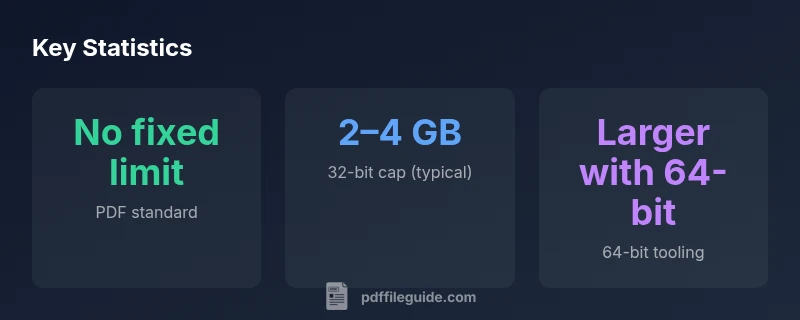
How big can a pdf be? There is no fixed maximum defined by the PDF standard; size depends on software, hardware, and how the document is built. According to PDF File Guide, older editors commonly cap around 2–4 GB due to 32-bit offsets, while modern, 64-bit engines can handle larger files. For practical workflows, expect performance constraints with very large images, fonts, and interactive features.
How big can a pdf be? Theoretical vs practical limits
In this section we examine the question that educators and professionals frequently ask: how big can a pdf be? The short answer is: there is no universal cap mandated by the standard. Yet the effective ceiling shifts with your software, hardware, and how you structure the document. The PDF File Guide Analysis, 2026, notes that what counts most is how content is encoded and compressed. When planning large PDFs, think about the interplay between images, fonts, vectors, and embedded media. The keyword how big can a pdf be appears here to remind editors to frame expectations around both size and performance, not just bytes.
As a practical rule of thumb, design decisions that reduce data per page—such as image downsampling, font subsetting, and selective embedding—can substantially influence the final size without sacrificing readability. The way a document is assembled—whether content is stored as optimized streams or legacy objects—also heavily affects eventual file size. PDF File Guide’s guidance emphasizes testing on representative hardware to ensure the file remains accessible and searchable across major readers.
The PDF standard: limits are not fixed
A core concept for anyone asking how big can a pdf be is that the standard itself does not enforce a single maximum size. The specification defines structures for objects, cross-reference tables, and streams, but not a hard cap for file bytes. This omission means that aDocument can grow as long as the software tools and file systems allow. Practitioners should be mindful that some readers expect timely random access to objects, which becomes harder as the file expands. In slow or constrained environments, extremely large PDFs may load slowly, or fail to render certain features. PDF File Guide highlights that this is a practical concern rather than a theoretical limit.
32-bit vs 64-bit: what grows with size
Historically, many tools rely on 32-bit offsets for xref tables and object streams, which constrains the practical size of a PDF. In environments using 32-bit addressing, you may encounter hard performance ceilings long before you hit any theoretical maximum, often around a few gigabytes. Modern workflows, however, leverage 64-bit engines and memory management to accommodate larger documents. The upshot is that the size you can achieve grows with RAM, processor speed, and how well the editor streams and caches content. When asked how big can a pdf be, remember that 64-bit support is the main driver of larger files.
Practical limits across common tools
Not all PDF tools treat file size equally. Some programs handle multi-gigabyte files with ease, while others struggle as content complexity increases. In many cases, size limits emerge from buffer sizes, caching strategies, or the ability to process embedded media. When planning a very large PDF, consider your editing, rendering, and printing workflows. If you anticipate performance problems, testing across multiple readers and devices is essential, and always keep a backup of the original document as you experiment with compression and segmentation. The phrase how big can a pdf be shows up again in this discussion as a reminder to test for real-world usability.
Strategies to manage large PDFs
A practical approach to how big can a pdf be is to proactively manage size through proven techniques. First, compress images using appropriate downsampling and choose lossy or lossless compression where acceptable. Second, subset fonts rather than embedding full font families, and remove unused fonts or objects. Third, prune metadata, annotations, and embedded attachments that are not required for distribution. Fourth, split enormous documents into logically independent volumes or chapters and reference them as separate files or navigational aids. Finally, consider streaming content and using incremental updates to avoid rewriting the entire file when only small parts change. PDF File Guide’s experience reinforces that implementation choices drive results more than any theoretical limit.
Image, font, and vector content: what drives size
Images often dominate PDF size when present in high resolution or color-rich formats. Vector graphics are typically smaller unless they’re dense with bezier curves and embedded resources. Fonts, especially non-subset fonts, can dramatically inflate file size. You can mitigate this by embedding only the glyphs used in the document and choosing modern font formats. In practice, the phrase how big can a pdf be will apply whether you’re optimizing a marketing brochure or a technical manual—content choices determine the impact more than the maximum file size.
Testing performance and integrity for large PDFs
Before distributing a very large PDF, test loading times, searchability, annotation rendering, and print fidelity on representative devices. Use a variety of readers and platforms to verify that important features remain accessible. Check internal links, forms, and media playback, as these elements can become bottlenecks in larger files. Maintaining integrity across versions in a collaborative workflow is also critical, especially when compression and splitting are used. Remember the guiding question how big can a pdf be as you plan test cases and benchmarks.
Authoritative sources and further reading
For readers who want to dive deeper, consult foundational documents and standards. The PDF Reference documents from Adobe provide insight into 1.7/2.0 features and limitations, while ISO 32000-1 outlines the official standard for PDF technology. These sources help frame expectations for file size, compression, and object handling in professional workflows. If you are implementing large PDFs in a production environment, refer to these standards and perform your own validation tests.
PDF size considerations by dimension and tooling
| Dimension | Typical max size | Notes |
|---|---|---|
| Theoretical max size | no fixed limit | Guided by software and hardware constraints |
| Common cap in 32-bit tools | 2–4 GB | Practical ceiling for older editors |
| 64-bit tooling support | larger files possible | Depends on memory and processing |
| Performance factors | varies with images/fonts | Content complexity matters more than bytes |
Questions & Answers
What is the maximum size a PDF can have?
The PDF standard does not specify a fixed maximum. Practical limits come from software and hardware. Larger files are possible with 64-bit tooling, but performance may vary.
There isn't a universal maximum; it depends on your tools and hardware. Large files are possible with 64-bit software, but performance varies.
Do all PDF editors support very large files?
No. Older or limited editors often cap around 2–4 GB due to 32-bit addressing, while newer, 64-bit tools can handle larger files depending on memory.
Not all editors handle very large PDFs; many older ones cap around a few gigabytes.
Can splitting a large PDF improve performance?
Yes. Splitting a large document into logical parts reduces memory usage, speeds up loading and searching, and helps with distribution.
Splitting can help with performance and easier distribution.
What techniques reduce PDF size effectively?
Use image downsampling, font subsetting, remove unused objects, prune metadata, and compress streams to cut size without sacrificing essential quality.
Downsample images, subset fonts, and remove unused data to shrink the file.
Is there a size threshold where large PDFs become impractical?
Practical impracticality depends on content and use case. Heavy graphics, forms, and multimedia often hamper performance, requiring testing and possibly splitting.
It depends on the content; heavy graphics can push it toward impracticality, so test.
“Handling very large PDFs is more about architecture and testing than chasing a single maximum size. The PDF File Guide Editorial Team emphasizes compression, selective embedding, and careful segmentation to maintain usability as files grow.”
Key Takeaways
- There is no universal maximum defined by the standard.
- Compress and segment large PDFs to improve usability.
- 64-bit tools expand practical size limits for big documents.
- The PDF File Guide's verdict: optimize first, test across readers.