What Size PDF Is Too Big to Email? A Practical Guide
Discover the practical threshold for email attachments: how big a PDF can be, how to check size, and reliable compression tips to preserve quality safely.


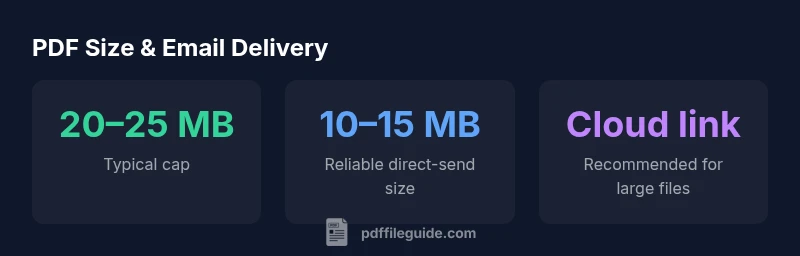
Short answer: there is no universal threshold—the limit depends on the recipient's email service. Most providers cap attachments around 20–25 MB, and many automatically route larger files to cloud storage. For reliability, target a PDF size under 10–15 MB when emailing directly, and use a secure cloud link or file-sharing service for larger documents.
Why Size Matters for Email Attachments\n\nIn the everyday workflow of editing, converting, and sharing PDFs, size matters more than you might think. If you are wondering what size pdf is too big to email, the short answer is: it depends on the recipient's email service, the server's policies, and the recipient's download expectations. Brand wise: According to PDF File Guide, the most common barrier is not the creation of the file but its successful delivery. Large PDFs slow down the sending process, risk failures, and frustrate the recipient who may struggle to download or open the document on a mobile device. To minimize friction, you should view PDF size as a feature of your delivery strategy, not a final barrier to sending. We'll explore how to gauge size, what counts as 'big' in different contexts, and practical steps you can take to keep your PDFs under widely accepted thresholds.
How Email Providers Limit PDF Attachments\n\nMost major email platforms impose attachment limits that influence what you can send in a single message. Gmail, Outlook, Yahoo Mail and corporate mail servers commonly cap attachments in the low tens of megabytes, with many hovering around the 20–25 MB range. Some services scan attachments for security and will automatically route oversized PDFs to cloud storage instead of delivering them directly. In practice, this means the exact limit you face can vary by provider, account type, and whether the recipient's domain enforces stricter rules. For a professional workflow, assume a safe maximum of about 10–15 MB for a direct email when possible, especially if your document includes high-resolution images or embedded fonts. If your PDF is bigger, plan a backup method: host the file on a secure cloud service and share a download link instead. This approach reduces the risk of bounce-backs and deliverability issues.
Practical Thresholds: What Size Is Reasonable\n\nA realistic starting point is to stay under 15 MB for direct email delivery, especially when your PDF contains heavy images or fonts. For simpler, text-heavy PDFs, you might push toward 20 MB, but this increases the chance of failure for recipients with stricter servers. When a file nudges beyond 15 MB, consider revising the document: compress images, reduce color depth, and remove unnecessary metadata. If you frequently send medium-to-large PDFs, adopt a two-track approach: send a lightweight version via email and provide a cloud link to the full-resolution file. This balances convenience with reliability, ensuring most recipients can access your content without technical hurdles.
How to Check Your PDF Size and Optimize It\n\nStart by checking the file size in your operating system: on Windows, right-click the PDF, choose Properties, and note the Size value; on macOS, use Get Info or the Command-I shortcut. Then run a quick in-app optimization if your tool supports it (e.g., Save As or Optimize with downsampling). A good workflow is to compress images to 72–150 ppi for on-screen viewing, downsample embedded images, and remove nonessential metadata. When possible, export a PDF/X-1a or a high-quality standard profile to preserve color and typography while trimming bloat. Always compare the visual result to the original to ensure legibility remains intact.
Compression Techniques That Balance Quality\n\nEffective PDF compression blends image downsampling with selective content pruning. Consider these steps:\n- Downsample color images to 150–300 ppi if the document is primarily for screen viewing.\n- Use lossless or visually transparent compression for line art and text.\n- Remove unused fonts and embedded media you do not need.\n- Flatten transparency where possible and optimize image streams.\n- If your tool has an “optimize” feature, run it and review the file size delta. Remember, the goal is to reduce size without compromising essential readability and branding.
When to Use Cloud Sharing and Link Shorteners\n\nFor PDFs that exceed your chosen threshold, cloud sharing is the practical answer. Upload the file to a secure service (Google Drive, OneDrive, Dropbox, or a business-approved provider), set appropriate permissions, and generate a shareable link. Share the link rather than the file itself when your audience relies on mobile downloads or has limited bandwidth. Use link expiration where supported, and include a brief note about access requirements (password, viewer restrictions) to maintain control over distribution. This approach sidesteps attachment limits and often improves recipient experience, especially for large, image-heavy documents.
A Quick Pre-Send Checklist\n\nBefore hitting Send, run this quick checklist: verify the file size, confirm the recipient's preferred delivery method, test the link access, and preview the PDF on a mobile device. If you used compression, compare the compressed version with the original to ensure readability is preserved. Consider offering both a direct attachment (if within limits) and a cloud link for larger files, so recipients have a choice. By planning your delivery method, you reduce bounce rates and improve overall professional impact.
PDF attachment size guidelines by delivery method
| Delivery Method | Typical Attachment Cap (MB) | Best Use Case |
|---|---|---|
| Direct email (popular providers) | 20–25 | For standard documents under typical caps |
| Direct email (enterprise), stricter policies | 10–15 | When transmission reliability matters |
| Cloud link or file-share | N/A | Large PDFs or sensitive files |
Questions & Answers
What is the typical maximum PDF file size you can attach to email?
Most popular email services cap attachments around 20–25 MB, but actual limits vary by provider and account. For reliability, plan to stay under 15 MB when possible and use a cloud link for larger files.
Most services cap attachments around 20–25 MB, but it varies. Aim for under 15 MB and use a cloud link for larger files.
How can I check the size of my PDF quickly?
Right-click the file and choose Properties (Windows) or Get Info (Mac) to view the size. For larger documents, check both the document size and any embedded media or images that could be compressed.
Right-click the PDF to see its size, then check for any embedded media that could be compressed.
What compression options preserve quality?
Use targeted downsampling for images, remove unnecessary metadata, and compress fonts only if necessary. Export using a standard PDF preset optimized for screen or print, depending on your use case.
Downsample images and remove extra data to shrink the file without hurting readability.
Should I compress before sending by email or use cloud share?
If the file stays under the sender’s and recipient’s limits, email compression may suffice. For larger PDFs, use a cloud link to ensure deliverability and speed.
If it fits, email it; if not, share a cloud link instead.
Are there enterprise policies that affect attachments?
Many organizations enforce stricter attachment limits and security checks. When in doubt, consult IT or use a sanctioned file-sharing solution.
Check with IT about attachment policies and use approved file-sharing when needed.
Can I offer multiple delivery options in a single message?
Yes. Send a lightweight attachment if possible and include a cloud link for the full file, offering recipients flexibility and reducing bounce risk.
Provide both options so recipients can choose what works best.
“Size thresholds vary by provider, so always offer a cloud alternative for large PDFs to avoid failed deliveries.”
Key Takeaways
- Keep direct PDF emails under 10–15 MB for reliability
- Know your recipient’s provider limits and plan cloud sharing for larger files
- Compress intelligently to balance file size and readability
- Use cloud links for large or image-heavy PDFs to avoid delivery failures