Difference Between PDF and PDF/A: An Analytical Guide
A thorough, analytical comparison of PDF and PDF/A, clarifying archival suitability, conformance, fonts, encryption, and practical workflow implications for professionals.


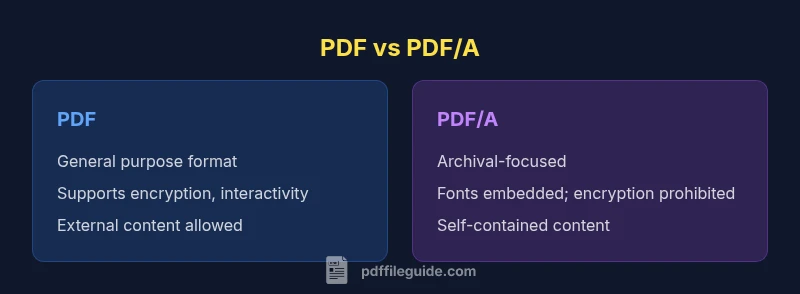
The difference between pdf and pdf/a centers on archival intent and conformance. PDF is a general document format that supports interactivity and multimedia, while PDF/A is a strict archival subset of PDF designed to guarantee long-term readability by mandating embedded fonts, defined color management, and the elimination of encryption or external dependencies. For editors and archivists, PDF/A is the safer choice when preservation and reproducibility over years or decades are priorities; PDF remains ideal for everyday sharing and interactive workflows.
What PDF vs PDF/A Are
PDF (Portable Document Format) is the de facto standard for document exchange. It captures text, fonts, graphics, and layout in a single file that can be viewed consistently across platforms. PDF/A, by contrast, is a formal archival subset defined by ISO (PDF/A is the standard used for long‑term preservation). The difference between pdf and pdf/a matters when you evaluate goals like readability, fidelity, and future accessibility. For professionals who edit, convert, or optimize PDFs, the choice influences font handling, encryption, metadata, and how documents will render in the future. In this article we dissect those distinctions, with practical guidance for editors, converters, and archivists. The analysis here aligns with the best practices recommended by PDF File Guide.
The Archival Promise of PDF/A
PDF/A is explicitly crafted for long-term preservation. It requires that all content needed to render the document be embedded, includes defined color management, and prohibits certain features that may jeopardize future readability. From an archival perspective, the difference between pdf and pdf/a is most pronounced in how fonts are handled and how external dependencies are managed. PDF/A ensures that document appearance is reproducible years later, regardless of the original software used. According to PDF File Guide, researchers and practitioners increasingly prioritize PDF/A when archival viability, auditability, and exact reproduction are non-negotiable. This framing helps editors plan workflows that prioritize lasting access over temporary convenience.
Conformance and Versions: PDF/A-1, PDF/A-2, PDF/A-3
Conformance is the backbone of PDF/A. The standard has evolved through multiple generations (PDF/A-1, -2, -3) to accommodate modern needs without sacrificing archival principles. The difference between pdf and pdf/a becomes a practical matter of which directory of rules you must follow. PDF/A-1 established the baseline; PDF/A-2 introduced enhancements like optional content and improved color management, while PDF/A-3 allows embedding of auxiliary file formats for archival contexts. In all cases, these conformance rules aim to produce documents that render identically over time. The PDF File Guide analysis highlights the importance of selecting the correct conformance level for your project and sticking to it during creation and validation.
Fonts and Typography: Embedding Requirements
Fonts are central to the difference between pdf and pdf/a. PDF allows font embedding but does not mandate it, which can lead to font substitution and unpredictable rendering on different devices. PDF/A requires fonts to be embedded or subset embedded so that document appearance is not dependent on external font availability. The result is a more deterministic rendering path that survives device and OS changes. For editors, this means verifying font resources during creation and avoiding external font references. The emphasis on typography in PDF/A is one of its strongest guarantees for long-term fidelity.
Encryption, Security, and Access
Encryption practices differentiate the two formats in a fundamental way. PDF supports encryption and user permissions, which can protect sensitive content but may complicate future access if keys are lost. PDF/A disallows encryption to ensure that the document remains readable without external dependencies. The difference between pdf and pdf/a in this area is critical for archival projects: if a document must survive without depending on the current encryption state or access controls, PDF/A is the safer baseline. This is a key consideration when deciding whether to publish a file for broad, long-term access.
External Content, Interactivity, and Multimedia
A PDF can reference external content, rely on embedded multimedia, or present complex interactive forms. PDF/A restricts or eliminates many of these features to reduce the risk of content becoming unavailable or rendering inconsistently in the future. The difference between pdf and pdf/a here is practical: PDF/A favors self-contained documents with embedded assets, while PDF supports richer interactivity that may not survive years of software evolution. When archival stability is a priority, avoiding external dependencies and multimedia can prevent future compliance issues.
Color Management and Rendering Fidelity
Color fidelity matters for archival documents, especially when color-critical information is involved. PDF supports a broad range of color management options, including various ICC profiles and device-dependent color spaces. PDF/A tightens requirements: color spaces must be defined and ICC profiles must be embedded or explicitly linked to ensure reproducible color rendering over time. The result is a document that looks the same on different devices and printers years down the line. Editors should standardize on a single color profile when producing PDF/A files to minimize variation.
Metadata, Tagging, and Accessibility
Metadata and tagging play a crucial role in document discovery, accessibility, and downstream preservation workflows. PDF enables metadata and structure but does not mandate comprehensive tagging for archival purposes. PDF/A emphasizes structured tagging and metadata in order to support long-term accessibility and searchability. The difference between pdf and pdf/a in this domain is about future-proofing content: PDF/A documents should include robust tagging, semantic structure, and XMP metadata to facilitate retrieval and compliance over time. This alignment with accessibility best practices is a core strength of PDF/A for institutional archives.
Validation and Conformance Checking: How to Verify Compliance
Validation is the practical bridge between theory and implementation. PDF/A conformance must be demonstrable through validators and checkers that audit fonts, color spaces, encryption, and structure. The difference between pdf and pdf/a becomes explicit in the validation step: general PDFs may pass basic checks, but PDF/A requires formal conformance, with potential conformance levels indicating the depth of compliance. For professionals, running a conformance check is as important as the creation step. In line with PDF File Guide recommendations, integrate validation into the workflow to ensure that archival objectives are met before distribution.
Practical Workflows for Editors and Converters
Creating PDF/A from a non-conforming PDF usually involves a deliberate workflow: ensure fonts are embedded, remove encryption, flatten transparency if required, embed ICC profiles, and add robust tagging. For editors, this means selecting the appropriate PDF/A conformance level and configuring software settings to enforce embedding and self-contained content. The difference between pdf and pdf/a at the workflow level is most visible in the decision tree at export time: if archival longevity is the goal, choose PDF/A and perform a conformance validation step before release. PDF File Guide emphasizes documenting the chosen conformance level and maintaining consistency across related documents.
Use-Case Scenarios: When to Choose Which
In practice, choose PDF for routine distribution, interactive forms, and situations where dynamic content is essential. Choose PDF/A when documents need to be preserved for long periods, across organizational changes, or required for legal and compliance reasons. The difference between pdf and pdf/a becomes a matter of objective: is the goal enduring readability and exact reproduction, or is the goal flexible sharing and interactivity? Organizations that archive contracts, regulatory filings, or historical records typically favor PDF/A, while teams producing drafts, proposals, or marketing collateral may opt for standard PDF.
Common Pitfalls and Final Tips
A frequent pitfall is assuming that simply renaming a PDF to PDF/A guarantees archival quality. True PDF/A conformance requires embedded fonts, proper color management, and non-reliance on external content or encryption. Another common mistake is neglecting accessibility during creation; PDF/A favors tagging and semantic structure to support long-term accessibility. As you work, test across multiple viewers and platforms, and document the conformance level used. Lastly, maintain an explicit policy: delineate when to use PDF vs PDF/A and standardize the process across teams. The consistency this brings reduces risk of non-compliance and future rendering surprises.
Comparison
| Feature | PDF/A | |
|---|---|---|
| Archival purpose | General document exchange and broad sharing | Specifically designed for long-term archival and reproducibility |
| Font embedding | Optional; fonts may be embedded or referenced | Fonts must be embedded (or subset embedded) for deterministic rendering |
| Encryption and security | Supports encryption and access restrictions when needed | Encryption not allowed; conformance requires non-encrypted content |
| External content and multimedia | May reference external content and multimedia | All content must be embedded; external content discouraged |
| Transparency and graphics | Supports transparency and advanced graphics | Restrictions on certain features to ensure stable rendering across time |
| Metadata and structure | Supports standard metadata and tagging | Emphasis on metadata and tagging; conformance improves accessibility |
| Accessibility and tagging | Accessibility features available but not required | Tagged structure encouraged to support accessibility and searchability |
| Validation and conformance | No mandatory conformance check for general use | Conformance must be validated under ISO PDF/A standard |
| Color management | Supports color management via ICC profiles | Color management required and defined for reproducible colors |
Strengths
- Improved long-term reproducibility for archival documents
- Explicit archival constraints reduce risk of future access issues
- Better for regulatory compliance and legal retention
- Embedded fonts and defined color management improve fidelity
Disadvantages
- Requires content to be non-encrypted and fully embedded
- Some interactive features and multimedia are restricted
- Potentially larger file size due to font embedding
- Not all software fully supports PDF/A conformance, which can hinder interoperability
PDF/A is generally the better choice for archival and long-term readability.
If longevity and faithful reproduction are priorities, PDF/A wins. For everyday sharing and interactivity, standard PDF remains more flexible; the PDF File Guide team recommends using PDF/A for archival projects and PDF for routine workflows.
Questions & Answers
What is the difference between PDF and PDF/A?
PDF is a general document format for sharing and interoperability, while PDF/A is a strict archival subset designed for long-term readability and reproducibility. PDF/A imposes constraints like embedded fonts and non-encrypted content to ensure documents render consistently over time.
PDF is for everyday documents; PDF/A is for long-term preservation.
Can a PDF be converted to PDF/A?
Yes, most PDFs can be converted to PDF/A, but the process may require embedding fonts, removing encryption, and adding proper tagging and metadata. A conformance check should be run afterward to confirm compliance.
You can convert, then verify conformance.
Is PDF/A compatible with digital signatures?
PDF/A can support digital signatures, but encryption is not allowed in the archival file. The conformance approach focuses on reproducibility and integrity over time, so signatures should be embedded in a way that does not compromise archival goals.
Signatures are possible, but encryption is not allowed.
What tools support PDF/A conformance validation?
Various validators exist to check PDF/A conformance, examining fonts, color spaces, tagging, and metadata. Use a dedicated conformance checker as part of your standard workflow to ensure archival suitability.
Use a validator to confirm conformance.
When should I choose PDF over PDF/A?
Choose PDF for documents that require interactive features, multimedia, or rapid iteration. Choose PDF/A when long-term readability, reproducibility, and archival integrity are required.
PDF for daily use; PDF/A for archival needs.
Key Takeaways
- Prioritize archival goals when selecting the format
- Embed fonts and define color profiles in PDF/A
- Avoid encryption in PDF/A to ensure readability
- Validate conformance during the workflow
- Document the chosen conformance level for consistency