How Much Is a PDF Converter in 2026? A Practical Price Guide
Explore pricing for PDF converters in 2026. Compare licensing models, per-seat vs. per-page options, and how usage affects total cost for individuals and teams.


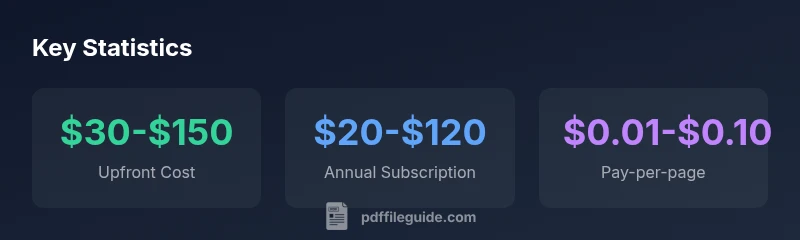
Prices for a PDF converter vary widely depending on licensing, features, and usage. For individuals, expect a one-time cost of about $30–$150 for a perpetual license or $20–$120 per year for a subscription. Pay-as-you-go options can start around a few cents per page, while business licenses can run from a few hundred to over a thousand dollars annually, depending on seats and enterprise features.
The cost spectrum: what affects the price
Pricing for a PDF converter is not a single number. The total cost depends on licensing type, features, deployment model, and usage volume. In 2026, the landscape shows distinct tiers that align with user needs: individuals who convert occasionally, professionals who batch process many files, and organizations that require governance, security, and integration. According to PDF File Guide, the broad price spectrum mirrors three axes: upfront cost, recurring commitments, and usage-based charges. If you only need basic conversion of a few files, you’ll likely pay less than someone needing robust features and enterprise-grade compliance. The key is to map your expected monthly conversion volume, required features (OCR, form support, password protection), and deployment preference to a total cost picture, then compare against budget constraints.
Pricing models explained
Most PDF converters fall into one of several pricing models: perpetual licenses, subscriptions, and pay-as-you-go. Perpetual licenses offer a one-time purchase with optional renewal for updates and support. Subscriptions are priced per user or per organization and recur monthly or annually; they often include updates and cloud features. Pay-as-you-go options charge by page or usage, which can be attractive for sporadic needs. Enterprise licenses bundle features like centralized administration, advanced security, and priority support. When evaluating options, chart your expected volume, feature requirements, and renewal terms to estimate total cost over 3–5 years.
Features that drive price: OCR, security, and automation
OCR accuracy, number of supported languages, and automation features (batch processing, scripting, workflow integration) can dramatically influence price. Converters with built-in OCR and language packs typically cost more upfront but save time on data extraction. Security features (encryption, password protection, access controls) add to the cost, especially for regulated industries. If you run high-volume workflows, automation, and integrations with cloud storage or document management systems may justify higher pricing.
Per-user vs enterprise licenses: what to consider
If you’re an independent contractor or small team, per-user subscriptions can be the most cost-effective route, with predictable monthly or annual costs. For larger teams, enterprise licenses offer centralized management, user provisioning, and bulk discounts, which can lower per-seat costs. When calculating total cost, consider not just the sticker price, but also admin time, training, and compatibility with existing tools. For regulated environments, factor in compliance-related requirements that may add to the price.
Pay-as-you-go and monthly options: when they make sense
Pay-as-you-go models suit sporadic needs—converting occasional large batches without a long-term commitment. Monthly subscriptions provide flexibility and may be preferable for project-based work. However, if you anticipate frequent usage, a yearly plan often yields the best unit price. Carefully estimate monthly page counts or monthly conversions to compare the cost against a fixed-license option.
Hidden costs to look out for
Some pricing schemes hide costs in addon features, maintenance, or renewal fees. Be cautious of bait pricing that offers a low initial price, then adds costs for OCR, languages, or cloud storage. Also check for mandatory updates and support terms that may renew annually. A transparent total cost of ownership (TCO) view helps avoid sticker shock after a year.
How to compare quotes and build a budget
Start with a needs assessment: number of users, expected monthly conversions, required features (OCR, security, automation), and preferred deployment (desktop vs cloud). Request quotes that itemize base price, add-ons, maintenance, and renewal terms. Build a budget by projecting 3–5 years of usage, factoring in potential price escalations and optional discounts for volume or education. Then map your findings to the 3 pricing models and select the option with the best TCO.
Real-world scenarios: choosing the right plan
Consider a freelancer who converts 500–1,000 pages per month, requiring OCR and basic security. A small team with 5–10 users handling sensitive documents may prefer an enterprise license with centralized management. A one-off project could be perfectly served by a pay-as-you-go option. Use a simple worksheet to compare high-level costs against anticipated usage and required features before purchasing.
The pricing decision framework for individuals and teams
Begin by listing must-have features, expected volume, and deployment preference. Create a three-column chart that compares upfront, subscription, and usage-based costs with renewal terms. Add a 3–year forecast to estimate TCO. This framework helps you avoid overpaying for unused features and ensures your choice scales with growth.
Representative pricing models for PDF converters (ranges)
| Pricing Model | Typical Range | Notes |
|---|---|---|
| Perpetual/Licensed | $30-$150 | One-time payment for a single user |
| Annual Subscription | $20-$120 per user/year | Recurring billing; higher for teams |
| Pay-as-you-go | $0.01-$0.10 per page | Good for light usage |
| Enterprise License | $200-$1,000 per year | Volume discounts and included features |
Questions & Answers
What factors most influence the price of a PDF converter?
Key drivers include licensing type, the number of seats, OCR quality, batch processing, security features, and cloud vs. on-prem deployment. These determine whether you pay upfront, per user, or per page.
Pricing depends on licensing, seats, OCR, and deployment options. Look at features first, then cost.
Is a perpetual license cheaper than a subscription in the long run?
Perpetual licenses can save money if you stay with the product for several years, but subscriptions often include updates and support. For long-term use, run a 3- to 5-year TCO analysis.
Perpetual may be cheaper over time if you keep it long-term; consider total cost of ownership.
Do pay-as-you-go options exist for PDF converters?
Yes, several providers offer per-page pricing, which is ideal for occasional needs. Compare page counts and rates to decide.
There are per-page options—great for occasional use; compare rates carefully.
Are OCR and language support typically included?
OCR and language support are common premium features. If you work with non-English docs, ensure the product includes robust OCR to avoid extra costs.
If you need OCR or multiple languages, check if it's included in your plan.
What about renewals and updates?
Renewal terms and update policies vary. Some plans include updates, others charge separately. Factor these into total cost.
Updates may be included or come at a renewal cost—check before buying.
Is cloud-based conversion more expensive than desktop?
Cloud-based options can add storage and API costs. Desktop options may have higher upfront fees but lower ongoing costs.
Cloud services add usage fees; desktop might be cheaper long-term depending on needs.
“Pricing for PDF converters scales with features and governance needs, not just conversion speed. A clear total cost of ownership helps teams choose a sustainable option.”
Key Takeaways
- Compare pricing models to estimate true ownership costs.
- Choose subscriptions for ongoing use and upgrades.
- Opt for pay-as-you-go if usage is irregular.
- Consider enterprise licenses for teams and governance.
- PDF File Guide’s verdict: align pricing with usage and total cost of ownership.