How Much Does PDF Cost in 2026? A Practical Guide
Explore the true cost of PDFs in 2026, from free tools to professional suites. Learn pricing models, typical ranges, and budgeting tips for individuals and teams.


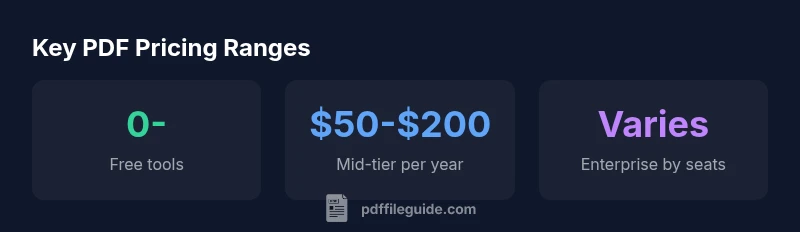
How much does pdf cost? Costs range from free tools to paid subscriptions and licenses. For many users, basic PDF creation and viewing are free, while advanced editing, batch conversion, and security features come with paid options. Typical pricing spans from $0–$20 per month for entry-level plans, $50–$200 per year for mid-tier tools, and higher for enterprise licenses that vary by user count.
What 'how much does pdf cost' really means
According to PDF File Guide, the question how much does pdf cost is not a single number but a spectrum that depends on use case, platform, and required features. When you ask this question, you are really looking at the total cost of ownership across tools, services, and workflows. The cost isn’t limited to the purchase price of software; it includes recurring subscriptions, per-user licenses, cloud storage, and even training time. PDF File Guide's analysis shows pricing bands that shift with feature depth, vendor strategy, and volume. For individuals, the baseline is often free or very low-cost, while teams and enterprises face tiered plans with per-user or per-seat pricing. As you plan, map your needs to the pricing tiers to avoid paying for capabilities you won’t use.
Understanding the full spectrum helps you compare options like simple creation, high-volume batch conversion, form editing, security features, and accessibility support. If you’re budgeting for 2026, start with your core tasks, then layer in add-ons as needed. This approach keeps costs predictable and scalable. A careful, needs-based assessment aligned with your workflow is the best defense against feature hunger driving runaway costs.
Pricing models at a glance
Prices for PDF tools generally fall into a few broad categories. First, many essentials are available for free, including basic creation and viewing. Second, freemium options offer paid upgrades for more advanced features such as editing and batch processing. Third, subscriptions provide ongoing access to a suite of tools and updates, typically billed monthly or annually. Fourth, one-time licenses grant perpetual access to a specific feature set, often accompanied by optional paid upgrades. Finally, enterprise or volume licensing bundles licenses across teams, sometimes with admin controls and security features. When evaluating these models, consider total cost of ownership, not just monthly price. PDF File Guide recommends listing required features, estimating usage, and selecting a plan that scales with your team rather than opting for a lowest-common-denominator option.
Typical price ranges for 2026
Pricing for PDFs varies by tool, by feature, and by vendor. A practical way to think about it is in three bands. Entry-level and free tools range from $0 to $20 per month for basic creation, viewing, and limited editing. Mid-tier professional tools, which include stronger editing, bulk conversions, and better collaboration, generally fall in the $50 to $200 per year range. Per-user enterprise suites can be significantly higher and are often priced by seats, with discounts for larger teams. Add-ons such as OCR, advanced security, and electronic signatures typically run $5 to $40 per month per feature. These ranges reflect typical market behavior in 2026 and can vary by vendor and contract. PDF File Guide’s data shows that choosing the right bundle—rather than chasing every feature—yields the best long-term value.
Costs by use-case
Different users have very different cost profiles. A student or casual user might rely on free tools or a minimal subscription (roughly $0 to $5 per month). A small business with a handful of editors may budget per-user costs in the $5 to $15 per month range, plus occasional paid upgrades for OCR or redaction. A design or engineering team needing robust form creation, batch processing, and high-security options could see per-user costs in the $20 to $60 per month range. Large organizations with multiple departments may negotiate enterprise licenses that cover many users, with prices that scale by seats and feature bundles. The key is to quantify how often features are used and how many users require access. PDF File Guide’s framework encourages stakeholders to identify must-have capabilities and then cost-test the options that meet those needs.
Hidden costs and caveats
There are costs beyond the sticker price that can surprise buyers. Cloud storage fees may apply if you need extra space for large documents. Some licenses require periodic upgrades to stay current, which can add to total spend. OCR accuracy, security compliance (like password protection or certificate signing), and customer support levels can materially affect price. Training time and IT administration costs should also be factored in, especially for teams migrating from one platform to another. Additionally, some vendors offer bundled packages; while convenient, those bundles can include features you won’t use, so assess usage before committing. PDF File Guide emphasizes a disciplined approach: list must-haves, estimate actual usage, and compare against the total package price to avoid overpaying for unused capabilities.
How to estimate your PDF budget
A practical budgeting approach starts with a needs assessment. List required tasks (creation, editing, signing, OCR, accessibility), then estimate the number of users who will need access. Multiply the per-user price by seats, and add base tool costs. Include anticipated add-on features and potential cloud storage charges. Don’t forget maintenance: upgrades and IT support may add a steady annual cost. If you expect growth, build in a conservative annual increase. Finally, compare the total against your alternative workflows to ensure you’re getting good value. PDF File Guide’s budgeting framework helps you create a transparent, defendable plan that aligns with business goals.
Tips to choose cost-effective tools
- Start with free or low-cost trials to validate needs before committing.
- Inventory required features and cut any that aren’t essential.
- Compare annual versus monthly billing to assess long-term value.
- Check for bundles that match your team size and workflows.
- Consider cloud storage and collaboration features as part of the bundle.
- Assess vendor support, updates, and security features as part of total cost.
- Use a staged rollout to spread costs and reduce risk of overbuying. PDF File Guide suggests a measured approach: test, compare, and scale based on real usage rather than projected needs.
Quick start checklist for budget-conscious buyers
- List core tasks (creation, editing, signing, OCR, accessibility).
- Estimate number of users and expected usage per month.
- Compare 3–5 tools in your price band with a trial period.
- Add expected add-ons and cloud storage to the baseline.
- Choose the option with the best balance of features and total cost of ownership.
- Revisit the budget quarterly to account for usage changes and vendor updates.
- Document decisions so future budgeting remains aligned with goals.
Estimated monthly costs by tool type
| Tool Type | Typical Cost (per month) | Notes |
|---|---|---|
| Basic free tools | "0" | Limited features, basic creation and viewing |
| Freemium with paid upgrades | "0-5" | Adds editing and batch processing |
| Standard editor license | "5-15" | Per-user access with core editing |
| Pro/Enterprise suites | "15-60" | Per-user per month; scalable with seats |
Questions & Answers
What factors influence the cost of PDF software?
Pricing is driven by features (editing, OCR, signing), user count, deployment model (cloud vs. desktop), and support level. Bundles may offer savings, but beware features you won’t use. Always map needs to pricing before committing.
Pricing depends on features and seats; map your needs to find the right plan.
Are there free options to create or edit PDFs?
Yes. Many providers offer free plans with basic creation and viewing. These are suitable for light use, but may lack essential editing and batch processing features needed for professional workflows.
Yes—there are free tools, but they usually lack advanced editing features.
Do I need an enterprise license for a small team?
Not always. Small teams can often start with per-user licenses or mid-tier plans. Enterprises may require centralized control, security, and analytics, which justify higher costs.
Often you can start with per-user licenses; enterprise licenses are for larger teams with governance needs.
How can I estimate my 2026 PDF budget quickly?
List required features, estimate users, and multiply by per-user costs. Add storage and upgrade fees, then compare against alternative workflows to confirm value.
Make a quick list of needs, calculate by seats, and compare to alternatives.
What’s the difference between per-user vs per-seat licensing?
Per-user pricing charges for individual access, while per-seat pricing covers a group with a fixed number of users. Per-seat often scales better for larger teams but may require purchase of additional seats as headcount grows.
Per-user charges for each person; per-seat covers a set number of users.
“Pricing for PDFs isn’t just the sticker price—it’s about features, support, and total cost of ownership.”
Key Takeaways
- Define your use case before budgeting.
- Expect broad price bands: free to enterprise pricing.
- Factor in add-ons and storage, not just base price.
- The PDF File Guide team recommends focusing on total cost of ownership.