PDF vs JPEG: A Practical Comparison for Editors
Explore how PDFs and JPEGs differ in format, use cases, quality, and workflow. Learn when to choose PDF or JPEG for printing, editing, and sharing in professional environments.


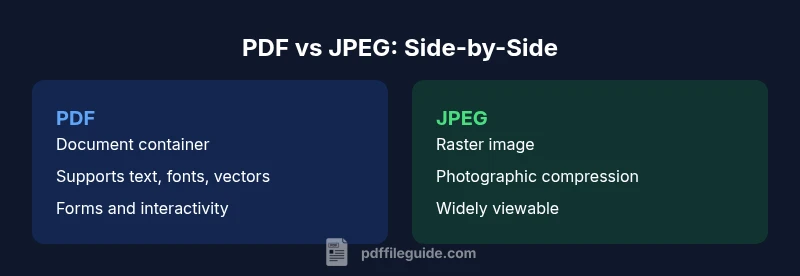
No—PDF and JPEG are not interchangeable. PDF is a flexible, multi‑purpose document container that can embed text, vectors, forms, and fonts while preserving layout across devices. JPEG is a raster image format designed for photographs and compressed imagery. They serve different roles in workflows, so the choice depends on the task—document distribution versus image display or editing.
is pdf the same as jpeg
The question is frequently asked in studios, offices, and classrooms: is pdf the same as jpeg? The short answer is no. PDF (Portable Document Format) and JPEG (Joint Photographic Experts Group) were designed with different goals in mind. PDF acts as a container that can hold text, vector graphics, interactive forms, and embedded fonts, all while maintaining a stable layout across platforms. JPEG, by contrast, is a raster image format optimized for photographic content, with lossy compression that reduces file size at the cost of some image detail. This distinction matters for how you create, edit, share, and archive content. In practice, is pdf the same as jpeg? The answer is a clear no, and the implications cascade through every stage of a project.
The PDF versus JPEG comparison is not merely about file type names; it reflects broader workflow decisions. PDF files are well suited for multi-page documents, official reports, and forms that may require annotation or interactivity. JPEGs are ideal for fast-loading visuals, photo galleries, or images embedded in documents where the content is static and primarily visual. For professionals using PDF File Guide as a reference, understanding these differences helps prevent costly missteps in production pipelines. As you read, consider which format aligns with your output needs, audience expectations, and long‑term accessibility goals.
-1
Comparison
| Feature | JPEG | |
|---|---|---|
| Format nature | Document container capable of text, vector graphics, forms, and embedded fonts | Raster image compressed for photography and web use |
| Compression model | Supports multiple content types; compression applies to embedded images and fonts, not a single universal rule | Raster compression primarily governs pixel data; artifacts appear with aggressive compression |
| Editability | Can be edited via text, form fields, or embedded content in authoring tools; layout remains stable | Editability is limited to image editing (via raster editors) and annotations within some viewers |
| Best use case | Multi-page documents, forms, manuals, reports, archiving with layout fidelity | Photo albums, web images, social media thumbnails, quick visuals |
| File size dynamics | Can be larger due to embedded content and fonts; size depends on pages, images, and vectors | Typically smaller for simple photos, but contingent on compression level and image dimensions |
| Viewability across platforms | Widely supported by printers, readers, and workflow systems; supports searchability and accessibility features | Widely supported for display; lacks document-level structure and accessibility features |
Strengths
- PDF offers robust document capabilities (text, fonts, vectors, forms) for professional publishing
- JPEG provides efficient, universally viewable raster images suitable for web and photo workflows
- PDF's consistent rendering across devices supports archiving and legal-documents workflows
- JPEGs are easy to share quickly and integrate into slides or social media
Disadvantages
- PDFs can be bulky with complex content and may require viewers to ensure fonts and assets render correctly
- JPEG compression can degrade quality and introduce artifacts with high compression
- PDF workflows can be more complex, requiring authoring tools and correct settings to preserve interactivity
- JPEG images lack the multi‑page and vector features that some documents require
PDF and JPEG serve distinct purposes; PDFs are document containers with layout and interactivity, while JPEGs are image rasters optimized for photographs.
When choosing between PDF and JPEG, align with the task: document distribution and editing favor PDF, while image-centric displays favor JPEG. Properly selecting the format improves print results, accessibility, and workflow efficiency.
Questions & Answers
Is a PDF always better for printing than a JPEG?
Not always. PDFs preserve layout and fonts for multi‑page documents, which is ideal for professional printing and archiving. JPEGs are sufficient for single-page visuals or photo galleries where a simple image is required without extra document structure.
PDFs work best when you need consistent printing and document integrity; JPEGs are fine for quick image printing when the content is just a photo.
Can a JPEG be embedded in a PDF without loss of quality?
Yes, you can embed JPEG images in a PDF without additional loss beyond the JPEG compression. The PDF preserves the image as it was embedded, and you can choose to re-compress it in the PDF workflow if needed.
Embedding a JPEG in a PDF keeps the image as-is; you can adjust PDF compression later if desired.
Are PDFs editable like Word documents?
PDFs support editing in various contexts, such as form fields or text annotations, but not in the same way as a word processor. Full text editing usually requires specialized tools and may affect layout fidelity.
PDF editing is possible, but more limited and tool-dependent compared to word processors.
Is JPEG a vector or a raster format?
JPEG is a raster format, meaning it stores image data as pixels. It does not scale without loss of quality like vectors do, which is important for sharp enlargements.
JPEGs are raster images, so scaling can blur details.
When should I export as PDF instead of JPEG?
Export as PDF when you need document structure, annotations, forms, or cross‑platform consistency. Export as JPEG when you need simple, portable images for quick viewing or web use.
If you need a document with pages and forms, choose PDF; for a photo-focused image, choose JPEG.
Is there a fundamental difference in file size between PDF and JPEG for the same content?
File size depends on content type and compression settings. PDFs can be larger for documents with many vectors and fonts, while JPEGs vary with image complexity and compression level.
Size varies a lot by content; there is no universal rule that PDF is always bigger or smaller than JPEG.
Key Takeaways
- Choose PDF for documents, forms, and multi‑page layouts
- Choose JPEG for simple, fast-loading images and web display
- Understand compression impacts on quality and file size for each format
- Plan workflows that leverage each format's strengths to avoid losses in accessibility or editability