Should Resume Be PDF or Word? A 2026 Comparison
A thorough comparison of PDF and Word resume formats, covering readability, ATS compatibility, collaboration, accessibility, and distribution to help professionals decide the best format in 2026.


Should resume be pdf or word? In most cases, finalize as a PDF to preserve layout and ensure consistent viewing across devices and ATS. Use Word for drafting and collaboration, then export a clean PDF for submission. If a recruiter requests Word, follow the instruction. Additionally, keep a lightweight PDF/A variant for archival and long-term access.
should resume be pdf or word? Practical considerations for final submissions
The choice between a PDF and a Word document for a resume hinges on how the file will be read, stored, and indexed by hiring teams. The question should resume be pdf or word captures a core concern for job seekers: readability, consistency, and compatibility across systems. According to PDF File Guide, the default approach is to start with a Word draft for editing and collaboration, then export a polished PDF for sending. This aligns with the practice of preserving the visual layout while ensuring universal access. The PDF File Guide team emphasizes that final submissions benefit from a stable format that preserves typography, margins, and spacing, which reduces the risk of misalignment when opened on different devices.
In practice, the decision is not merely about software; it’s about how the resume is consumed. A well-constructed Word document can reflect savvy drafting and revision processes, while a PDF demonstrates professional presentation and reduces surprises for the reader. The balance lies in recognizing submission expectations and keeping a native source file for future edits. PDF File Guide’s guidance helps professionals frame this balance clearly.
Format stability vs. editability: core tradeoffs
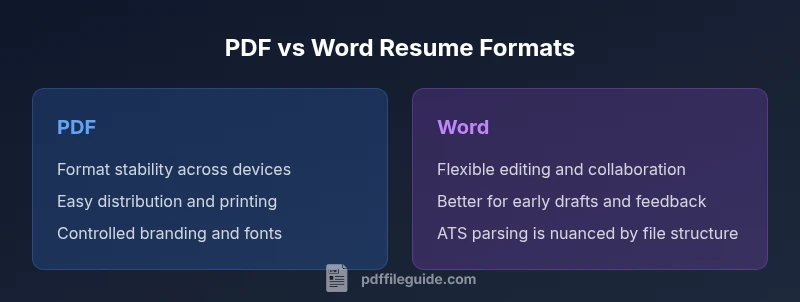
Format stability and editability are the two primary axes on which the pdf-vs-word question turns. PDFs excel at preserving fonts, margins, and visual layout when viewed on different devices or through diverse software. This stability is especially valuable for recruiters who open resumes on varied platforms, ensuring consistent appearance. Conversely, Word documents shine in the editing phase: text is easily updated, comments and track-changes are straightforward, and collaboration with mentors or recruiters can happen in real time. The tradeoff is that Word files may render differently if the recipient uses another version of Word or a different operating system, potentially shifting layout. In addition, while PDFs can be protected with passwords or restricted permissions, editing a finalized PDF requires extra steps or access to the original content. A practical workflow is to draft in Word, then export to PDF for distribution, keeping the Word file as your master draft for future updates.
When to use PDF for resumes
PDFs are typically preferred when finalizing a resume for external submission. Key scenarios include applications to large organizations with strict formatting expectations, submissions through portals that display a fixed layout, and archival purposes where long-term readability matters. PDFs lock in typography, spacing, and bullets, preventing unwanted shifts that might occur if the recipient opens the file on a different platform. If you embed fonts and ensure text remains selectable, PDFs maintain accessibility and searchability, which helps with basic screening and internal keyword matching. PDF is also beneficial when you want to present a branded, print-ready document that mirrors your portfolio or professional persona. The PDF File Guide notes that a well-tagged PDF improves screen reader accessibility for candidates who rely on assistive technologies.
When to use Word for resumes
Word resumes are advantageous during the drafting, feedback, and collaboration phases. They’re easier to share for edits, comments, and version control, and they integrate smoothly with applicant tracking systems (ATS) during parsing when the file is structured clearly. If an employer explicitly requests a Word document, or if you anticipate frequent updates and tailoring, Word becomes the pragmatic choice. Word also supports rich editing features, such as comments from mentors or recruiters, which can speed up the refinement process. When you’re ready to submit, you can convert to PDF to preserve presentation, but keeping the Word version as your editable source file is critical for ongoing updates and customization.
ATS compatibility and distribution considerations
Applicant Tracking Systems (ATS) vary in how they parse resume content. Text-based PDFs that are properly tagged can be parsed reliably, but some older ATS versions perform better with Word documents. If you anticipate submitting through a corporate portal that uses a strict parser, you should verify the required format in the job posting. A safe approach is to prepare both formats: a Word draft for editing, and a PDF for submission when the portal accepts PDFs. For recruiters who request plain text or simple formatting, ensure your resume content remains clean and keyword-rich in both formats. PDF is generally the default for external submissions, while Word remains a flexible option for collaborative rounds.
Practical workflow: drafting, validating, and sharing
A robust workflow begins with drafting in Word to leverage track changes and comments for feedback. After the content is polished, export a PDF to preserve the exact layout, typography, and spacing. Before sending, test the PDF by opening it on a different device and by performing a simple text search to confirm readability. Keep a labeled Word version for updates and tailoring to individual roles. If your employer or ATS requires Word, you can alternate accordingly, but having both formats ensures you are prepared for any scenario. This approach aligns with common industry practices and minimizes last-minute surprises during application submission.
Branding, typography, and accessibility across formats
Consistent branding is critical for a professional impression. Use standard fonts and avoid exotic typefaces that may render poorly. When using PDF, embed fonts and ensure the document remains accessible by using readable font sizes and tagged structure. In Word, apply the same typography choices through styles to maintain consistency across drafts. Accessibility considerations include using simple headings, descriptive anchor text for links, and alternative text for images when applicable. Both formats can support accessibility if crafted with care; PDFs should be tagged for screen readers, while Word should follow accessible document design practices. PDF File Guide emphasizes that accessibility should be a priority in both formats.
Common mistakes and how to avoid
Avoid sending documents with tracked changes visible, as this undermines professionalism. Double-check that hyperlinks work, especially in PDFs, and verify that contact details are correct. Ensure your resume uses a clean, scannable structure with consistent headings and bullet formatting. Do not rely on decorative elements that may break on different systems. Always verify your resume in the target format before submission, and maintain a clean master in Word to simplify updates. Following these practices reduces formatting drift and increases clarity for both human readers and ATS systems.
Real-world scenarios and templates for decision-making
In practice, the should resume be pdf or word decision depends on the job, industry, and submission method. For corporate roles with formal portals, PDFs are often preferred for their stability. For startups or roles emphasizing collaboration, Word can be advantageous during the interview process when rapid editing is common. Industry-specific examples include design and marketing roles where exact typography matters, versus administrative roles where quick edits and multiple revisions are common. By aligning your workflow with the expectations of the target employer, you maximize readability and accessibility while preserving your branding.
Future-proofing your resume: archiving and updates
Keep your master copy in Word for ongoing updates and tailoring to new roles. Archive finalized PDFs for record-keeping and easy sharing. Use consistent naming conventions for versions to simplify tracking, and consider generating a plain-text copy for environments with limited formatting support. Regularly review and refresh your resume content to ensure alignment with current trends and job requirements. This proactive approach helps you stay ready for opportunities without sacrificing presentation or readability.
Comparison
| Feature | PDF Resume | Word Resume |
|---|---|---|
| Format stability across devices | PDF: Strong with consistent layout | Word: Layout can shift across software/version |
| Editability and collaboration | PDF: Difficult to edit after finalization | Word: Easy to revise with track changes |
| ATS compatibility | PDF: Reliable when properly tagged | Word: Can be parsed but depends on structure |
| File size and archiving | PDF: Typically compact and stable | Word: Larger and may vary with edits |
| Branding and typography control | PDF: Full control over fonts and layout | Word: Fonts may vary across systems |
| Accessibility support | PDF: Accessible when tagged correctly | Word: Accessibility depends on version and structure |
Strengths
- PDF preserves formatting across devices and software versions
- Final PDFs are easy to share and print consistently
- Word is highly editable for feedback and collaboration
- Word drafts help you iterate quickly before finalizing as PDF
Disadvantages
- PDFs can be harder to edit after submission if you don't have the original source
- Some ATS systems handle PDFs less reliably than Word unless properly tagged
- Word files may render differently on non-Microsoft platforms
PDF is typically the better choice for final submissions; Word is best for drafting and collaboration
In practice, draft in Word and finalize in PDF for distribution. Always follow employer instructions if they specify a format.
Questions & Answers
Should I always send a resume as PDF?
Not always. If the employer requires Word, or if the posting specifies file types, follow it. For most external applications, PDF is preferred due to consistent formatting.
Usually PDF is preferred, unless asked for Word. Always follow the job posting guidance.
Can PDFs be edited after I've sent them?
Editing a finalized PDF is not straightforward; you would typically need the original source or specialized tools. To keep options open, keep a Word version for edits.
PDFs are hard to edit once sent; keep a Word version for updates.
How reliable are PDFs for ATS parsing?
Many ATS parse text well from PDFs if the file is properly tagged; otherwise, Word is more forgiving. Always test your resume in plain text as a quick check.
PDFs can be parsed by ATS if tagged properly; Word is a safer fallback in some systems.
Is Word preferable for collaboration?
Yes, Word makes it easy to share, comment, and update with recruiters or mentors. Convert to PDF for final submission.
Word is great for teamwork; convert to PDF when you’re done.
How should I handle branding and fonts across formats?
Choose standard fonts, embed fonts in PDFs, and avoid custom fonts that may not render identically. In Word, ensure font consistency by using the same style settings.
Stick to common fonts; embed fonts in PDFs for fidelity.
Are there accessibility considerations?
Tagged PDFs improve screen-reader support; Word documents can be accessible if built with heading structure and alt text. Both require careful formatting.
Accessibility matters in both formats; tag PDFs and structure Word properly.
Key Takeaways
- Draft in Word, finalize in PDF
- Test ATS parsing by viewing text in plain view
- Embed fonts and maintain standard typography
- Follow any employer-specific format requests
- Keep a master Word version for updates