Read PDF for Free: Safe Ways to View PDFs Online Today
Learn legitimate, free methods to read PDFs without paying. Discover browser viewers, open-source readers, library resources, and accessibility tips to read PDFs for free while respecting copyright.


You can read pdf for free by using browser-based viewers, free desktop readers, and library/open-access resources. Start with your web browser for quick viewing, then explore open-source options for offline use. Always verify that the source is legitimate to respect copyright and stay secure. This guide shows practical, legal paths to read PDFs without cost.
What reading PDFs for free really means
In practical terms, reading a PDF for free means accessing documents you are legally allowed to view without paying. According to PDF File Guide, responsible readers seek sources with appropriate rights, such as library databases, open-access repositories, or publisher promotions. This approach protects authors and publishers while giving you legitimate access on your own terms. If you’re aiming to read a report, e-book, or article without a purchase, prioritize sources that explicitly offer free access or are in the public domain. When you encounter a PDF that’s not freely accessible, avoid unauthorized downloads and instead look for legitimate alternatives. Read pdf for free is not about bypassing rights; it’s about leveraging trustworthy channels that grant permission to read.
Where to legally read PDFs for free
There are several reliable paths to access PDFs without cost. Public libraries often provide digital lending services that include PDF eBooks and research papers. Open-access repositories, such as institutional archives or government platforms, host scholarly articles and reports with generous licensing. Publisher promotions, author personal pages, and project-funded archives also provide free copies. In addition, educational platforms sometimes offer downloadable PDFs to accompany course materials. PDF File Guide analysis shows that most legitimate free PDFs come from libraries, open-access sources, and author-sanctioned repositories. By focusing on these sources, you’ll reduce the risk of piracy and malware while expanding your reading options.
Browser-based and mobile reading options
Modern browsers include built-in PDF viewers that let you open PDFs directly in the tab without installing extra software. This is the fastest way to read a document marked as read pdf for free. On mobile devices, many browsers and apps support PDF rendering, so you can carry your reading with you. If you need features like bookmarking or markup, explore browser extensions or dedicated apps, but ensure they come from trusted sources. When you’re on the go, cloud storage access (like a library account or educational portal) lets you pull PDFs quickly from legitimate repositories.
Desktop readers and open‑source options
If you prefer more control than a browser provides, desktop readers offer richer navigation and annotation features. Adobe Acrobat Reader remains a common choice, while open‑source options like SumatraPDF, MuPDF, Okular, and Evince provide lightweight, fast viewing without subscription costs. These tools support essential features such as search, text highlighting, and adjustable zoom. When choosing a reader, prioritize compatibility with your operating system and ensure the software is downloaded from official sites to avoid bundled malware. For many readers, reading for free is simply about using a legitimate source and a capable viewer.
How to download and read PDFs from legitimate sources
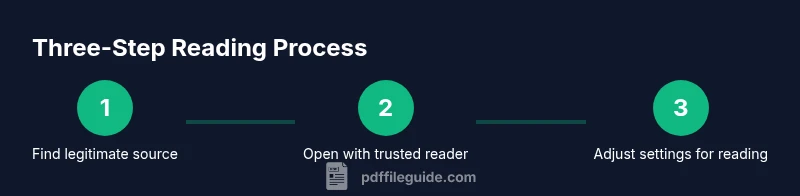
To read PDFs for free, first locate a legitimate source—library portals, open-access repositories, or publisher promotions. From there, use the site’s download or view option to access the file. If the source requires a login (like a library account), log in through the official portal. After downloading, open the file with your preferred reader and adjust settings (single-page vs. continuous scroll, night mode, text reflow) to improve readability. Remember to respect licensing terms; some PDFs may allow personal use but restrict redistribution. When in doubt, consult the source’s terms or contact support for clarification.
Accessibility and offline reading considerations
Accessibility features can dramatically improve readability for different users. Look for PDFs with tagged structure, proper headings, and text that can be extracted by screen readers. If a PDF isn’t accessible by default, you can often run it through accessibility checkers or use reader modes that reflow text. For offline reading, ensure you’ve downloaded an authorized copy to avoid streaming restrictions. If you rely on text-to-speech, choose readers that support this function and verify the text selection works smoothly with the selected speech engine. Reading for free should not come at the expense of accessibility.
Safety, copyright, and best practices
Always verify the legality of free PDFs before you download. Stick to library portals, open-access repositories, and publisher promotions. Avoid pirated copies, cracked software, or files from suspicious sites, as they can carry malware. Keep your device protected with up-to-date antivirus software and use a reputable PDF reader. If a document asks for unusual permissions or prompts to install extra software, stop and reassess the source. The goal is to read PDFs for free without compromising security or copyright compliance.
Practical tips to optimize your reading experience
- Use the built-in viewer first for quick access, then switch to a dedicated reader if you need advanced features. - Toggle night mode or adjust contrast to reduce eye strain during long reading sessions. - Save or bookmark important pages within the legal access framework to make revisiting content faster. - For research, keep a simple citation trail and note licensing terms if you plan to reuse content.
The reader’s checklist for legal, free PDF access
- Identify legitimate sources (libraries, open‑access, publisher promos). 2) Confirm licensing terms allow personal viewing and note any redistribution limits. 3) Use a trusted viewer and keep software current. 4) Enable accessibility features as needed. 5) Keep your device secure and scan downloaded files before opening. Following this checklist will help you read pdf for free responsibly and safely.
Tools & Materials
- Web browser or device with internet access(Any modern browser can view PDFs directly in the tab.)
- PDF reader software(Choose a reputable reader (e.g., Adobe, SumatraPDF, MuPDF).)
- Library account or access to open‑access repositories(Needed for legitimate free downloads from some sources.)
- Antivirus and secure download practices(Keep devices protected when downloading PDFs from any source.)
Steps
Estimated time: 15-30 minutes
- 1
Identify legitimate sources
Start by locating library portals, open-access repositories, or publisher promotions that offer free PDFs. Verify licensing terms before downloading to ensure personal viewing is allowed.
Tip: If a site asks for unusual permissions, stop and verify its legitimacy. - 2
Choose your reading method
Decide whether you’ll view in-browser for speed or use a desktop reader for advanced features like annotations or text search.
Tip: Browser viewing is fastest for quick reads; switch to a dedicated app for deeper study. - 3
Open the PDF in your chosen viewer
Open the file directly from the source or after downloading. Check that text renders correctly and adjust zoom or layout as needed.
Tip: Enable bookmarks or notes early if you plan to revisit sections. - 4
Adjust viewer settings for comfort
Turn on night mode, adjust contrast, or switch to text reflow if available to reduce eye strain during long sessions.
Tip: Use full-screen mode when concentrating on lengthy documents. - 5
Check accessibility features
If you rely on assistive technology, ensure the PDF is tagged and readable by your screen reader or TTS tool.
Tip: If tagging is missing, try a separate accessibility checker or alternate formats. - 6
Save a personal copy responsibly
Store a local copy only if the source allows personal downloads. Maintain proper citation records for future reference.
Tip: Organize PDFs by topic and create a simple bibliography outline.
Questions & Answers
Is it legal to read PDFs for free?
Yes, as long as the PDF is provided under a license or in the public domain. Always verify licensing terms on the source site before downloading or viewing. When in doubt, use official library portals or open-access repositories.
Free PDFs are legal when provided by legitimate sources like libraries or open-access repositories. Always check licensing terms before downloading.
Where can I read PDFs for free legally?
Legitimate options include library digital collections, government publications, university open-access repositories, and author-approved pages. These sources explicitly allow personal viewing and download within licensing terms.
Look for library portals, government sites, and open-access repositories for legal, free PDFs.
Can I read PDFs offline for free?
Yes, many libraries and open-access sources offer downloadable PDFs you can save for offline reading. Ensure you are downloading from authorized sources and respect any usage restrictions.
Offline reading is possible from legitimate sources; download from trusted portals and store copies locally.
Are there safety risks with free PDFs?
Free PDFs from unknown sites may carry malware. Stick to trusted sources, keep antivirus updated, and verify file integrity before opening.
Be cautious with PDFs from unfamiliar sites; use trusted sources and scan files first.
What about copyrighted materials?
Copyright remains important. Free access does not override rights; use publisher promotions, author-approved copies, and open-access postings to stay compliant.
Copyright matters—choose open-access or publisher-approved copies to stay compliant.
Watch Video
Key Takeaways
- Identify legitimate sources first
- Use browser viewing for quick reads and desktop readers for depth
- Prioritize accessibility features when needed
- Respect licensing and copyright
- Protect devices with up-to-date security tools