Why Is PDF Not Letting Me Edit? An Urgent Troubleshooting Guide
Urgent guide to fix PDF editing blocks, covering permissions, passwords, form locks, and signatures. Learn safe steps to regain edit access quickly.


The most common reason a PDF won’t let you edit is restricted permissions or password protection. Start by checking the document’s security settings, viewing the permissions, and trying a different editor. If you can’t modify, ask the author for editing rights or a password. Also verify you’re using a capable editor and that the file isn’t read-only. If form fields are locked, or a digital signature blocks changes, you’ll need appropriate access. This quick check often reveals the root cause.
Why PDF editing might be blocked
Why is pdf not letting me edit? This situation is more common than you might think, and the root cause often lies in how the PDF was prepared rather than your software. According to PDF File Guide, many editors encounter this problem due to file-level protections (permissions), password requirements, or document structure that locks content. Before you blame your computer, take a breath and review the file’s security posture. A blocked edit can stem from a simple setting, or from a legal or contractual protection embedded in the file. Understanding the exact mechanism helps you choose the right remedy without risking policy violations. In professional workflows, PDFs are frequently secured to preserve layout, prevent data leakage, or enforce compliance. Recognizing the typical patterns—read-only restrictions, protected forms, or certified signatures—lets you triage quickly and move toward a compliant solution.
Quick check: what you’re likely facing
- Permissions: The document may restrict editing, copying, or printing. These are set by the author or administrator and can appear in several places: document properties, the security tab, or within Adobe Acrobat/Reader’s Protection settings.
- Password protection: A user password prevents edits; an owner password might still allow changes by someone with the right credentials.
- Fillable forms vs. non-editable content: Some PDFs allow only form field interaction while blocking accidental edits to static text.
- Digital signatures or certifications: A signature or an approved certificate can lock content until edits are validated or the signature is removed.
- Scanned pages or image-only PDFs: If the PDF is a scan, the content is treated as an image rather than editable text, requiring OCR.
Real-world nuance: balance between access and integrity
When a document is restricted, it’s usually to protect the author’s rights or ensure data integrity. On a practical level, the same file may be editable in one tool but locked in another depending on how the security is implemented. The PDF File Guide team emphasizes that you should always aim to operate within the document owner’s permissions. If you’re unsure about your rights, seek clarification from the author or your organization’s policy owner. This helps avoid accidental policy violations while keeping your workflow efficient.
Steps
Estimated time: 30-45 minutes
- 1
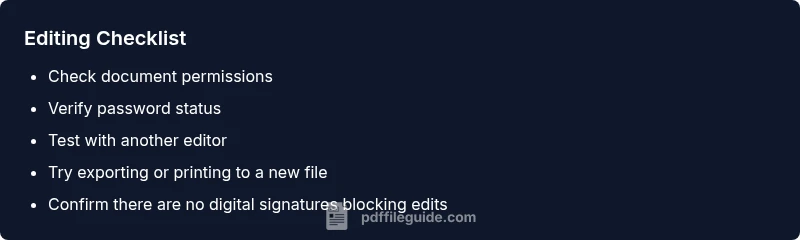
Check permissions in the PDF
Open the file in your editor and inspect the document properties. Look for a Security or Restrictions section to confirm whether editing is allowed and which actions are restricted. If you see 'Not permitted to edit', you’ve identified the primary blocker.
Tip: If you can’t access the security tab, try a different viewer that exposes restrictions clearly. - 2
Look for a password requirement
If a password prompt appears, ask the file owner for the password or for a version with edits enabled. Do not attempt to bypass password protection without authorization.
Tip: Always verify you have legitimate access before attempting any deprotection steps. - 3
Test with another editor or update software
Sometimes a compatibility quirk hides editing capabilities. Install or try a trusted editor, and ensure your software is up to date with the latest security and feature sets.
Tip: If you’re using a legacy viewer, a modern editor may reveal edit options that were blocked before. - 4
Try exporting or saving a copy
If allowed, export the file to a different editable format or save as a new copy and check if edits become possible in the new version.
Tip: Save a backup before exporting to avoid accidental data loss. - 5
Check for forms or digital signatures
If you’re working with a form or a signed document, edits may be restricted until you fulfill form rules or obtain signature validation.
Tip: For signed documents, avoid removing signatures unless you have explicit rights to do so. - 6
Consult the author or admin for rights
If none of the above works, contact the document owner or your admin to obtain permission or an editable copy.
Tip: Document ownership and policy controls often govern edit rights; validate before proceeding.
Diagnosis: PDF won't let me edit
Possible Causes
- highDocument permissions restrict editing
- mediumPassword protection on the document
- mediumForm fields locked or content locked by a certificate
- lowDigital signature or certification prevents edits
- lowOutdated viewer or corrupted file
Fixes
- easyOpen Document Properties and Security Settings to view restrictions
- easyRequest owner password or editing rights from the author
- easyTry a different PDF editor or update your current software
- easySave As a new copy if you’re granted permission
- mediumIf a signature/certification blocks edits, obtain authorization or remove with proper rights
- easyIf the file is a scan, run OCR or export to an editable format if allowed
Questions & Answers
What does 'permissions restricted' mean in a PDF?
Permissions control what you can do in a PDF (editing, printing, copying). If editing is blocked, the security settings deny changes unless you have owner access.
Permissions limit what you can do in a PDF; you need the owner’s rights to edit.
Why can't I edit a password-protected PDF?
A password protects editing. Without the correct credentials or owner permission, edits are blocked.
If there's a password, you need the password or permission to edit.
Can I edit a scanned PDF?
Scanned PDFs are images. To edit, run OCR or convert to an editable format if allowed.
A scanned PDF isn’t editable until you use OCR or convert it.
What if form fields are locked?
If fields are locked, you may only fill them. Editing the underlying text may require owner access or permissions.
Locked form fields usually mean you can only fill them, not edit the layout.
What are digital signatures and certification?
Digital signatures or certification can lock edits until the signature is validated or removed with authorization.
Signatures can prevent edits unless you have authorization.
When should I seek professional help?
If you risk violating rights or policy, contact the owner or a qualified service to obtain proper access.
If rights aren’t clear, consult the document owner or a professional.
Watch Video
Key Takeaways
- Identify the root cause: permissions, password, or form locks.
- Only modify the document with owner authorization.
- Use a trusted editor and keep backups.
- OCR or export may unlock editability for scans.