How Large PDF Files Email: Limits, Strategies, and Alternatives
Discover how large PDFs can be emailed, typical attachment limits across providers, and practical options—compression, splitting, or cloud links—for sharing big PDFs.


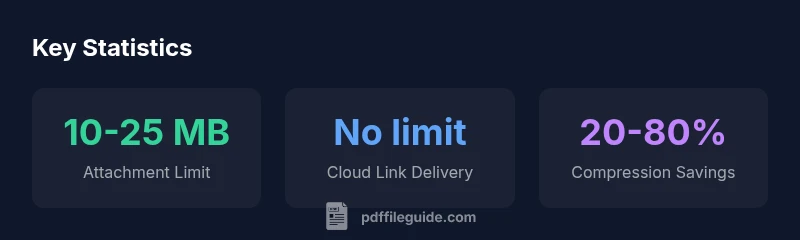
According to PDF File Guide, there is no universal limit for a PDF size in email, because limits vary by provider. Most major services impose practical caps between 10 and 25 megabytes for attachments, with larger files often rejected or slowed. For truly large PDFs, consider alternatives such as sharing a secure download link or compressing the file before sending.
Why size limits exist for email and PDFs
Email uses MIME encoding (base64) which inflates binary data by about 33%. That means a PDF that is 10 MB on disk becomes roughly 13 MB in an email, limiting what most servers can transmit in a single message. In addition, email providers implement attachment caps to protect users from spam and to manage bandwidth. These policies differ by provider and by domain, and some corporate mail systems apply stricter limits for security and compliance. As a result, there is no universal how large is too large rule for how large pdf file email; the answer depends on the sender and recipient setup. According to PDF File Guide Analysis, 2026, many mainstream services place practical caps in the 10–25 MB range for attachments, with occasional exceptions for certain file types or trusted domains. When you encounter a file that approaches or exceeds these thresholds, plan alternative delivery methods or preemptive optimization.
How different providers handle attachments
Different email platforms enforce their own size ceilings. For example, consumer-grade services often cap attachments in the 10–25 MB range, while business accounts may negotiate higher limits or impose stricter requirements for security. Gmail, Outlook/Hotmail, and Yahoo typically apply practical caps to ensure fast delivery and reduce spam; corporate mail servers can present different thresholds based on ISP, VPN usage, and compliance rules. If your document exceeds a provider's limit, consider a cloud-based link or a secure portal instead, and always test by sending to an alternate address before notifying the recipient.
Practical strategies to send large PDFs
Start with a quick assessment of the recipient’s capabilities. If the file is likely to trigger a limit, compress the PDF or split it into logical parts. Use descriptive email copy that explains what the recipient will receive and how to access it. For extremely large files, prefer a cloud-based link with a short expiration and a password if needed. Keep a backup copy and verify access after sending.
Compressing PDFs effectively
Compression should focus on preserving readability while reducing file size. Remove extraneous metadata, embedded fonts when possible, and unused layers. Downsample large images to a suitable resolution for on-screen viewing, and re-export with optimized settings. The goal is a balance: sufficient quality for readers without bloating the file. Expect a wide range of results depending on content type, but many documents see meaningful reductions without noticeable degradation.
Alternatives to emailing large PDFs
When an attachment is impractical, cloud storage services offer shareable links with controllable access. You can set expiration dates, download limits, and password protection to protect sensitive information. Another option is a secure transfer portal or a document management system that tracks who accessed the file and when. Providing clear instructions in your email body helps recipients know what to expect and how to proceed.
How to verify receipt and ensure accessibility
Rely on delivery confirmation sparingly; many providers do not guarantee read receipts. Instead, confirm with the recipient that the link works or that the attachment was received. If the document is intended for accessibility, ensure the PDF is tagged and readable with screen readers, and provide an alternative text or accessible version when possible.
Case study: sending a large PDF using a cloud link
A consultant faces a 150 MB PDF required by a client. Rather than emailing the file, they upload it to a secure cloud folder, generate a time-limited link, and share the link in the email. The client clicks the link, downloads the file, and confirms receipt within minutes. The approach avoids bounced messages and gives control over access.
Tools and settings to keep in mind
Use built-in PDF optimizers or trusted third-party tools to reduce size before sending. When cloud sharing, enable access controls and consider password protection. If you must email, test different compression settings and verify that the recipient can open the file on multiple devices.
Comparison of sending methods for large PDFs
| Delivery Method | Typical Limit | Best Use |
|---|---|---|
| Email attachment | 10-25 MB | Small PDFs; quick share |
| Cloud link | No inherent limit | Large PDFs; trackable access |
| Secure portal download | No inherent limit | Sensitive documents; controlled access |
Questions & Answers
What is the typical maximum attachment size for email providers?
Most providers cap attachments in the 10–25 MB range. Some corporate or paid accounts may allow larger limits, but always verify the recipient's constraints before sending.
Most email providers cap attachments around ten to twenty-five megabytes; check limits before sending.
Can I email a very large PDF by splitting it into parts?
Splitting a large PDF into multiple attachments can work, but ensure all parts arrive and are clearly linked for the reader.
Splitting can help, just make sure all parts arrive and stay linked.
What are effective compression strategies for PDFs?
Compress images, downsample color spaces, and remove metadata and unused objects to reduce size without sacrificing readability.
Use image compression and metadata removal to shrink files.
When should I use a cloud link instead of an attachment?
Use cloud links for files over 25 MB or when you want to track downloads and revoke access easily.
Choose a cloud link for big files or when you need control over access.
Are there security considerations when sending large PDFs?
Yes. For sensitive documents, use password protection, encryption, or secure portals with time-limited links.
Protect sensitive PDFs with passwords or secure sharing.
What tools can help compress PDFs without affecting readability?
Many built-in and third-party tools offer PDF optimization; choose ones that preserve readability while reducing size.
There are multiple tools that optimize PDFs while keeping readability.
“Choosing the right delivery method for large PDFs matters for reliability and security. Compression, combined with secure cloud links, often yields the best balance.”
Key Takeaways
- Assess recipient's limits before sending.
- Prefer compression for small files.
- Use cloud links for very large files.
- Test access with a dummy recipient.
- Consider expiration on shared links.