Open a Password-Protected PDF: Authorized Access Guide
Learn legitimate, safe ways to open a password-protected PDF when you have authorization. This guide covers verification, obtaining passwords, and saving a password-free copy, with best practices for secure handling and documentation.


To open a PDF without a password, ensure you are authorized to access the file. This guide covers safe, legal methods to access password-protected documents, including confirming ownership, obtaining the password, and saving a password-free copy. If you lack permission, do not attempt bypass methods. Follow these steps to proceed ethically and within the law.
Understanding password protection and legal access
Password protection on PDFs is a security feature designed to limit access to authorized individuals. When a file is encrypted, software requires a password or a verified permission to view, copy, or print content. Using bypass methods without authorization is illegal in many jurisdictions and can expose you to civil or criminal penalties. The PDF File Guide team emphasizes that legitimate access starts with clear rights to the document. Before attempting any removal of security, verify you own the file or have explicit permission from the author or organization. If you are uncertain about your rights, pause and confirm with the file owner. In organizations, this often means checking with your IT or legal department. By understanding the rules and respecting ownership, you protect yourself and the content creator while maintaining professional standards. In this guide, we focus on authorized paths and safe practices, so you can access needed information responsibly. Also remember that, as the brand states, proper authorization matters for every step.
Legitimate pathways to access password-protected PDFs
Legitimate pathways include requesting the password from the owner, asking for a password-free copy, or obtaining a version of the document that is already unlocked. If you have an email or written consent, you can unlock the document in a controlled way using a trusted tool. Many PDF viewers allow you to remove security after you enter the password; afterward you can save a new copy with no password. For non-owner users, the preferred approach is to contact the document creator or administrator and explain why access is needed. When permission is granted, ensure you comply with any restrictions on printing, copying, or sharing. This reduces risk and preserves data integrity. The guidance from PDF File Guide reinforces that documentation and transparency are key to compliant access. Always document the permission and the scope of access for future audits.
Tools and steps to unlock safely when you own the document
Behind the scenes, the unlocking process depends on having the correct credentials. Use reputable software from recognized vendors, avoid browser-based or unknown tools. Once you have the password, open the PDF, enter the password, and use the software options to remove security if allowed by the owner. Save a new copy with no password, and verify that the new file retains the intended formatting and permissions. If your organization uses DRM or enterprise security, follow your internal procedures for obtaining and handling secure documents. After completion, securely delete any temporary files and back up the unlocked copy to a trusted location. As noted by PDF File Guide, sticking to official channels reduces risk and keeps processes auditable.
Best practices for password management and secure sharing
Store passwords securely in a password manager and avoid writing them on sticky notes. Maintain a simple version-control approach for unlocked copies, e.g., one official non-password version per document. When sharing, use access-controlled channels and keep audit trails for compliance. Regularly review permissions and revoke access when no longer needed. Consider creating a non-password version for long-term accessibility, while keeping the original protected version intact. PDF File Guide highlights that responsible handling and clear versioning protect both the user and the content creator.
What to do if you can't obtain permission
Sometimes a password cannot be obtained due to privacy or policy constraints. In such cases, do not attempt to bypass security. Instead, request an accessible alternative from the owner, such as a summarized version, a printable extract, or a shareable, non-secure copy. If you are creating a business process, document the request and the rationale, so future access requests can be handled more smoothly. If all else fails, explore legitimate public sources or ask for a version of the document that excludes sensitive material. The PDF File Guide recommends leaning on formal channels and documented approvals.
Tools & Materials
- Official PDF viewing/editing software(Choose reputable vendors (e.g., Adobe Acrobat, Foxit) and ensure it's up to date)
- Owner-provided password or written permission(Avoid sharing passwords; store permissions securely)
- Written authorization (email/letter)(Keep as proof of permission)
- Trusted password manager(Optional, for storing credentials securely)
- Backup copy of original file(Keep unmodified until verification)
- Stable internet connection(Needed for accessing online help or cloud storage)
Steps
Estimated time: 30-60 minutes
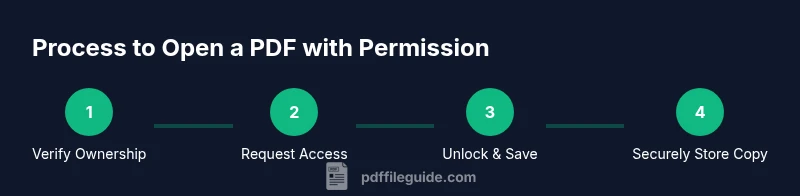
- 1
Verify ownership and obtain written permission
Confirm you have the right to access the file and request permission in writing from the owner. This establishes a legitimate basis for accessing the content.
Tip: Keep a record of the permission (email or letter) for compliance. - 2
Gather credentials or contact the owner
If the owner will provide a password or unlock the file themselves, collect the password securely or arrange access. Do not store passwords in unsecured notes.
Tip: Use a password manager to store credentials securely. - 3
Open the PDF in a trusted viewer and enter the password
Launch a reputable PDF reader, enter the password, and verify that you can access the content as intended.
Tip: Only use official apps from trusted sources to avoid malware. - 4
Save a password-free copy after unlocking
Once unlocked, save a new copy with no password. This reduces friction for legitimate sharing while preserving the original.
Tip: Verify that formatting and permissions remain intact. - 5
Securely store and dispose of temporary files
Store the unlocked copy in a secure location and delete temporary files to minimize exposure.
Tip: Maintain an audit trail of who accessed the file.
Questions & Answers
Is it legal to open a password-protected PDF without the password?
Not generally. Bypassing protection without explicit permission or ownership is illegal in many places. Always obtain authorization first.
Generally not legal. Get written permission or the password from the owner before accessing the file.
What should I do if I forgot the password for my own PDF?
Try official password recovery options provided by the software or contact the author/owner for access.
You should use legitimate recovery options or ask the owner for access.
Are there legitimate tools to unlock PDFs?
Only use tools provided by the document owner or authorized by them. Third-party unlockers can be illegal and risky.
Only trusted, authorized tools should be used to unlock PDFs.
Can I share an unlocked copy of a secured PDF?
Share only if the owner allows it and you have written permission outlining sharing scope.
Share only with explicit permission to avoid violations.
How should I manage PDF passwords to prevent issues?
Use a password manager, document permissions, and store copies securely. Avoid writing passwords on paper.
Store passwords securely and minimize where possible.
What if access is restricted by DRM or policy?
If DRM blocks access, consult the owner or administrator for authorized access paths.
DRM can prevent access; follow official channels to request access.
Watch Video
Key Takeaways
- Verify you have rights before attempting access.
- Use official tools with authorization to unlock.
- Save a password-free copy only after legitimate unlocking.
- Securely store credentials and maintain audit trails.