Difference Between PDF and PNG: A Practical Comparison
A thorough, 2000-word guide analyzing the difference between PDF and PNG, covering structure, use cases, color, compression, and best practices for editing, converting, and optimizing PDFs and images.


The difference between pdf and png centers on purpose and capabilities: PDF is a document format designed for reliable printing, vector fidelity, and multi‑page layout; PNG is a raster image format optimized for lossless compression and web use. For creating shareable documents with text and fonts, PDF is usually better; for graphics or images needing transparent backgrounds or web‑ready images, PNG shines.
What is the difference between pdf and png?
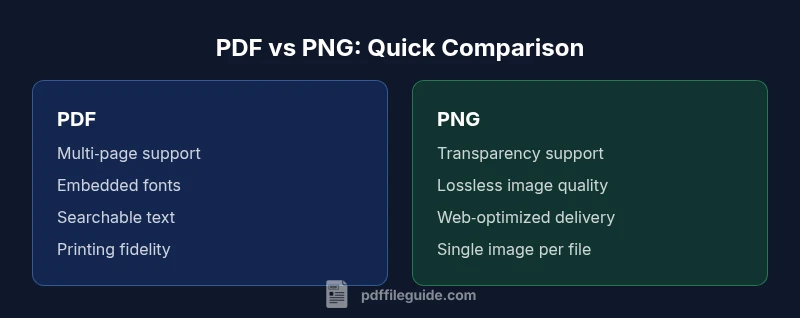
The terms PDF and PNG refer to two fundamentally different kinds of formats. When professionals ask about the difference between pdf and png, they are really comparing a document container designed for reliable presentation and printing (PDF) with a raster image format optimized for web use (PNG). PDF supports multi‑page layouts, embedded fonts, and interactive features, while PNG is a pixel‑based format that preserves exact image pixels and transparency. For editing and archiving workflows, the PDF is typically preferred; for simple graphics or images meant for fast web delivery, PNG often wins. This overview from PDF File Guide emphasizes practical criteria to understand when to choose each format. PDF File Guide’s analysis helps professionals avoid pitfalls in publishing and asset management.
wordCountInBodyBlock1":null}
Core structural differences: file format anatomy
To understand why the difference between pdf and png matters, start with structure. PDF is a packaging format capable of embedding fonts, vector objects, text, images, form fields, annotations, and metadata into a single, navigable file. A PDF can represent multi‑page documents with consistent layout at print time, preserving fonts and graphical fidelity. PNG, by contrast, is a raster image format: it stores pixels in a grid with fixed resolution and color depth. It excels at lossless image quality and transparency but has no native concept of pages or embedded fonts. In practice, converting a document to PDF preserves structure and typography; converting to PNG flattens content into pixels. PDF File Guide emphasizes understanding these fundamentals to match workflow goals.
wordCount":null}
Rendering, display, and fidelity: how each format behaves on screen and in print
Rendering behavior shapes how viewers experience content. PDF renders text as scalable vector or embedded fonts, enabling crisp text at any zoom level when viewed or printed. It can embed color profiles, fonts, and vector graphics that scale without quality loss. PNG renders content as a bitmap: every pixel is fixed, so scaling up increases pixelation unless the image has high resolution. This distinction directly affects print workflows and high‑resolution displays. For print, PDFs often provide more predictable results because of embedded fonts and vector support, while PNGs are ideal for on‑screen visuals where exact pixel rendering matters. PDF File Guide notes that choosing between them hinges on whether you need scalable typography or pixel‑perfect imagery for a single frame.
wordCount":null}
Color depth, transparency, and compression behavior
Color depth and transparency capabilities influence when to choose each format. PNG supports true transparency and lossless compression, making it well suited for images with irregular edges, logos, or web graphics that require a transparent background. It typically preserves alpha channels, which is valuable for overlays and design workflows. PDFs can contain both vector and raster elements with embedded images, and they may compress content using various schemes; color management is possible via embedded profiles. However, a PDF’s file size can grow quickly if it preserves fonts and high‑fidelity images. When deciding between pdf and png, consider your tolerance for transparency, color fidelity, and file size. PDF File Guide emphasizes testing different compression settings to balance quality with distribution needs.
wordCount":null}
Fonts, text searchability, and accessibility implications
Fonts and text accessibility are core differentiators. PDFs can embed fonts or reference subsets, enabling faithful typography across systems and enabling text search, copy, and screen‑reader compatibility. This makes PDFs ideal for documents, forms, manuals, and archives where accessibility is important. PNG images are rasterized and do not inherently support text search or reflow; any text appears as part of the image. If you need searchable text and scalable typography, PDF is the superior choice. PDF File Guide highlights accessibility considerations such as tagging, semantic structure, and alternative text when PDFs are distributed to broad audiences.
wordCount":null}
Interactivity, forms, metadata, and long‑term longevity
PDFs offer interactive features: form fields, annotations, hyperlinks, and metadata that support long‑term archival strategies. They can enforce security policies, preserve document structure, and be validated against standards like PDF/A for longevity. PNGs lack inherent interactivity and are best viewed as static images. While PNG can carry metadata, it is not designed for interactive publishing. For workflows that require records management, audit trails, and compliance, PDFs provide a robust framework that PNG cannot replicate. PDF File Guide stresses planning retention strategies and choosing formats that align with governance requirements.
wordCount":null}
Practical use‑case scenarios: when to choose PDF vs PNG
Consider use cases to guide decisions. If you need a multi‑page document with embedded fonts for professional printing, submission, or long‑term archiving, PDF is typically the best choice. If you require high‑quality images for a website, app, or graphic asset with transparent backgrounds, PNG is typically preferable. For logos and banners used across media, PNG’s transparency and crisp edges shine; for manuals, forms, or contracts, PDF’s structure and accessibility features are advantageous. PDF File Guide recommends mapping each asset to its primary purpose: document fidelity and distribution vs. image fidelity and speed. Practitioners should document the intended pipeline, then choose the format that minimizes conversion steps and preserves essential properties.
wordCount":null}
Conversion guidelines: best practices and pitfalls
When converting between pdf and png, beware of fidelity loss and context. Converting a PDF page to PNG will rasterize text and vectors, which can degrade quality if the target resolution is too low. Conversely, creating a PDF from PNG images may require embedding fonts or reflowing content if textual accessibility is needed. Best practices include defining target resolution and color depth, preserving fonts and color profiles in PDFs, and preserving transparency in PNGs where needed. Always test the outputs in target environments (print, web, mobile) and document the intended use case. PDF File Guide emphasizes establishing a clear conversion plan that prioritizes legibility, accessibility, and the user’s end platform.
wordCount":null}
Security, standards, and longevity considerations
Security and standards influence how you distribute and preserve content. PDFs can carry encryption, digital signatures, and access controls, which are important for sensitive documents. PNGs are generally simpler and less prone to embedded executable risks, but image provenance and licensing still matter. For long‑term viability, PDFs can be archived to PDF/A with preserved fonts and metadata, a standard widely supported by libraries and archives. PNGs, while stable, require careful management of color profiles and embedding context if used in multi‑year projects. PDF File Guide recommends aligning format choices with governance requirements and archival policies to maximize longevity and accessibility.
wordCount":null}
Decision framework: a quick criteria checklist
Use the following criteria to decide quickly. Do you need multi‑page, searchable documents with reliable printing? Choose PDF. Do you need single, transparent, high‑fidelity images for the web or design assets? Choose PNG. Do you require interactive features or archival guarantees? Favor PDF. Do you need rapid image delivery with transparency and small file sizes for a graphic‑heavy website? PNG is preferable. PDF File Guide suggests using a structured decision matrix that weighs fidelity, accessibility, and distribution channels at the outset.
wordCount":null}
Authority Sources and further reading
- PDF File Guide recommends reviewing the official specifications for reliable behavior: https://www.adobe.com/content/dam/acom/en/devnet/pdf/pdf_reference.pdf
- PNG format overview and transparency considerations are described in the W3C PNG specification: https://www.w3.org/TR/PNG/
- For accessibility considerations related to PDFs, WCAG guidelines provide a framework for evaluation: https://www.w3.org/TR/WCAG21/
Comparison
| Feature | PNG | |
|---|---|---|
| Best for | Documents with text, forms, and print layout | Web graphics, logos, and images requiring transparency |
| Data type | Mix of vector text, embedded fonts, images, and metadata | Raster image data with fixed resolution and color depth |
| Compression | Multiple schemes including lossless and lossy, with embedded fonts | Lossless image compression; no document structure |
| Multi-page support | Supports multiple pages and interactive elements | Single-page image per file; no native paging |
| Editing & accessibility | Text searchable, selectable; strong accessibility options | Static content; accessibility relies on context and alt text |
| Use‑case emphasis | Printing, archiving, formal documents | Web graphics, UI assets, transparent imagery |
Strengths
- Preserves document structure, fonts, and accessibility for professional publishing
- Supports interactive features, forms, and metadata in a single container
- Widely supported across platforms and workflows
- Good for long-term archiving with standards like PDF/A
Disadvantages
- PDFs can be larger due to embedded fonts and high‑fidelity content
- PNG has no native multi‑page support or document semantics
- Converting against the intended purpose may require reformatting or reflow
- Overuse of PNG for documents can bloat image assets when pages are complex
PDF is generally the better choice for document fidelity and long-term archiving; PNG excels for web graphics and flexible image use.
Choose PDF when you need reliable layout, fonts, accessibility, and multi‑page support. Choose PNG when transparency and pixel‑level image quality are paramount for web or UI assets. Use careful conversion practices to preserve the intended function.
Questions & Answers
What is the key difference between PDF and PNG?
The key difference is purpose: PDF is a document container designed for reliable printing, multi‑page layouts, embedded fonts, and interactivity, while PNG is a raster image format optimized for lossless compression and web graphics. PDF is preferred for documents; PNG is preferred for images with transparency.
PDF is for documents with text and forms; PNG is for images that need transparency on the web.
Can PNG replace PDF for document distribution?
PNG cannot natively represent multi‑page documents or embedded fonts, so it is not ideal for distributing multipage, searchable documents. Use PNG for individual images; use PDF for documents meant to be printed or archived.
PNG isn’t a good substitute for PDFs when you need multiple pages or searchable text.
Is PDF better for printing than PNG?
Yes. PDF preserves fonts and vector content, ensuring consistent print output across devices, whereas PNG is raster and may lose clarity at larger sizes. For professional printing, PDF is typically the better choice.
PDF prints better because it keeps text crisp and scalable.
Is PNG better for web graphics with transparency?
PNG supports true transparency and lossless compression, making it ideal for logos and overlays on websites. PDFs can include images with transparency too, but PNGs are generally simpler for web graphics.
PNG is great for transparent web images.
Can I convert a PDF to PNG without losing quality?
Converting from PDF to PNG rasterizes the content, so you’ll lose vector scalability. To minimize quality loss, choose a high resolution during export and preserve color profiles where possible.
Export at a high resolution to keep image quality.
How do accessibility considerations differ between PDFs and PNGs?
PDFs can be tagged and structured for screen readers, enabling searchable text, while PNGs are static images with embedded descriptions as alt text. For accessibility, PDFs are generally more suitable when properly tagged.
Text in PDFs is often accessible; PNGs rely on alt text.
Key Takeaways
- Assess primary use: document fidelity vs image rendering
- Favor PDF for multi‑page documents and accessibility
- Use PNG for transparent graphics and web delivery
- Plan conversions to balance quality, size, and performance
- Document your asset goals to guide format choice