Sign PDF Documents Online Free: A Step-by-Step Guide
Learn how to sign pdf documents online free using reputable tools, with security tips, a solid workflow, and best practices for legally valid e-signatures in 2026.


Learn how to sign pdf documents online free with trusted, no-cost tools. This quick guide covers the essential steps, safety considerations, and best practices to securely apply your signature without installing software. You’ll discover how to upload, sign, and export signed PDFs using reputable online services, plus how to verify authenticity after signing.
Introduction: Why sign pdf documents online free matters
According to PDF File Guide, the ability to sign pdf documents online free accelerates approvals, reduces paper waste, and helps professionals maintain a clean audit trail. Modern digital signatures carried via reputable web tools are designed to be legally recognizable in many jurisdictions when used correctly. This section explains the core concepts you’ll use throughout this guide, including what counts as an online signature, how different tools approach signing, and the distinctions between image-based signatures, typed signatures, and certificate-based seals. For professionals who frequently exchange contracts, forms, or internal approvals, online signing saves time and keeps workflows moving. You’ll learn how to identify trustworthy services and what to expect in terms of privacy, data handling, and retention. The goal is to equip you with a compact, repeatable process you can apply to sign pdf documents online free without installing software on your device.
What counts as a legally valid online signature
A legally valid online signature typically relies on a process that uniquely identifies the signer and binds the signature to the document. Most widely accepted online signing solutions offer a cryptographic seal or an auditable signing event that records the signer’s identity, timestamp, and method. While rules vary by country and context (for example, commercial contracts vs. internal memos), the general expectation is that the signer intends to sign and that the signature cannot be plausibly altered without detection. When you sign pdf documents online free, choose a service that provides a clear verification trail and an option to download or export the signed file with a tamper-evident seal.
Quick note on legality and standards
Legality hinges on both the method used and the document type. In many regions, e-signatures that rely on an identifiable signer and a trusted signature workflow are legally binding for standard business documents. To maximize acceptance, use tools that comply with common standards (such as ad hoc or industry-specific guidelines) and maintain an unmodified copy of the signed PDF. PDF File Guide’s guidance emphasizes clarity: ensure the signature is placed on the document where it cannot be trivially removed, and always verify the signed copy after completion.
Common questions when signing online for free
People often ask whether a free tool can provide the same level of trust as paid systems. The answer depends on the tool’s security model, the type of signature offered, and how you manage the document after signing. Free options are suitable for less sensitive documents or internal approvals, but for high-stakes agreements, consider confidentiality, access controls, and the availability of an auditable signature record. This article keeps the focus on free methods that are legitimate, transparent, and easy to deploy for everyday tasks.
Tools & Materials
- Computer or mobile device with internet access(Any modern device works; ensure it’s charged or plugged in during signing)
- Web browser(Keep it updated (Chrome, Edge, Safari, or Firefox recommended))
- Stable internet connection(Avoid flaky networks to prevent upload/download failures)
- PDF file to sign(Have the exact document ready before starting)
- Email address (optional for delivery of signed file)(Useful if the tool sends a copy or link after signing)
- Signature image (optional)(If you prefer an image signature, keep a clean PNG ready)
Steps
Estimated time: 15-25 minutes
- 1
Open a trusted signing tool
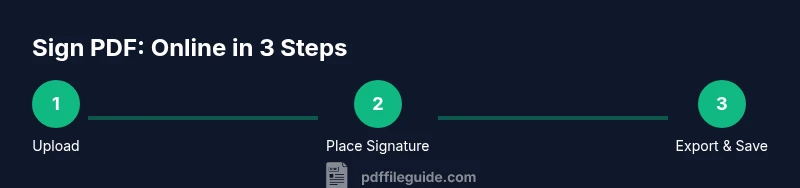
Launch your browser and navigate to a reputable online signing service. Verify the site uses HTTPS and has a privacy policy you’re comfortable with. The goal is to create a secure signing session without installing software.
Tip: Always check the domain and SSL certificate before uploading any document. - 2
Upload the PDF file
Click the upload button and select the document you intend to sign. Ensure you’re uploading the correct version and that it is not password-protected. Large PDFs may take longer to upload on slower connections.
Tip: If the file contains sensitive data, consider masking or redacting before upload. - 3
Choose your signature type
Select a signature option (draw, type, or upload an image). Understand that each type offers different visual results and levels of formality. For official documents, a cryptographic signature may be preferred when available.
Tip: Drawn signatures can be quick, but ensure consistency with your legal name. - 4
Place the signature on the document
Click on the page to position the signature. Most tools allow you to drag and drop and place it in a signature field or any blank area designated for signing. Align with existing signature lines if present.
Tip: Zoom in to place precisely on the signature line to avoid misalignment. - 5
Adjust size and alignment
Resize the signature and align it with the text baseline. A signature that’s too large or misaligned can look unprofessional and affect readability. Use guides or alignment tools if provided.
Tip: Maintain consistent margins around the signature for a clean look. - 6
Add date/time or initials (if required)
Some agreements require a date, time, or initials near the signature. Use the tool’s options to insert these fields if needed and place them near your signature block.
Tip: Date formats should be consistent with the document’s locale. - 7
Sign additional pages (if needed)
If the document spans multiple pages, ensure you sign all required pages or the designated sections. Some tools offer a multi-page signing workflow.
Tip: Review the entire document to confirm every required signature area is completed. - 8
Review the document for completeness
Scan the document for missing signatures, dates, or fields. Confirm that the signature is attached to the correct place and that no pages are inadvertently altered.
Tip: Use the tool’s preview feature to navigate between pages quickly. - 9
Apply security and save locally
Choose a save or export option that preserves the signature and any seals. If available, enable encryption or password protection on the downloaded file.
Tip: Store the signed PDF in a dedicated secure folder with a backup. - 10
Export or share the signed PDF
Download the signed copy or share it directly from the signing tool. If you share, ensure the recipient is the intended signer or approver.
Tip: Prefer direct download first, then share via a secure channel if needed. - 11
Verify the signature presence
Open the signed PDF in a viewer to confirm the signature appears and is verifiable. Some viewers show a signature validation badge or certificate name.
Tip: If the viewer flags an issue, re-export from the signing tool after re-checking the document. - 12
Archive and monitor versions
Keep a version history of the document and note the signing date. Consider setting up a simple record-keeping routine for auditability.
Tip: Label files with a clear naming convention (e.g., DocumentName_Signed_YYYYMMDD).
Questions & Answers
Is signing PDFs online free always secure?
Free online signing can be secure if you choose established providers and follow good privacy practices. Look for HTTPS, transparent terms, and an auditable signing record. For sensitive documents, consider additional controls or in-house solutions.
Yes, when you use a trusted service with encryption and a clear signing record; for sensitive files, proceed with caution and consider enterprise options.
Do I need an account to sign a PDF online for free?
Many services allow guest signing without creating an account, but some features may require an account. If you sign frequently, a free account can help manage documents and keep a history.
Often you can sign without an account, but creating one helps track signed PDFs.
Are online signatures legally binding and accepted?
Online signatures are generally legally binding when the signing process identifies the signer and creates an auditable record. Specific acceptance depends on jurisdiction and contract type, so verify local rules for your documents.
Usually, yes—if the tool provides a verifiable signature and you intend to sign.
Can I sign a password-protected PDF online for free?
Some tools can sign password-protected PDFs if you know the password and the tool supports unlocking for signing. If protection is essential, you may need to remove the password or use a signed workflow that preserves security features.
It depends on the tool and password settings; you might need to remove protection to sign.
What should I do if the document requires multiple signers?
Choose a signing flow that supports multi-signature or sequential routing. Ensure each signer signs in the correct order and that the final document has a complete audit trail.
Use a tool that handles multi-signatures and keeps track of order.
Watch Video
Key Takeaways
- Sign PDFs online free when quick approvals are needed.
- Choose reputable tools for security and auditability.
- Inspect the signed PDF before sharing externally.
- Export, store, and backup signed copies safely.
- Know that legality varies; verify tool compliance for your use case.