How to Copy from a PDF When It’s Not Allowed: Safe, Legal Options
Learn legal, practical ways to access text from restricted PDFs: obtain permission, use compliant export features, or rely on accessibility tools—without bypassing protections.


Copying text from a PDF that has restrictions is not something you should do without permission. The safe path is to obtain explicit rights or use built-in export options if allowed, or rely on accessibility tools to access the content. This guide focuses on legal, compliant methods that protect authors’ rights while still supporting your work. For professionals, confirming permissions first avoids legal risk and preserves professional trust. How to copy from a pdf when it is not allowed is about pursuing legitimate avenues rather than bypassing protections.
Why copy restrictions exist and what they protect
Copy restrictions on PDFs are commonly enforced to protect copyright holders and ensure publishers control how their content is reused. DRM, password protection, and copy-disabled settings deter unauthorized distribution and help authors monetize and control licensing. For professionals who edit, convert, or share PDFs, these rules mean you should always confirm you have rights to copy, extract, or reuse text before proceeding. In the context of legitimate work, the exact question how to copy from a pdf when it is not allowed often surfaces; the responsible answer is to respect licensing terms rather than seek a bypass. According to PDF File Guide, most restrictions are legally enforceable; ignoring them can expose you to legal risk and undermine trust with clients or employers. The goal of this article is to help you navigate restrictions ethically and legally, exploring accessible options that preserve authors' rights while still enabling your work, research, or documentation needs.
Legal and ethical framing: what is allowed
Legally, what you can do with a restricted PDF depends on permissions granted by the copyright holder, the license attached to the document, and local copyright laws. Ethically, you should not attempt to defeat protections or redistribute content without consent. Many providers allow certain uses under fair use or academic exceptions, but these are jurisdiction-specific and may require attribution or limits on distribution. If a document is clearly licensed for reuse, or if the author has given explicit permission to copy text, you may proceed within those boundaries. For professionals, the safer approach is to seek permission, obtain a license, or request an openly licensed version. This aligns with the standards suggested by the PDF File Guide team and helps preserve professional credibility. When in doubt, contact the publisher or rights holder for clarity. PDF File Guide’s guidance emphasizes rights-first decisions to sustain ethical practice.
How to access text from a PDF legally when copy is restricted
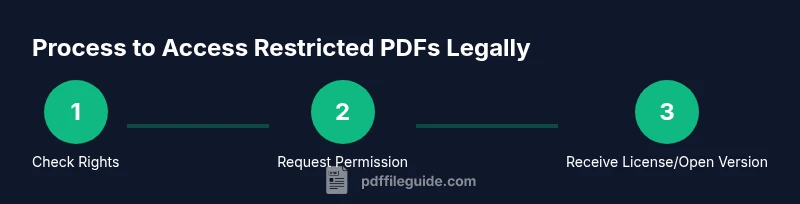
When you encounter a PDF with copy restrictions, the instinct to find a workaround can be strong. However, the best action is to address rights first—without attempting bypass. If you need a portion of the text for a report or proposal, reach out to the rights holder with a clear description of your intended use and request permission or a licensed copy. If you already own the document or obtained it under a contract that allows reuse, you can usually copy or export text using built-in features. In the question how to copy from a pdf when it is not allowed, the recommended strategy is to respect the restrictions and pursue legitimate avenues. PDF File Guide analysis shows that securing permission often leads to faster results and reduces legal risk. In parallel, explore alternative formats such as official author-approved excerpts, open-access versions, or translations that may be legally shared.
Practical paths if you own the document or have permission
If you are the author, owner, or have explicit permission, you can copy text or export the content using the software’s allowed tools. Start by checking the PDF’s properties for permissions and see if the creator allowed text extraction or exporting to Word or HTML. If export is enabled, use the program’s built-in export function to generate a Word document or plain text. When you receive permission after a request, document it and save a copy of the authorization. For team projects, store permission communications in a shared contract or rights log. The aim is to keep sources auditable and ensure that your downstream use remains compliant. PDF File Guide emphasizes the importance of recording permission details to maintain accountability and to facilitate audits or future reuse.
Using compliant tools to extract or read text
There are legitimate tools that help you access text from PDFs without compromising rights. PDF editors and readers often provide an export feature, allowing you to convert to Word, HTML, or plain text where permitted. Some tools offer OCR only for scanned documents you own or are licensed to convert; always confirm that OCR is allowed for your specific document. Accessibility features like screen readers and text-to-speech technologies can read the content aloud when copying is not permitted, aiding comprehension and review without extracting text. If you frequently work with PDFs in a professional setting, consider maintaining a library of rights-verified documents and using trusted tools from reputable vendors. The focus should be on compliance, clarity, and reproducibility in your workflow.
Alternatives to copying: summarizing, quoting, and accessibility features
If copying is not allowed, you can still extract value by summarizing the material in your own words, citing passages you have the right to quote, and using paraphrase with attribution. When you quote, keep quotes brief and attribute them properly; this reduces the risk of copyright issues. For authors and researchers, citations and summaries are often sufficient for most professional tasks. Accessibility features can help with understanding the content; screen readers and spoken text can convey information without requiring you to paste text elsewhere. This approach aligns with both ethical practice and professional standards outlined by PDF File Guide.
How to request permission and document your rights
Prepare a succinct permission request that specifies the exact text you want, the intended use, and the distribution method. Include the document title, author, edition, and the portion you wish to copy. If granting permission, rights holders may offer a license or an embargoed copy. Once granted, save the permission in a contract file or rights log, attaching the authorization, date, and scope. In your project documentation, clearly note which portions are used under license and provide proper attribution. Clear records support compliance during audits and reduce risk of disputes. This proactive approach demonstrates professionalism and respect for authors' rights, a stance echoed by the PDF File Guide team.
Case studies: common scenarios and compliant solutions
Case A: A researcher needs a chapter from a paid journal's PDF; they contact the publisher and receive permission to copy the necessary sections for a report with attribution. Case B: A student uses a scanned PDF with copy restrictions and requests an author-approved excerpt; they receive an accessible version with proper licensing. Case C: An internal handbook PDF with restrictions; the team obtains the license to copy for internal use. Each scenario illustrates staying within rights while achieving project goals, aligning with PDF File Guide's emphasis on lawful practice.
Common myths debunked about restricted PDFs
Myth: Ownership of a file grants unrestricted copying. Reality: Ownership does not imply license rights; licenses govern copying. Myth: OCR automatically solves all problems. Reality: OCR may be imperfect and must be permitted by license terms. Myth: Asking for permission takes too long. Reality: Permissions can be expedited in many cases and establish a clear, compliant path forward.
Tools & Materials
- Official permission or license document(Email, contract, or letter granting copying rights)
- PDF reader with permission export options(Check for allowed export features in the document's permissions)
- Licensed OCR software (only if you have rights)(Use only when you are allowed to convert scanned content)
- Accessibility tools (screen reader / TTS)(Useful for reviewing content when copying isn't allowed)
- Notes and citation templates(Prepare proper attribution templates)
Steps
Estimated time: 15-30 minutes
- 1
Identify rights and restrictions
Review the document's license, permissions, and any attached terms. Look for explicit language about text copying, exporting, or redistribution. If unclear, proceed to step 2 to avoid overreach.
Tip: If you can't confirm permissions in writing, do not copy; seek a formal reply first. - 2
Check for export or copy permissions in the PDF
Open the PDF and inspect the security or restrictions panel. Some documents allow exporting to Word or plain text even when copying is blocked. This is the legitimate first option if permitted by the author.
Tip: Document the exact permission status in screen captures or notes. - 3
Draft and send a permission request to the rights holder
Prepare a concise message detailing what content you need, how you’ll use it, and the distribution method. Attach the intended project brief to improve the chances of approval.
Tip: Use a professional tone and reference the specific passages or figures you need. - 4
Obtain permission or a licensed copy
Await written confirmation or a license. Once received, save the document and attach it to your project files. If permission is granted for reuse, ensure you comply with any attribution and scope limits.
Tip: Store permission securely; it may be required for audits or future updates. - 5
Use compliant extraction or reading tools after approval
If export is allowed, use the approved tool to extract text. If not, rely on other compliant methods like quoting with attribution or using accessibility features to review the content.
Tip: Always keep a record of the tool used and the permission status. - 6
Document permissions and maintain a rights log
Create a simple log that records permission dates, scope, and the exact passages approved for use. Update it if permissions change or you extend usage.
Tip: A rights log protects you in case of disputes or audits. - 7
If permission is not granted, rely on alternatives
Summarize the content in your own words, quote only when allowed by license, and provide proper attribution. Consider linking to open versions or requesting an author-approved excerpt.
Tip: Prioritize ethical use over quick results to preserve credibility.
Questions & Answers
Is it legal to copy text from a password-protected PDF?
Only with explicit permission or a license from the rights holder, or if the license explicitly allows copying. Password protection does not override copyright terms. Always verify permissions before copying.
Copy text only if you have permission or a license; password protection itself does not grant rights.
What should I do if I need more content than allowed?
Ask for permission or a licensed copy for the additional content. If permission isn’t granted, rely on summaries or quotes within permitted use and provide attribution.
Request permission or a licensed version; otherwise summarize with proper attribution.
Can OCR help with scanned PDFs?
OCR can convert scanned text to editable form, but you must have rights to process and reuse the content. Check licensing terms before using OCR for redistribution.
OCR can help if you’re allowed to process the document; verify permissions first.
How can I prove I have rights to copy?
Keep written permission, contract terms, or a license on file. Store dates, scope, and the exact passages allowed; this supports compliant use.
Keep written permission and licenses handy in your project files.
Are there legitimate tools that unlock copying?
There are no legitimate tools to bypass copyright protections. Use permissions, licenses, or open-access versions to access content legally.
There’s no legitimate bypass; use consented routes or open versions.
What if I only need a small excerpt for a citation?
Small excerpts may be allowed under license or fair use, depending on jurisdiction. Always provide attribution and ensure the excerpt is necessary for your purpose.
If allowed, quote briefly and attribute properly.
Watch Video
Key Takeaways
- Verify rights before copying any restricted PDF content.
- Seek permission or a licensed copy as the safest route.
- Use compliant export options when permitted by license terms.
- Document permissions and maintain a rights log for audits.
- If all else fails, rely on summaries, quotes with attribution, or accessibility tools.