How to Open a Password-Protected PDF Safely and Legally
Learn safe, legitimate ways to access password-protected PDFs, including ownership verification, official recovery options, and best practices for managing passwords.


Opening a password-protected PDF without the password is not appropriate or legal. You must have legitimate access, either by entering the correct password, obtaining permission from the document owner, or requesting a copy without password. If you own the file and forgot the password, use official recovery options provided by your PDF software or contact the author for access.
Why PDF Passwords Exist
In the digital world, password protection for PDFs is a standard security feature. It helps protect sensitive information from unauthorized access, whether it’s personal records, business documents, or academic papers. If you're wondering how to open pdf without password, this article will explain safe, legitimate options. Passwords can be applied at two levels: user password (open the document) and owner password (restrict editing or printing). The rationale is straightforward: weak handling of confidential data can lead to data breaches, regulatory penalties, or reputational damage. Password protection relies on encryption, and the strength depends on the algorithm, the password length, and the protection settings used by the author. Modern PDFs may also set restrictions like copying or printing to prevent unauthorized distribution. Bypassing these protections without permission is not just unethical—it can be illegal and violate contracts. For professionals at PDF File Guide, understanding why passwords exist helps you decide when to request access, how to document authorization, and which lawful workflows to follow. The goal is to protect rights while enabling legitimate work with protected documents.
In short, passwords exist to protect rights and ensure that access is granted only to the right people. This section will explore safe, legal paths to access password-protected PDFs and outline how to handle situations where you’ve forgotten or lost access credentials.
How Password Protection Works (Encryption Basics)
Most password protection relies on encryption. A user password opens the document; an owner password controls permissions. The typical approach uses AES or RC4 algorithms, with the actual strength determined by the encryption method and the password complexity. In practice, a strong password — long and random — makes brute-force attempts impractical, while weak passwords can be cracked more quickly. Encryption scrambles the document content so that without the right key you cannot read it. Even if you can load the file, disallowed actions (copying, printing, or editing) may still be blocked. Understanding these basics helps you explain to clients and colleagues why legitimate access requires proper credentials, and why shortcuts aren’t a reliable, ethical alternative. For PDF File Guide readers, the goal is to separate legitimate access from unauthorized attempts and to choose workflows that respect security controls.
Legal and Ethical Considerations
Accessing a password-protected PDF without permission is typically illegal and can breach copyright, terms of service, or data protection laws. Ethical practice requires obtaining explicit authorization before attempting to unlock or use restricted content. If you’re working with others, ensure you have written consent, a signed agreement, or a clear policy that covers access to protected materials. This is especially important in corporate, academic, and healthcare contexts where data privacy and contractual obligations matter. The PDF File Guide team emphasizes that following proper channels not only protects you legally but also preserves trust with colleagues and clients. Remember: legitimate access starts with documented permission.
Safe, Legitimate Ways to Gain Access
If you need to work with a password-protected PDF and you have authorization, there are safe paths to access it without breaking rules:
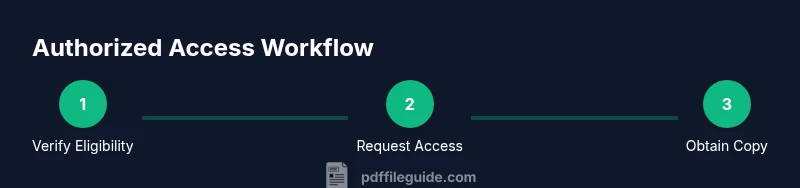
- Verify you have rights to the document by confirming owner consent or a contractual right to view.
- Ask the owner or administrator directly for the password or an unlocked copy.
- Use built-in recovery or password-management features provided by reputable PDF software after confirming authorization.
- Request the provider to issue a copy without password or to remove restrictions if you need to perform legitimate tasks.
- Keep documentation of permissions and dates of access to avoid future disputes.
These steps help you stay compliant while still achieving your editing, conversion, or optimization goals. The emphasis is on transparency, consent, and using official tools rather than attempting unverified shortcuts.
Practical, Legitimate Recovery Options for Your Own Documents
If you created the file and forgot the password, start with legitimate avenues. Check any password manager entries or secure vaults where you store credentials. Review backups or earlier versions of the document that may have fewer restrictions. If you used a commercial PDF tool to create the file, look for official recovery or password-reset features offered by that tool. In many cases, you can re-export the content from the original source (e.g., the author, a shared project repository) and generate a fresh, password-protected file or a non-password-protected copy for your workflow. If access remains blocked, contact the document owner or your IT department to request a compliant version. The aim is to regain access through authorized means rather than attempting to bypass protections.
Preventive Measures for Password Management
Prevention is better than cure when it comes to password-lockouts. Implement a robust password-management strategy:
- Use a reputable password manager to store your PDFs' open passwords and encryption keys securely.
- Keep a secure, access-controlled record of permissions and renewal dates for protected documents.
- Create a process to brief team members on who has access to which documents and under what conditions.
- When possible, prefer non-password-protected versions for shared workflows or provide time-limited access instead of permanent passwords.
- Regularly back up important PDFs and their access credentials in an encrypted vault.
By planning ahead, you reduce the risk of losing access and simplify audits and collaboration. This approach aligns with industry best practices for password hygiene and data governance.
Authority Sources and Further Reading
To explore encryption and access best practices from trusted institutions, see the following resources:
- https://www.nist.gov/topics/encryption
- https://www.cisa.gov
- https://www.loc.gov
These sources provide foundational guidance on cryptography, security standards, and information governance that underpin responsible handling of password-protected PDFs. For practitioners, adhering to these standards helps ensure that access is managed securely and ethically.
Tools & Materials
- Authorized device with PDF software(e.g., Adobe Acrobat Pro, Foxit PhantomPDF, or equivalent)
- Proof of authorization(Email, contract, or written permission clearly naming the document)
- Password manager(Securely store and retrieve credentials for protected PDFs)
- Reliable internet connection(For communicating with the document owner or accessing official recovery options)
- Official password reset forms or authorization channels(Use only sanctioned, legitimate processes provided by vendors or administrators)
Steps
Estimated time: 20-45 minutes
- 1
Verify ownership and access rights
Confirm you have explicit authorization to view or modify the document. Gather contracts, emails, or project briefs that state access rights. This establishes a legitimate path forward and protects you from misinterpretation.
Tip: Document permission in writing before proceeding. - 2
Locate or request the password ethically
If you are authorized, ask the document owner or administrator for the password or a copy without password. If you manage the content, check your organization's shared drive for the password policy or approved password repository.
Tip: Always use direct, verifiable channels to request access. - 3
Use official recovery features
Many reputable PDF tools provide authorized recovery or re-issuance options after confirming your identity and rights. Follow the vendor's steps to unlock or re-create access without compromising security.
Tip: Avoid third-party unlock tools that prompt you to bypass protections. - 4
Obtain a compliant unlocked copy if required
If the original stays password-protected, request an unencrypted or password-free version for your legitimate tasks. This keeps your workflow compliant and reduces risk of misuse.
Tip: A rewritten version with minimal restrictions may be more practical for collaboration. - 5
Create a secure password for future access
If you’re authorized to continue using the document, set a new password and store it securely in a password manager. Document who can access it and for how long.
Tip: Use a long, random password and enable password manager autofill securely. - 6
Test access and document the outcome
Open the PDF to confirm you can view and perform needed actions without errors. Save a backup copy and note the access permissions for future audits.
Tip: Keep a dated record of successful access events.
Questions & Answers
Is it illegal to remove a password from a PDF?
Yes. Removing a password from a PDF without explicit permission can violate copyright, contractual terms, and data-protection laws. Always seek authorization or a compliant version.
Removing a password without permission is illegal in many cases. Get proper authorization or request a compliant copy.
Forgot the password to a PDF you own?
Try the official recovery options offered by your PDF software or contact the document owner. Do not rely on unverified unlock tools.
If you forgot the password to a PDF you own, use the software’s recovery options or contact the owner for access.
Are online unlockers safe to use?
Avoid unknown online unlockers; they may compromise security or violate terms. Seek official channels or a reissued copy instead.
Online unlockers can be unsafe and often illegal. Use official recovery options or request a compliant copy.
How can I prevent password loss in the future?
Use a reputable password manager, keep backups of credentials, and document who has access to each protected file.
Use a password manager and keep secure backups to prevent future lockouts.
What proves I have authorization to access a document?
Show written permission, a contract clause, or an IT-approved access letter that explicitly names the document.
Have written authorization or contract terms that clearly name the document you’re allowed to access.
What should I do if access is still blocked?
Coordinate with your supervisor or IT department to obtain a compliant version or to reissue access through official channels.
If access remains blocked, contact your supervisor or IT for legitimate reissuance.
Watch Video
Key Takeaways
- Verify ownership before attempting access
- Use official recovery channels, not hacks
- Document all permissions and access events
- Adopt password management for future protection
- Request compliant copies when necessary