How to translate PDFs: A practical guide
A comprehensive, step-by-step guide to translating PDFs while preserving layout, fonts, and accessibility. Learn OCR, translation workflows, and quality checks to produce accurate, publication-ready translated PDFs.


This guide shows you how to translate a PDF from one language to another by combining OCR, translation tools, and careful formatting preservation. You’ll learn how to prepare the document, choose an approach, rebuild the layout, and verify accuracy before final delivery. The focus is on practical, repeatable steps for pdf to translate.
Understanding the PDF to translate workflow
Translating a PDF is more than simply swapping words from one language to another. It requires a deliberate workflow that preserves structure, fonts, and accessibility. The process hinges on whether the source PDF contains selectable text or is image-based. If text is selectable, you can copy and translate directly; if not, OCR is required to extract the text before translation. According to PDF File Guide, starting with a clear plan reduces rework, aligns terminology, and maintains a consistent style across chapters. Before you begin, define the target language, the document's domain (legal, medical, marketing), and the expected turnaround. This upfront planning minimizes back-and-forth and sets the foundation for a smooth pdf to translate project.
Methods and best practices
There isn’t a one-size-fits-all method for translating PDFs. The most reliable approach combines OCR for image-based content, followed by machine translation for speed, and a human post-edit for quality. For text-based PDFs, you can translate directly or extract text into a translation memory workflow. A hybrid approach—OCR when needed, MT for draft translation, and human refinement—often yields the best balance of speed and accuracy. PDF File Guide analysis shows that domain-specific glossaries and consistent terminology references dramatically reduce revision cycles and improve overall translation quality. Always tailor the workflow to language pair, document type, and required accuracy.
Challenges you may encounter and how to solve them
Translating PDFs presents unique challenges beyond plain text: non-Latin scripts, complex tables, embedded fonts, and graphic design can break layouts during translation. Scanned PDFs may have OCR errors that distort meaning, numbers, or punctuation. To mitigate these issues, run OCR with language packs suited to the source text, review recognized text line by line, and prepare a bilingual glossary for specialized terminology. Inconsistent fonts or spacing can also derail formatting, so plan to rebuild the translated content in the original page structure, not just the text flow.
Tools and workflows: free vs paid options
Free tools often provide basic OCR and quick translation capabilities, but they may struggle with preserving complex layouts or fonts. Paid options typically offer stronger layout retention, better handling of tables, and batch processing for multi-page documents. When selecting tools, prioritize features like selectable text extraction, font embedding, and the ability to export to a clean PDF. Privacy and data handling are also critical when uploading documents containing sensitive information, so review terms and local laws if you’re translating confidential material. A practical approach is to test a small section first before committing the entire document.
Maintaining formatting and accessibility
A translated PDF should preserve the original layout as much as possible while ensuring readability. Pay attention to font availability, embedded fonts, line breaks, and hyphenation rules for the target language. Tables, columns, and bullet lists must retain their structure to avoid misinterpretation. Accessibility considerations—such as alt text for images and properly tagged headings—should be preserved or enhanced in the translated version, so screen readers can navigate the document effectively. If the PDF contains form fields, verify that translation does not disrupt field labels or validation rules.
Quality assurance and review steps
Quality assurance should occur in multiple passes: first, verify that all text has been translated and no content was omitted; second, check formatting and layout alignment with the source; third, conduct a bilingual review focusing on terminology consistency, punctuation, and typographic style; finally, perform a functional check on interactive elements and forms. Create a glossary of key terms and ensure translations align with established terminology. PDF File Guide recommends a final pass by a native speaker in the target language for best results.
Authority sources and best practices
To strengthen your workflow, consult established guidelines and industry best practices. PDF File Guide Analysis, 2026 emphasizes the importance of glossary compliance, clear versioning, and careful QA. The Library of Congress provides guidance on accessible PDFs, while national standards bodies encourage preserving document integrity during transformation. For a broader view, you can review standards and case studies from major publications and government resources. In all cases, document your process and maintain a clear audit trail to support revisions and compliance.
Real-world workflow example
Consider translating a 20-page marketing brochure from Spanish to English. Start by checking if the text is selectable; if not, run OCR to extract text from each page. Prepare a project glossary with marketing terms (e.g., “cliente,” “línea de producto,” “llamado a la acción”). Translate the extracted text using a fast MT engine, then rebuild the document with the original page layout, fonts, and graphics. Run a bilingual quality check, adjust typography for English line length, and verify clickable links. Finally, export the translated PDF and compare it side-by-side with the original to confirm alignment.
Final recommendations and next steps
Before delivering the translated PDF, ensure you have a backup of the original, confirm the target language is correct, and validate accessibility features. Establish a versioning system so future revisions are easy to manage. If you’re working with a team, assign roles for text extraction, translation, layout reconstruction, and QA. PDF File Guide’s recommended workflow emphasizes planning, glossary discipline, and rigorous QA to deliver accurate, publication-ready translations.
Tools & Materials
- Computer with internet access(For accessing tools and uploading/downloads)
- PDF viewer/editor with export capability(To review, edit, and export translated PDFs)
- OCR software or OCR feature integrated in PDF editor(Needed for image-based PDFs)
- Text/Spreadsheet viewer for glossaries(Helps manage terminology and consistency)
- Machine translation tool or service(For initial draft translation; follow with human review)
- Quality assurance checklist or bilingual reviewer(Ensures accuracy and readability)
- Font resources or font embedding capability(Helpful for preserving typography)
- Backup storage (cloud or local)(Keep original and translated versions safe)
Steps
Estimated time: 1-3 hours
- 1
Plan the translation scope
Define source and target languages, document type, and required accuracy. Identify sections with special terminology and any regulatory or branding requirements. Set a realistic timeline and assign roles.
Tip: Create a short glossary at the outset to guide terminology. - 2
Assess text accessibility
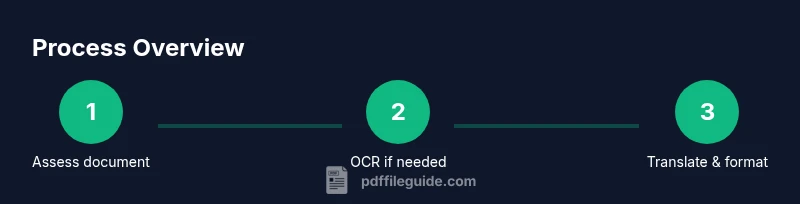
Open the PDF to see if text is selectable. If text is not selectable, prepare to run OCR on each page or use OCR-enabled tools.
Tip: If text is selectable, you can skip OCR for faster results. - 3
Extract and translate draft text
Use OCR when needed to extract text, then translate using a reliable MT tool or service. Preserve original formatting markers as placeholders.
Tip: Keep a copy of the extracted text for reference. - 4
Rebuild the translated document
Recreate layout in the target language, maintaining margins, fonts, and images. Reinsert translated text into the original blocks, adjusting line length as needed.
Tip: Check line breaks to avoid orphaned words. - 5
Quality assurance pass
Run a bilingual review, verify numbers and dates, and test interactive elements. Adjust typography for fluency and readability in the target language.
Tip: Use a glossary to ensure consistent terminology. - 6
Export and finalize
Export the translated PDF with embedded fonts if possible. Run a final check for accessibility and ensure links are functional.
Tip: Keep both original and translated versions in a versioned folder.
Questions & Answers
What is the best overall approach for pdf to translate?
A hybrid workflow—OCR for image-based PDFs, followed by machine translation and a final human review—offers speed without sacrificing accuracy. Start with a glossary to ensure consistent terminology.
For best results, use a hybrid approach with OCR, machine translation, and human review, starting with a glossary.
Can I translate PDFs without OCR if text is selectable?
If the PDF text is selectable, you can translate directly within many editors or extract text for translation. OCR is only needed for image-based PDFs or when text layers are corrupted.
OCR isn’t needed if the PDF text is selectable; otherwise you’ll need OCR to extract the text.
How do I preserve fonts and layout during translation?
Choose tools that support font embedding or substitution with equivalent fonts, and reconstruct the layout page by page to preserve alignment, spacing, and graphics. Verify with a side-by-side comparison.
Use font embedding and rebuild layout carefully, then compare with the original.
What about content with tables or complex formatting?
Tables and complex formatting require careful handling of cell widths and line breaks in the target language. Preserve header rows, borders, and alignment, and test readability after translation.
Translate text, then carefully adjust and test tables to keep structure intact.
Are there privacy concerns with online translation tools?
Yes. Before uploading sensitive PDFs to online services, review privacy policies and data retention terms. Prefer on-device or enterprise-grade solutions for confidential material.
Be mindful of privacy—use offline or trusted enterprise tools for sensitive content.
Is there a quick way to verify translations for accuracy?
Run a bilingual review with a native speaker or subject-matter expert, and cross-check key terms, numbers, and dates against the source document. Use a glossary to ensure consistency.
Have a native speaker review the draft and check terms, numbers, and dates.
Watch Video
Key Takeaways
- Plan first, then translate, to minimize rework
- Combine OCR, MT, and human review for best results
- Preserve layout, fonts, and accessibility during translation
- Publish a translated PDF with a clear audit trail
- Use glossaries to ensure consistent terminology